
Your Go-To-Market (GTM) stack is the engine of your revenue operations. When it’s inefficient, it slows down your pipeline, wastes resources, and creates misalignment between teams. Here are the 7 key warning signs that your GTM stack might need a health check:
- Duplicate Tools: Overlapping software increases costs and creates inefficiencies. Companies waste $50,000–$200,000 annually on redundant tools.
- Poor Data Quality: Duplicate records, incomplete fields, and outdated CRM data cost businesses $12.9 million annually and waste 25% of SDR time.
- Broken Integrations: Silent failures in workflows lead to inaccurate data and wasted time, with 41% of teams citing poor integration as their biggest challenge.
- Notification Overload: Too many alerts distract teams, delaying responses to leads and reducing conversion rates from 35% to as low as 5%.
- Team Misalignment: Disconnected metrics across sales, marketing, and customer success lead to inefficiencies and forecasting errors.
- Fragmented Buying Signals: Scattered intent data delays follow-ups by days, missing critical opportunities to engage prospects.
- Pipeline Inefficiency: Sluggish sales cycles and unclear bottlenecks result in wasted resources and inaccurate forecasts.
Key takeaway: If your GTM stack is causing delays, misalignment, or wasted resources, it’s time for an audit. Start by mapping your tools, integrations, and workflows to identify inefficiencies and prioritize fixes. Companies that address these issues see faster deal cycles and higher revenue per employee.
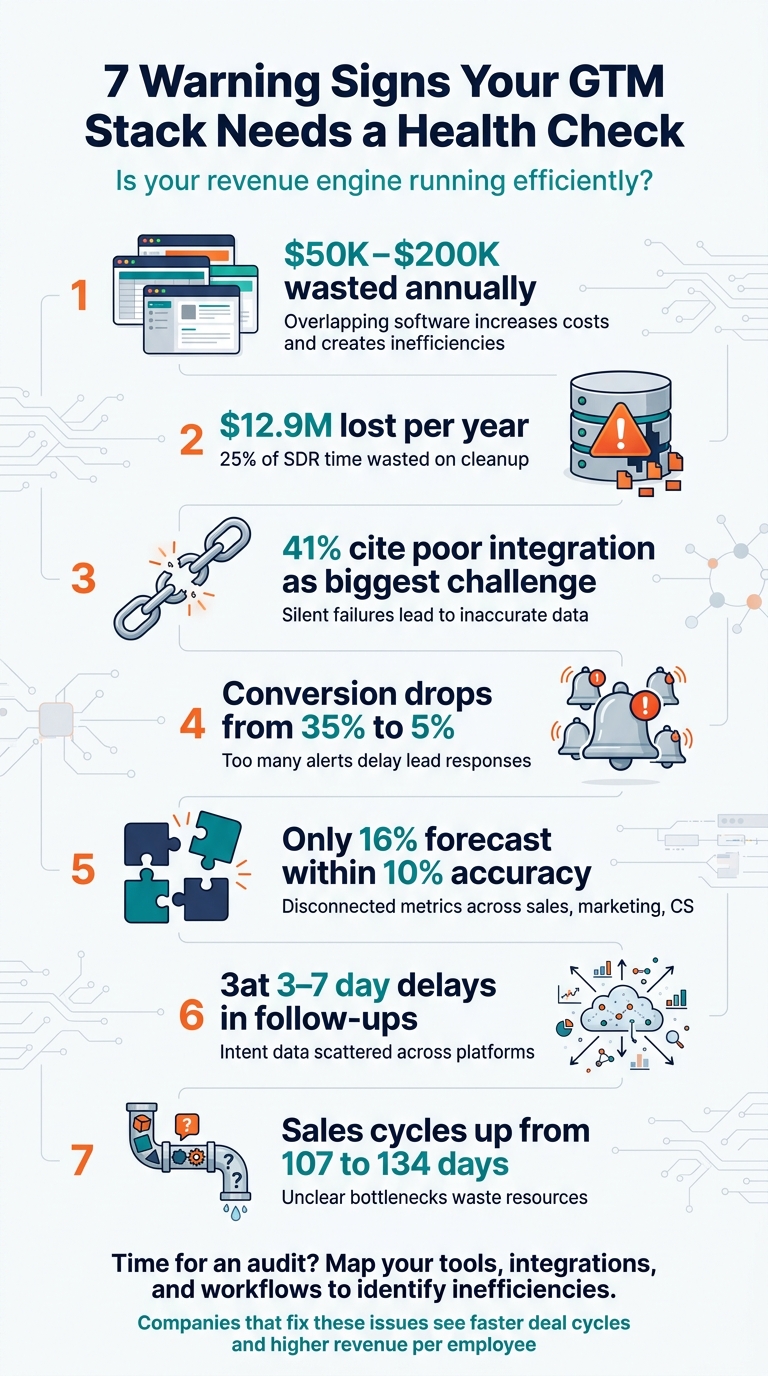
7 Warning Signs Your GTM Stack Needs a Health Check
1. Duplicate Tools and Overlapping Features
Symptoms and Indicators of the Issue
Today’s GTM teams juggle 11–15 tools on average, with nearly 30% managing 16 or more. If no one can clearly explain the purpose of each tool, it’s a sign of redundancy. Reps often waste time switching between 8+ browser tabs just to research or log a single lead. Common overlaps include multiple sales engagement platforms or ABM tools duplicating your marketing automation system’s features.
Another glaring issue? Hot leads take 4–6 hours to reach an SDR because they’re stuck in fragile integration workflows. These delays not only slow operations but also drive up costs, creating ripple effects across the business.
Business Impact and Operational Inefficiencies Caused
While subscription fees account for only 30% of GTM stack costs, the remaining 70% comes from integration and maintenance overhead. On average, mid-market companies waste $50,000 to $200,000 annually on unnecessary or overlapping tools.
"If you’re paying an SDR $60K/year and they spend 40% of their time on data entry, you’re paying $24K/year for a data entry clerk." – GTMStack Team
As your company grows, these inefficiencies multiply. Just 10 tools create 45 potential integration paths, each requiring separate security checks, vendor management, offboarding, and training. For SDRs, switching between disconnected tools eats up 47 minutes of productive time each day. That’s nearly 8 hours of lost selling time daily for a 10-person team.
Practical Diagnostic or Audit Approach
To tackle these redundancies, start with a tool audit. Inventory every tool in your stack and flag those with overlapping features, low adoption, or no clear owner. Make sure you can explain what each tool replaces and how it integrates with the rest of your systems. Check feature usage – if your team only uses 20% of a tool’s features, you’re likely overpaying. Trace your data flow from lead capture to CRM to spot where redundant tools are duplicating or syncing data unnecessarily.
Use the 30% upkeep rule: if your ops team spends more than 30% of their time on maintenance and troubleshooting, your stack has grown too complex. The goal isn’t to strip away tools entirely but to ensure every tool serves a clear, distinct purpose that aligns with your team’s needs.
2. Poor Data Quality and Incomplete CRM Records
Symptoms and Indicators of the Issue
If your CRM is suffering from poor data quality, you’re not alone. A staggering 63% of B2B professionals rate their CRM data quality as "fair" or worse, while only 8% consider it "excellent". Duplicate records typically account for 12–15% of entries, and "ghost records" – inactive contacts or outdated company data – can make up as much as 40% of your database. Add inconsistent formatting, like mismatched phone number formats, and you’ve got a recipe for broken integrations. If your email bounce rate exceeds 3% or your open rates dip below 25%, it’s a clear sign that data accuracy is dragging down your communication results. These problems don’t just create headaches – they lead to operational chaos and lost revenue.
Business Impact and Operational Inefficiencies Caused
The consequences of bad data go far beyond an untidy CRM. On average, organizations lose $12.9 million annually due to poor data quality. Sales development reps (SDRs) spend up to 25% of their time on manual tasks like deduplication or hunting for missing information – time that could be spent generating pipeline. Incomplete or inaccurate records wreak havoc on forecasting; missing deal amounts or close dates turn revenue projections into unreliable guesses. Duplicate records also fragment the customer experience, making it harder to maintain consistent communication. Alarmingly, 37% of CRM users report losing revenue directly because of bad data.
"Bad CRM data silently kills forecasts, wastes SDR time, and lets deals slip through the cracks." – GTMStack Team
Practical Diagnostic or Audit Approach
Fixing data quality starts with understanding the scale of the problem. Assess key metrics like field completeness (how many records have all required fields filled), duplicate rates, record staleness (how many haven’t been updated in over 90 days), email accuracy, and naming consistency. While the average team operates with field completeness of 55–65% and duplicate rates of 12–15%, the target should be 95%+ completeness and minimal duplicates. Clean, reliable CRM data ensures your entire GTM system functions as it should.
Here’s an example: Between January and March 2026, a mid-market SaaS company with 150 employees tackled data quality issues with a 90-day hygiene framework. By eliminating duplicates and outdated records, they reduced their CRM database from 18,000 to 11,200 records, slashed duplicate rates from 22% to 1.8%, and boosted field completeness from 58% to 96%. As a result, their forecast variance dropped from 30% to just 8%, and SDRs cut their data cleanup time from 5 hours per week to just 45 minutes.
Preventing data issues is always better than cleaning up after them. Use validation rules to ensure required fields are completed before saving records, and standardize picklists for key fields like State, Industry, and Deal Stage to avoid free-text errors. Automate repetitive tasks, such as formatting phone numbers and capitalizing names, to reduce human error. Finally, make regular reviews part of your routine – weekly data quality dashboard checks by Sales Ops and quarterly full audits can catch small issues before they snowball into bigger problems.
3. Broken Integrations That Fail Silently
Symptoms and Indicators of the Issue
Broken integrations can quietly wreak havoc by generating inaccurate data, even while appearing to function normally. These silent failures occur when automations run as expected but no longer align with your current go-to-market (GTM) strategy. For instance, a workflow might still sync data between your outreach platform and CRM, but outdated routing logic or misaligned field mapping can lead to flawed outcomes.
Here are some red flags to watch for:
- Teams resorting to exporting CSVs for forecasts instead of relying on CRM reports.
- SDRs manually searching for contact information despite having enrichment tools in place.
- Slower response times without a corresponding increase in workload or data volume.
This is not an isolated problem. In fact, 41% of GTM operations teams identify "too many tools, not enough integration" as their biggest challenge. These silent failures not only compromise data accuracy but also drag down the overall performance of your GTM efforts.
Business Impact and Operational Inefficiencies
Just like redundant tools, broken integrations can derail the effectiveness of your revenue engine. Silent integration failures often result in dashboards filled with outdated or fragmented data, turning routine forecast calls into frustrating detective work. The financial consequences are staggering: B2B companies lose an estimated $1 trillion annually due to misalignment between marketing and sales systems. While the subscription fees for your GTM stack might account for only 30% of its total cost, the other 70% is often spent on ongoing integration maintenance and troubleshooting.
The operational impact is equally severe. Sales reps end up spending only 28% of their time actually selling, with much of their week consumed by non-revenue-generating tasks. Critical updates, like bounced emails, may fail to propagate across systems, creating gaps in communication. Furthermore, when undocumented integrations are understood by just one person, their departure can leave your team scrambling to untangle and rebuild workflows.
Practical Diagnostic or Audit Approach
Addressing these silent failures starts with a thorough mapping of your data flows. Trace every step, from the initial touchpoint to the CRM record, identifying where data is created, transformed, or lost. If your team can’t track a lead’s journey or explain blank fields in the CRM, you’ve likely found a break in the chain. Also, watch for redundant API calls, as multiple systems syncing the same data can add unnecessary complexity and slow down operations.
Top-performing teams conduct quarterly reviews of all automated workflows to ensure they align with current GTM strategies. If onboarding new operations hires becomes a lengthy process dominated by teaching tool configurations rather than focusing on customer engagement, it’s a sign your integration setup has become overly complex. To mitigate risks, test new configurations alongside existing workflows using real data and custom fields before rolling them out fully.
4. Too Many Alerts and Notification Overload
Symptoms and Indicators of the Issue
Notification overload can cripple your team’s ability to make timely decisions, much like redundant tools or poor data quality can undermine your GTM stack. When alerts pour in from 11–15 tools, your team is forced into constant context-switching, pulling them away from revenue-driving tasks. It’s common to see SDRs completely ignoring these automated alerts, instead opting to manually sift through systems to create their own reports.
Alert delays, particularly those caused by latency, can stretch the response time for hot leads from just minutes to a frustrating 4–6 hours, sabotaging speed-to-lead. Even worse, conflicting alerts across systems often present inconsistent views of the same prospect, leaving teams scrambling to reconcile differences. Senior leadership teams can waste as much as 10–15 hours every week untangling these contradictions.
Business Impact and Operational Inefficiencies
The productivity toll is massive. SDRs spend 35%–50% of their time toggling between tools and reconciling alerts, causing conversion rates to plummet from 35% to as low as 5%. On top of that, reconciling conflicting alerts and dealing with poor data quality drains an average of $12.9 million annually from organizations.
"When your technology infrastructure can’t support your growth strategy, you face a painful choice: delay strategic initiatives while you rebuild, or execute poorly with inadequate tooling." – Jordan Rogers, The GTM Advisor
The financial impact extends beyond just tool subscriptions. Companies spend $120,000–$180,000 per year on senior personnel time just to reconcile data, time that could be spent driving revenue. When your team loses trust in automated alerts and reverts to manual processes, automation shifts from being a solution to becoming a burden. Fixing this requires the same level of attention as resolving tool or integration issues, making a targeted audit essential.
Practical Diagnostic or Audit Approach
To tackle these inefficiencies, start with a focused audit of your notification system. Begin by mapping your signal-to-action path – the journey a buying signal takes from detection to action. If this process takes more than 4 hours or involves multiple manual steps, you’ve pinpointed a major issue. Reducing context-switching alone could save reps 30–40 minutes per day, per person.
Next, conduct a signal audit to inventory every alert source. Ask yourself, "Does this alert lead to a specific, documented action within 24 hours?" If not, it’s just noise. Transition from fragile, point-to-point integrations to a centralized platform that can handle errors and notify you when a sync actually fails. Finally, align your team around a single set of "North-Star" metrics that sales, marketing, and customer success agree on to eliminate conflicting alerts across departments.
5. Misalignment Between Sales, Marketing, and Customer Success
Symptoms and Indicators of the Issue
When sales, marketing, and customer success teams operate on conflicting metrics, cracks begin to show. For example, marketing might report an increase in MQLs, but sales could still be staring at an empty pipeline. This disconnect forces leadership to spend as much as 10–15 hours each week manually reconciling data across systems. It’s no wonder that 29% of GTM professionals rank sales–marketing misalignment as their biggest operational headache.
Another red flag? Critical buying signals often get trapped in silos. For instance, a dip in product usage might be logged in one system but never make it to the account executive who could act on it. These fragmented metrics don’t just complicate collaboration – they undermine forecasting and operational efficiency.
Business Impact and Operational Inefficiencies
Misalignment is like a broken cog in your GTM machine. Teams can’t maintain a unified view of their data, which disrupts everything from forecasting to decision-making. Only 16% of GTM teams can forecast within a 10% margin of accuracy, largely because their data is scattered across disconnected platforms. Without real-time dashboards, 67% of revenue issues remain hidden until quarterly reviews – by then, it’s often too late to fix them.
"When your CRM, marketing automation platform, and data warehouse tell different stories, your teams make decisions based on fiction." – Jordan Rogers
For teams running Account-Based Marketing, the challenge is even sharper. Misalignment on target accounts is the top obstacle for 38% of these teams.
Practical Diagnostic or Audit Approach
Start by mapping out the lead journey – from the first interaction to the closed deal. Check conversion benchmarks: are trial-to-paid rates below 20–25% for self-serve or under 30–40% for sales-assisted processes? If so, you’ve likely uncovered misalignment. Another clear sign? If your team can’t track a lead’s journey to an opportunity in the CRM, the gaps are glaring.
You can also compare AI-detected buyer signals – like email response times or meeting participation – against rep-committed forecasts. This helps identify where gut instincts clash with actual engagement data.
Finally, assign clear ownership for metrics across teams. Marketing should own Lead-to-MQL conversion, sales should handle pipeline coverage, and customer success should focus on net revenue retention. When everyone agrees on definitions and responsibilities, those conflicting “truths” tend to disappear.
6. Buying Intent Signals Scattered Across Multiple Platforms
Symptoms and Indicators of the Issue
Fragmented buying intent signals add another layer of inefficiency to already misaligned and disconnected systems.
Picture this: sales reps juggling 15+ browser tabs just to piece together a prospect’s intent profile. LinkedIn might highlight engagement, G2 could show competitor research, and intent platforms might flag technographic updates – but none of these tools talk to each other. It’s no surprise that 41% of GTM professionals identify tool fragmentation as their top challenge.
The real killer? Delays in acting on intent signals. Manual processes often mean a 3–7 day lag between spotting a signal and taking action. Those delays are costly. Companies that engage funded prospects within 48 hours of detecting interest see conversion rates jump by 4x. And critical insights – like a VP of Sales visiting your pricing page while tweeting about outbound needs – get drowned out by 199 other signals.
Business Impact and Operational Inefficiencies
Fragmented signals don’t just slow things down – they cripple your pipeline. Sales reps spend only 28% to 34% of their time selling; the rest is eaten up by manual tasks like research and data entry. This inefficiency comes with a staggering price tag: $1 trillion annually in lost sales productivity due to misaligned marketing and sales systems.
Here’s why this matters: a single intent signal, like downloading a whitepaper, might yield a 5–8% reply rate. But when signals are combined – say, a new executive hire paired with pricing page visits – response rates can soar to 25–40%. Considering that B2B buyers complete 70% of their journey before ever talking to a vendor, fragmented signal tracking means you’re missing the chance to be on the "day-one shortlist" that captures 85% of purchases.
"The signal that mattered – the VP of Sales who visited your pricing page and just posted about needing better outbound tooling – gets buried under 199 noise signals." – MarketBetter
Practical Diagnostic or Audit Approach
The first step? Measure your time-to-action. Audit how long it takes from when a buying signal is generated to when a rep follows up. If it’s more than 24 hours, your systems are too fragmented. Next, trace the flow of data from the initial signal to your CRM. Look for bottlenecks, manual entry points, or data loss during this process. For example, in 2025, Analytic Partners boosted their qualified pipeline by 40% year-over-year by cutting manual research time from three hours to just 15 minutes per account. They achieved this by consolidating over 1,000 signal sources into a single, unified view.
Decay rates are another key metric. Demo requests and pricing inquiries lose value within hours because buyers are actively comparing vendors. Funding announcements become irrelevant within 48–72 hours, and intent surges fade in 3–7 days. If your signals are stuck in one tool while your reps operate in another, you’re missing these critical windows. Lastly, review bi-directional syncs between your intent tools and CRM. If signals don’t flow seamlessly into the platforms your reps actually use, those tools are costing you revenue rather than contributing to it.
Addressing these gaps is essential before tackling broader pipeline efficiency issues.
7. Declining Pipeline Efficiency and Unknown Conversion Bottlenecks
Symptoms and Indicators of the Issue
If your pipeline is slowing down and the cause isn’t immediately clear, inefficiency may be creeping into your system. The average B2B sales cycle has stretched significantly – from 107 days in 2023 to 134 days in 2024/2025. Meanwhile, companies are taking 150% longer to recover customer acquisition costs. If this mirrors your situation and you’re unsure why, your GTM stack could be the bottleneck.
One red flag is sluggish system responsiveness. If performance declines despite steady headcount and data volume, it’s often due to an overcomplicated integration layer. This problem mirrors tool redundancy issues, with reps spending 35-50% of their time on tasks like manual research, data entry, and switching between tools instead of selling. Additionally, only 16% of GTM teams achieve forecasting accuracy within 10%, while most experience variances of 20-35%. Without accurate pipeline predictions, identifying and fixing problems becomes nearly impossible. These inefficiencies eat away at your ability to maintain a predictable and efficient pipeline.
Business Impact and Operational Inefficiencies
B2B companies collectively lose about $1 trillion every year in sales productivity due to poorly aligned systems, with much of this stemming from manual coordination and administrative overhead. Reps spend just 28-34% of their time selling, while the rest is consumed by non-revenue-generating tasks.
The hidden financial drain lies in your GTM stack. Subscription fees only account for 30% of its cost – 70% comes from integration and maintenance. As Chris Zakharoff, Head of Solutions at GTM Engine, explains:
"Seventy percent of companies fail to integrate their sales processes into the technology they run, even while describing their operations as structured."
On top of that, poor data quality further erodes your ability to generate reliable revenue.
Practical Diagnostic or Audit Approach
Addressing these inefficiencies starts with a structured diagnostic of your GTM stack. Begin by mapping your lead journey – from the first touchpoint to CRM entry – to pinpoint areas where data is lost or manually altered. Evaluate your "time-to-action", which measures how quickly your team responds to key signals like a pricing page visit. High-performing systems act within 24 hours; if your response takes three days, you’re likely losing deals to faster competitors.
Next, audit your maintenance ratio – the percentage of engineering or ops resources spent on upkeep versus creating new features. If maintenance takes up more than 30%, your stack is overly complex. Review SDR ramp times as well. If new hires are bogged down by learning tool configurations instead of focusing on customers and products, the system is creating unnecessary cognitive load. Lastly, identify unused "zombie" subscriptions and overlapping tools that add no value.
A GTM Stack Audit can help uncover these inefficiencies and deliver a 90-day plan to get your pipeline back on track.
How to Conduct a GTM Stack Health Assessment
Overlooking the warning signs of an inefficient GTM stack can lead to serious setbacks. For Series A and B startups, where proving a scalable GTM motion is essential before the next funding round, evaluating the effectiveness of your tools is critical. It’s the difference between hitting growth targets and missing key opportunities.
A proper health assessment starts with documenting your entire stack, tracing a lead’s journey to uncover data gaps, and identifying redundant tools that don’t serve a clear purpose. Begin by listing each tool in your stack, along with its purpose, users, integrations, and costs. Next, map out a lead’s journey – from the first interaction to CRM entry – to identify where data might be lost or duplicated. Finally, flag tools with overlapping features, low adoption rates, or no clear ownership. As Mark Bedard, CEO and Founder of Upcell, wisely notes:
"A tool nobody uses isn’t free. It’s a liability that clutters your stack and confuses your team".
These foundational steps prepare you for a deeper analysis of your stack’s performance. Focus on metrics like data completeness, lead-to-CRM sync times, and how often reps actually use the tools. If more than 30% of your engineering or ops resources are tied up in maintenance rather than building new features, it’s a clear sign your stack is overly complicated. To prevent this, establish governance rules to control tool sprawl. One effective guideline is the "5-Hour Rule": only add a new tool if it replaces a manual process that takes at least five hours per week and can be implemented in under a week.
Once you’ve identified gaps and inefficiencies, you can implement targeted solutions. Regular audits are key to avoiding stack drift – the gap between your tools’ capabilities and your revenue goals. Services like GTM Engineering Services offer detailed GTM Stack Audits, including a 90-day implementation plan to create automated systems that turn outbound strategies into predictable pipelines. Conducting these audits twice a year helps you stay ahead of stack drift. With 71% of B2B teams actively consolidating their tool stacks by 2026, now is the time to move from scattered point solutions to a more integrated system. A thorough audit can turn inefficiencies into a streamlined engine for predictable growth.
Conclusion
Your GTM stack functions as the backbone of your revenue operations. When neglected, it can sap productivity, create data disarray, and slow down your pipeline. Companies with well-integrated systems see measurable benefits, including 15–25% higher revenue per employee and 30–40% faster deal cycles.
The dangers of ignoring inefficiencies – like tool duplication or disjointed data – grow over time, demanding swift action. Misaligned marketing and sales systems are estimated to cost B2B companies a staggering $1 trillion in lost sales productivity. Additionally, poor data quality can drain an average of $12.9 million annually from organizations. For Series A and B startups, these problems can jeopardize funding and derail scalable growth.
By 2026, 71% of B2B teams plan to consolidate their tool stacks, understanding that a streamlined, integrated approach outperforms a scattered collection of tools. Routine health checks – at least twice a year – are critical to keeping your stack optimized, preventing small issues from escalating into major roadblocks. If you’re seeing these red flags in your operations, now is the time to act.
Reach out to GTM Engineering Services for a comprehensive GTM Stack Audit and a tailored 90-day implementation plan to get your revenue engine back on track. Don’t wait until your pipeline grinds to a halt – take action today.
FAQs
What tools should I audit first in my GTM stack?
To tackle tool sprawl and avoid data silos, start by auditing your existing tech stack. Focus on key systems like your CRM, sales engagement platforms, and marketing automation tools. Check whether these tools are effectively integrated and aligned with your revenue objectives. This will help streamline operations, reduce inefficiencies, and cut out overlapping functionalities.
What data quality metrics should I track in my CRM?
Tracking critical data quality metrics in your CRM is essential for dependable insights and informed decision-making. Pay attention to accuracy (data that’s error-free and dependable), completeness (ensuring all necessary fields are filled), consistency (data aligned across platforms), and timeliness (keeping information current). Monitoring these metrics helps eliminate silos, enhances segmentation, and ensures forecast reliability – all of which are crucial for building scalable, predictable revenue operations.
How often should we run a GTM stack health check?
Running a GTM stack health check every quarter is a smart way to keep your operations running smoothly. These checkups ensure your tools are working together seamlessly, your data stays reliable, and your pipeline operates efficiently.
Skipping these reviews can lead to problems like redundant tools or isolated data, which can drag down your go-to-market efforts. Regular maintenance keeps everything aligned and prevents small issues from turning into bigger headaches.