Most startups fail because they can’t scale their go-to-market (GTM) systems. After launching your CRM and automating lead routing, the real challenge begins: turning initial momentum into a revenue engine that grows without constant manual effort. This is where post-GTM change management makes or breaks your business.
Here’s what you need to focus on:
- Set KPIs early: Measure adoption, data accuracy, and pipeline performance in the first 30 days.
- Validate systems: Test automations like lead scoring and enrichment before scaling.
- Get leadership buy-in: Without executive support, teams will bypass workflows and create inefficiencies.
- Create accountability: Use SLAs and dashboards to track commitments across teams.
- Establish feedback loops: Monitor adoption, survey teams, and adjust based on input.
- Optimize continuously: Audit tools, fix inefficiencies, and scale automation to reduce costs.
Companies that align Revenue Operations grow 19% faster and see 15% higher profitability. Treat GTM as an engineering problem – not a hiring one – and build systems that scale with your business.
Post-GTM Change Management: Key Metrics and Success Benchmarks
Planning Your Post-Implementation Support
The first 30 days after launching your GTM systems are crucial. This period determines whether your new infrastructure becomes a revenue-driving machine or just another costly tool gathering dust. It’s the time to set baselines, catch automation glitches, and establish feedback loops. Without early data and measurements, you won’t know if your lead routing or enrichment pipelines are delivering the results you expect – without these baselines, you’re essentially operating blind.
Set Up KPIs and Success Metrics
Your metrics should answer a straightforward question: Is this GTM change making it easier to drive consistent revenue? Focus on tracking key areas that matter most:
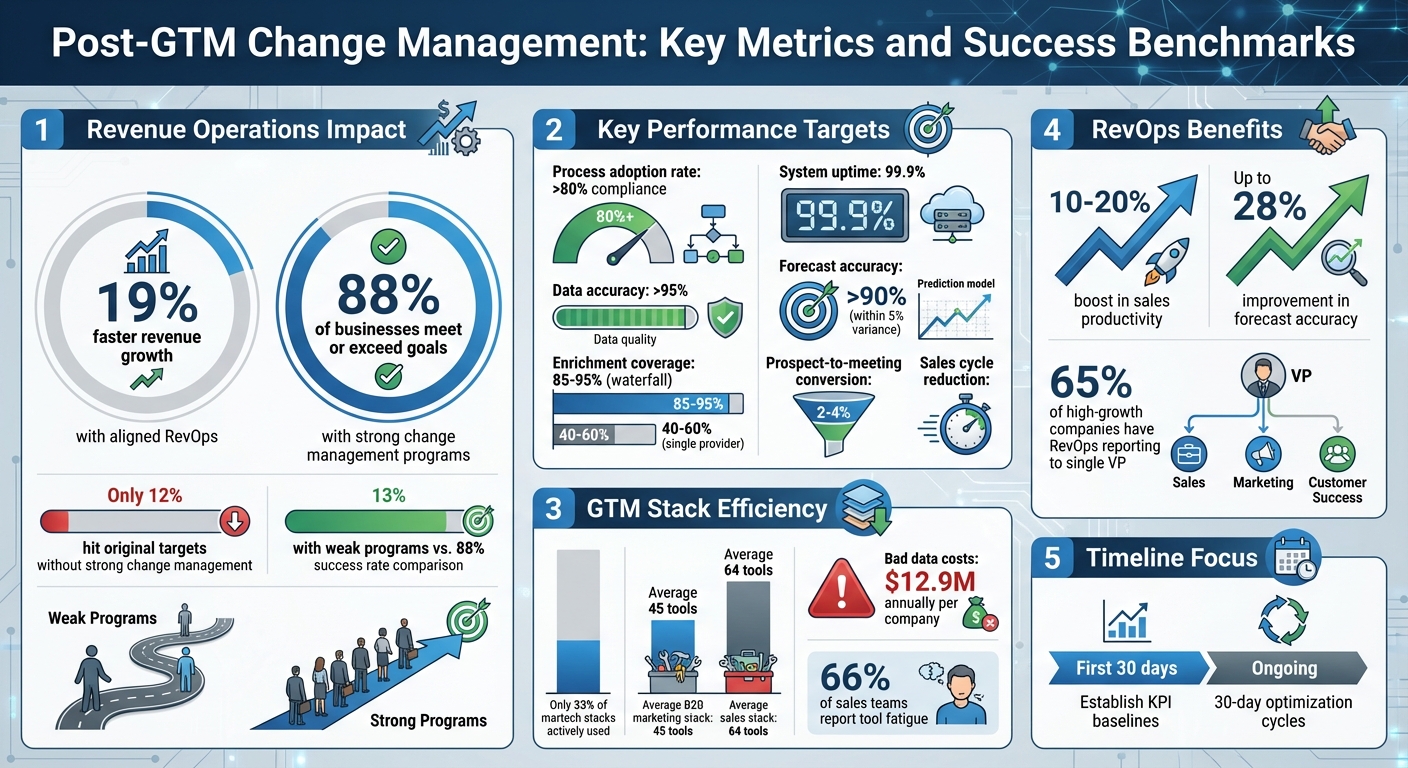
- Operational Metrics: Monitor how well processes are being adopted (aim for over 80% compliance), ensure data accuracy (target >95%), and check CRM data completeness.
- Conversion and Velocity Metrics: Track stage-to-stage conversion rates, shorten sales cycle length by 10–20%, and improve prospect-to-meeting conversion rates (typically 2–4%).
- Technical Metrics: Measure enrichment coverage (target 85–95% with a waterfall pipeline compared to 40–60% with a single provider), system uptime (99.9% is ideal), and time saved weekly through automation.
- Revenue Metrics: Assess forecast accuracy (target >90% within a 5% variance), pipeline velocity, and customer acquisition cost.
As Kushal Magar from SyncGTM explains:
"RevOps impact should be as visible as pipeline and revenue numbers."
Establish these baseline metrics within the first 30 days of implementation. From there, run focused 30-day optimization cycles to zero in on 2–3 metrics that show the largest gaps in performance.
Once your metrics are in place, the next step is to thoroughly test and validate your systems.
Build Tracking and Validation Systems
With your KPIs set, it’s time to validate every automation step before scaling up. For example, run 50 test leads through your enrichment pipeline and 20 opportunities through lead scoring to evaluate how well the system performs.
Your CRM should serve as the central hub for all GTM data. As Tina Sang, Growth Lead at Artisan, puts it:
"The CRM is where every signal, conversation, and conversion lives. Without it as the single source of truth, our GTM engine would just be a tangle of disconnected tools."
To maintain clean and reliable data, integrate automated hygiene processes into your daily workflows. This includes setting required fields for stage progression, applying validation rules to forms, and implementing ongoing deduplication. Document details like automation triggers, expected outputs, systems involved, and troubleshooting steps to quickly resolve any future issues.
Real-time dashboards, whether built using your CRM’s tools or platforms like Looker Studio, ensure your KPIs stay current. Weekly review meetings with your GTM engineering, RevOps, and sales teams will help refine scoring models and address data quality issues before they escalate.
The difference between companies that grow revenue 19% faster and those that stagnate often comes down to this critical planning phase. Skipping these foundational steps can set your systems up for failure.
Getting Leadership Alignment and Accountability
Once your systems are up and running, getting leadership on board is essential to ensure company-wide adoption. Without strong executive support, GTM systems often fall apart – sales teams bypass workflows, marketing dismisses data standards, and customer success creates their own unapproved processes.
The stats back this up: companies with well-aligned Revenue Operations experience 19% faster revenue growth and 15% higher profitability. However, only 12% of organizations attempting major changes hit their original targets. The key difference? Whether the CEO or CRO actively champions the changes and holds teams accountable for implementation.
Get Executive Buy-In
Executive sponsorship is what gives you the authority to enforce cross-departmental standards. Kushal Magar puts it bluntly:
"Without top-down support, RevOps becomes a suggestion box – sales ignores your processes, marketing rejects your data standards, and CS builds shadow systems."
At companies like Clay and Ramp, GTM Engineering reports directly to revenue leadership, enabling fast adjustments and clear accountability. In fact, 65% of high-growth companies have RevOps and GTM Engineering reporting to a single VP, which avoids the confusion and siloed models that happen when GTM engineers report to a CTO while sales reps answer to a CRO.
To lock in executive support, define the scope of GTM operations clearly – this includes CRM management, handling the tech stack, maintaining data standards, lead routing, and reporting. Get leadership to formally approve this scope and share it with the entire organization. This way, you have a solid foundation to push back if teams resist the changes.
Once leadership is aligned, the next step is to build accountability into the system.
Create Accountability Frameworks
Clear ownership is essential to avoid finger-pointing that can derail progress. Assign responsibilities based on the revenue pipeline. For instance, GTM engineers typically handle data infrastructure and automation, while account executives focus on discovery and closing deals.
Set up cross-functional Service Level Agreements (SLAs) with measurable commitments. For example, marketing might promise to deliver a certain number of qualified leads, while sales agrees to follow up within a specific timeframe. Use dashboards to track SLA compliance and review them weekly.
Kimberly Kaminski, CMO at Lakeside Software, explains the shift in mindset:
"The go-to-market used to be thought of… as just the sales team. I think in the last five years… I’ve seen this go-to-market diamond, where marketing, sales, product, and customer success come together."
Regular communication is key. Hold weekly meetings to tackle bottlenecks, bi-weekly system demos to showcase updates, and monthly strategic sessions with VP-level leaders from sales, marketing, and customer success. Involving them in process design ensures they take responsibility for their teams’ adoption of new workflows.
The best accountability doesn’t rely on constant oversight – it’s built into the system itself. Use required CRM fields to enforce stage progression, set up automated alerts for SLA violations, and create validation rules to block bad data from entering your tools. This kind of "behavioral architecture" ensures compliance without making managers micromanage every step.
Setting Up Feedback Loops and Monitoring
Once your GTM systems are live, having solid feedback and monitoring processes in place is non-negotiable. These systems ensure you know what’s working, what’s not, and where teams are encountering roadblocks. Without this, you’re essentially operating in the dark.
The numbers back this up: 88% of businesses with strong change management programs hit or exceeded their goals, compared to just 13% of those with weak programs. The key difference? Actively listening to users and making adjustments based on their input.
Build Feedback Mechanisms
Start by conducting 1:1 stakeholder interviews with team members from sales, marketing, and customer success. These conversations – ideally with 2–3 representatives from each group – help uncover operational pain points, manual workarounds, and gaps in data. Often, these are the areas where new systems might unintentionally create friction.
Implement a two-touch survey strategy to gauge sentiment over time. Send the first survey 1–2 weeks after rolling out your GTM changes to measure initial readiness and clarity. Follow up 3–4 months later to assess long-term adoption and identify any deeper issues that emerge as teams settle into the new system. This staggered approach ensures you catch both immediate and lingering challenges.
Track adoption rates closely – they’re a key indicator of how well the system is functioning. If compliance drops below 80%, it’s a red flag for potential friction points or trust issues with the data. Chris Zakharoff, Head of Solutions at GTM Engine, sums it up well:
"Good enablement lowers effort for the right actions and raises effort for failure modes… Daily behavior follows friction, not intent".
Use A/B testing to measure the effectiveness of new workflows against older methods. Test variables like AI-driven personalization, CTA performance, and lead routing logic. Consolidate these results into a centralized GTM playbook to ensure you’re using feedback to drive consistent improvements.
These feedback mechanisms lay the groundwork for continuous monitoring and improvement across all teams.
Monitor Performance Across Teams
Once feedback is collected, monitoring ensures those insights lead to meaningful changes. Schedule weekly cross-functional syncs to demo solutions, address bottlenecks, review KPI trends, and initiate 30-day optimization sprints targeting the most pressing performance gaps. These sprints focus on the top 2–3 metrics flagged by user input, driving fast, focused improvements.
Create action-planning dashboards to track the progress of initiatives sparked by feedback. When teams see their input leading to tangible changes, they stay engaged and motivated. As Ethan Burris and his co-authors explain:
"Employees experience ‘inaction fatigue,’ and harnessing their voices requires a long-term investment in building and sustaining trust that their feedback will make a difference".
Follow the 1-2-3 rule: choose one issue, take two concrete actions to address it, and check in at least three times to ensure the changes stick.
Use continuous system health metrics and automated alerts to stay ahead of potential problems. For example, set up Slack notifications for key signals like funnel stage shifts or high-intent actions such as pricing page visits. Monitor metrics like enrichment coverage (targeting 85–95%), CRM data completeness, and automation coverage to prevent revenue-impacting issues before they escalate. With effective monitoring, you can maintain system integrity and avoid disruptions.
Optimizing and Scaling Your GTM Systems
To keep your GTM systems growing alongside your business, you need more than just monitoring and feedback loops – you need a structured approach. Companies that scale successfully treat their GTM systems as carefully engineered projects, complete with clear ownership, measurable outcomes, and ongoing improvements.
Use GTM Stack Audits to Find Improvements
Regular audits of your GTM stack can uncover tools and processes that are holding you back. Did you know that only 33% of martech stacks are actively used? Or that bad data costs companies an average of $12.9 million annually?. These audits help you avoid wasting money on tools that don’t deliver and highlight where better systems can step in.
Start by taking stock of every tool in your stack – who’s responsible for it, what it costs, and how often it’s actually used. With the average B2B marketing stack containing 45 tools and sales stacks averaging 64, there’s bound to be overlap and inefficiencies. Map out your data flow from the first touchpoint to a closed deal, and you’ll likely find manual handoffs, redundancies, and gaps in velocity.
Talk to team members across sales, marketing, and customer success to identify manual workarounds that automation could fix. As Tina Sang, Growth Lead at Artisan, aptly says:
"The CRM is where every signal, conversation, and conversion lives. Without it as the single source of truth, our GTM engine would just be a tangle of disconnected tools".
A comprehensive audit follows three key phases. The Audit phase identifies inefficiencies by reviewing tools, mapping data flows, and conducting stakeholder interviews. This helps you eliminate waste and focus on your top five bottlenecks. The Build phase establishes a strong foundation by consolidating your CRM, defining your data model, and implementing waterfall enrichment to achieve 85–95% data coverage. The Scale phase focuses on automation, AI-driven orchestration, and rapid A/B testing through two-week sprints.
One standout improvement is waterfall enrichment. Instead of relying on a single data provider, this approach uses multiple providers in sequence, boosting coverage from 40–60% to as high as 85–95%. It significantly improves lead routing accuracy while cutting down on manual research for your team.
Once you’ve tackled inefficiencies, it’s time to refine your strategy with data-driven pipeline analytics.
Refine Strategy Using Pipeline Analytics
With your stack optimized, pipeline analytics become your next big lever. Businesses with aligned Revenue Operations teams experience 19% faster revenue growth and 15% higher profitability. The secret? Using data to fine-tune every stage of your funnel instead of relying on guesswork.
Your CRM should act as the single source of truth. Leverage real-time signals – like funding events, hiring trends, or technographic updates – to trigger automated workflows.
Adopt a tiered lead scoring system to prioritize leads effectively. For instance:
- Leads scoring below 50 go into automated nurturing sequences.
- Scores between 50–79 are handed off to SDRs for qualification.
- Scores of 80+ go straight to account executives.
This ensures your team focuses on leads with the highest potential.
Keep an eye on pipeline velocity metrics, such as time-to-opportunity and stage conversion rates, to measure the impact of GTM changes. Whether you’re testing new outreach sequences or tweaking lead routing, these metrics reveal what’s working. Companies implementing RevOps often see a 10–20% boost in sales productivity and up to a 28% improvement in forecast accuracy.
Approach GTM updates like product engineering. Use two-week sprints, set clear goals, maintain version-controlled workflows, and share release notes to keep everyone aligned. Everett Berry, Head of GTM Engineering at Clay, sums it up well:
"GTM Engineering works at Clay because we treat it like engineering. Clear ownership, sprint-based delivery, version control, release notes. The team has space to build real infrastructure instead of fighting fires".
This methodical approach shifts GTM from being a headcount issue to an engineering challenge, enabling you to scale without simply adding more people to the team.
Key Takeaways for Post-GTM Change Management
Post-GTM change management hinges on four key elements: thorough system audits, executive sponsorship, continuous feedback loops, and data-driven optimization. Begin by conducting a detailed audit of your tools and processes. Map out your data flows, pinpoint bottlenecks that hinder revenue velocity, and clean up bad data that may be dragging your systems down.
Having executive support is non-negotiable. Without visible backing from leaders like your CRO or CEO, teams may create shadow systems that undermine your core infrastructure. Once leadership is aligned, focus on defining your data model and implementing waterfall enrichment. This step can dramatically improve data coverage from 40–60% to 85–95%, establishing a single source of truth that automated systems rely on.
These pillars bring together the strategies for planning, alignment, monitoring, and optimization. By introducing cross-functional SLAs and automating repetitive tasks, you can replace manual processes with systems that scale. For instance, automating activities like lead routing, scoring, and CRM updates not only cuts down on inefficiencies but also reduces tool fatigue – an issue reported by 66% of sales teams. Companies that align Revenue Operations experience measurable benefits, including 19% faster revenue growth and 15% higher profitability.
Treat GTM as an engineering problem rather than a staffing challenge. Set KPI baselines within your first 30 days, then launch 30-day optimization cycles to tackle specific bottlenecks head-on. This approach shifts the focus from adding headcount to building scalable, technical solutions.
For startups ready to scale, GTM Engineering Services offers the expertise to build automated revenue systems. From GTM stack audits and multi-channel outbound design to CRM automation and pipeline analytics, we help Series A and Series B companies grow without relying on linear headcount increases. Start with a free 30-minute GTM Stack Audit to uncover gaps in your current setup and get a tailored 90-day implementation plan designed to hit your revenue targets.
FAQs
What should I prioritize in the first 30 days after a GTM system launch?
In the first 30 days, prioritize creating a solid operational framework. Begin by auditing your tools, processes, and data flows to pinpoint inefficiencies and gaps. Assign clear ownership of workflows within your team to ensure accountability. Introduce automation where possible to minimize errors and enhance data accuracy. Lastly, set up key performance indicators (KPIs) and dashboards to track progress, making sure your system can handle daily operations without CRM-related disruptions slowing you down.
Which KPIs best prove GTM adoption and revenue impact?
To gauge the success of your Go-to-Market (GTM) strategy, certain KPIs stand out for their ability to show both adoption and revenue impact. CRM adoption rates are a prime indicator, as they reflect how consistently your team uses the system, which in turn improves forecasting accuracy.
Pipeline metrics are equally critical. These include lead conversion rates, opportunity velocity, and deal win rates – all of which provide a direct lens into how well your systems are performing. Beyond these, other valuable indicators include:
- Lead scoring accuracy: Shows how effectively prospects are being prioritized.
- Automation adoption rates: Highlights the extent to which automation is streamlining processes.
- Revenue metrics: Such as Monthly Recurring Revenue (MRR), Customer Acquisition Cost (CAC), and Customer Lifetime Value (CLV), which are essential for understanding the financial health and efficiency of your GTM efforts.
Focusing on these KPIs gives a clear picture of how well your systems and strategies are driving growth.
How do I prevent teams from bypassing the CRM and creating shadow workflows?
If your teams are sidestepping the CRM, it’s crucial to ask why. Often, the problem lies in unreliable data or tedious manual tasks that make the system more of a burden than a tool. To fix this, focus on automation: streamline data entry, lead capture, and workflows to save time and boost accuracy.
Ownership is another key piece of the puzzle. Assign clear responsibility for CRM processes, and regularly audit workflows to ensure everything runs smoothly. Transparency is essential – teams need to understand how the CRM supports their goals.
Finally, keep a close eye on how tools are being used. Standardized processes aren’t just helpful; they’re necessary to keep everyone aligned and reduce the temptation to create workarounds outside the system.