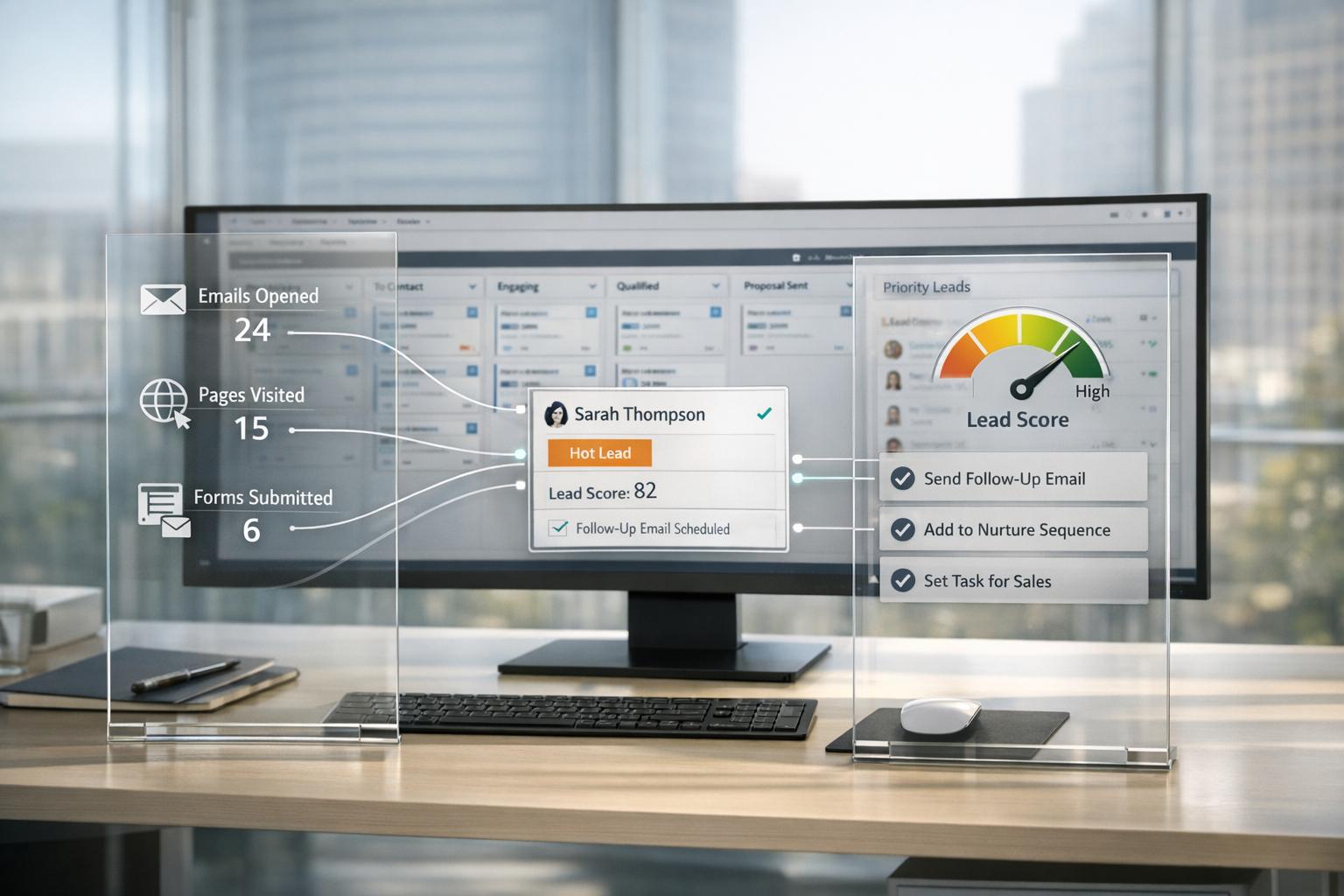
Behavioral data integration with tools like Clay and HubSpot transforms your CRM from a static contact list into a dynamic sales engine. By leveraging real-time signals – like website visits, LinkedIn activity, and funding news – you can prioritize high-intent leads and automate manual tasks, saving time and improving pipeline efficiency. Key takeaways:
- Data decay is costly: HubSpot databases lose accuracy at 2.1% per month, leading to wasted time on outdated leads.
- Behavioral signals matter: Actions like pricing page visits or new executive hires indicate buying intent, enabling timely outreach.
- Automation boosts results: Teams using Clay see 30% pipeline growth and 15–25% response rates, far exceeding typical cold outreach.
- Save time and resources: Automating lead enrichment and routing cuts manual research time by up to 80%.
For startups scaling beyond founder-led sales, integrating Clay with HubSpot ensures your team spends more time closing deals and less time on repetitive tasks, driving predictable growth and improved sales efficiency.
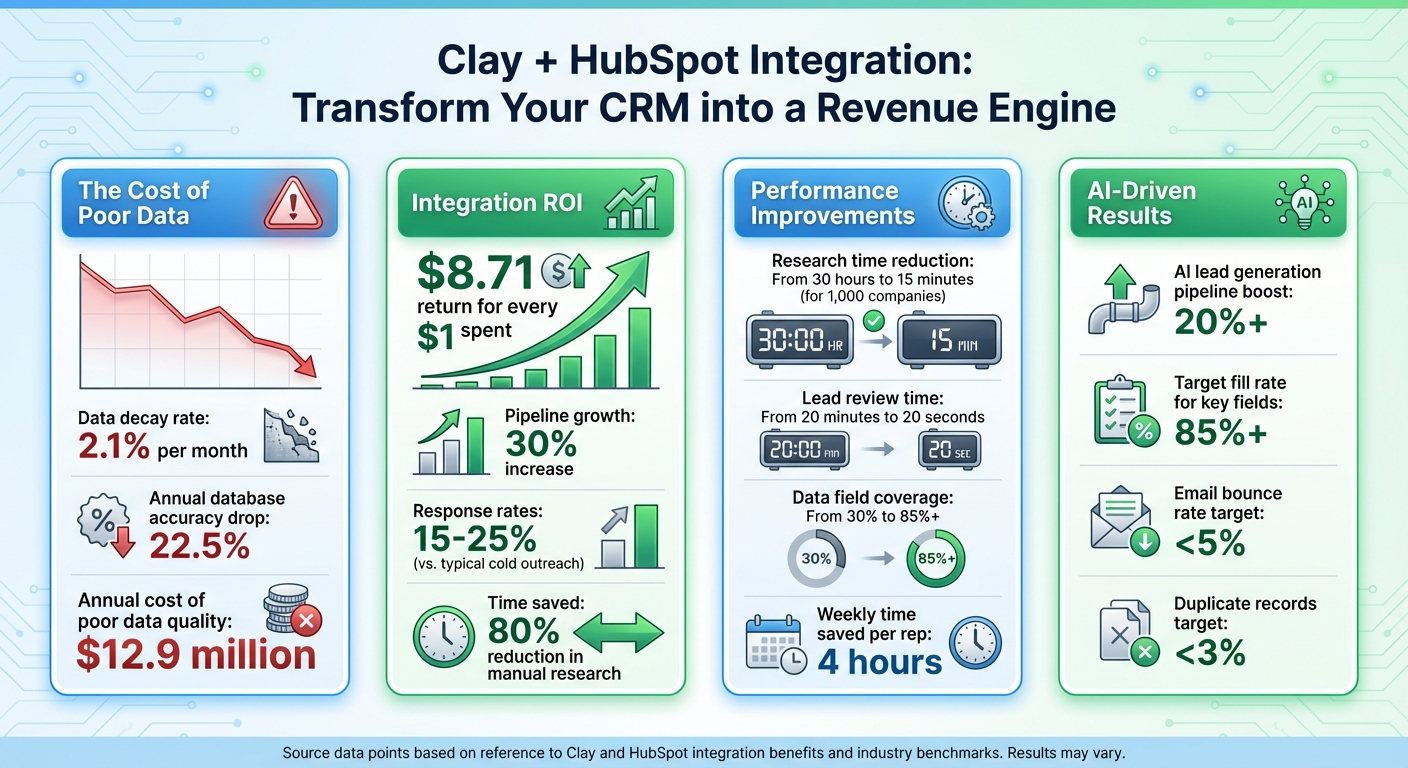
Clay and HubSpot Integration: Key Performance Metrics and ROI Statistics
How Behavioral Data Improves Outbound Strategy
Behavioral data tracks real-time actions – like multiple visits to a pricing page, detailed questions during a webinar, or LinkedIn posts highlighting specific challenges. These actions act as signals, showing when prospects are actively evaluating solutions. This allows outreach to feel timely and relevant, rather than disruptive.
"Signal based selling uses these moments to ensure your outreach is timely and helpful rather than a random interruption." – RevPartners
Switching from static prospect lists to signal-based selling changes the game. Instead of cold emailing disengaged contacts, you can act on triggers like a new executive hire, a surge in website visits, or a recent funding announcement. For instance, in early 2026, RevPartners helped Supered automate its lead research. The system now flags high-value signals – such as specific website visits or new hires – triggering timely outreach. Within months, this approach delivered a consistent stream of meetings.
For Series A and B startups, this approach tackles a common bottleneck: time spent on manual lead qualification. Automating this process not only saves time but also allows teams to focus their energy on more impactful activities. Let’s unpack the key behavioral signals that power this strategy.
What Behavioral Data Includes
Behavioral data can be divided into three main categories:
- Warm interaction signals: These are direct engagements with your brand, such as visits to key website pages (pricing or enterprise security), LinkedIn interactions, or signing up for a product trial. These signals show clear interest in your offerings.
- Cold intent signals: These come from external events, like new executive hires, leadership changes, recent funding rounds, or job postings hinting at a need for your solution. While indirect, these signals often mark the beginning of a buying cycle.
- Runtime context: This involves leveraging live data during outreach. For example, referencing a prospect’s recent podcast appearance, a LinkedIn post about a challenge, or a company’s annual report initiative ensures your message feels personalized and relevant.
These types of signals are the backbone of tools like Clay, which enrich your CRM with real-time data. For example, in March 2026, RevPartners automated the routing of over 950 webinar leads for FMG. Instead of relying on manual exports, the system instantly sent leads to sales, complete with details about the questions prospects asked during the event. Understanding these categories highlights why startups need to embrace behavioral data.
Why B2B Startups Need This Data
As startups move from founder-led sales to scalable go-to-market strategies, many face a challenge: 91% of companies with 10+ employees already use a CRM, but most treat it like a static spreadsheet. Behavioral data transforms CRMs into dynamic prioritization tools. By categorizing leads based on intent – like Tier 1 for pricing page visits (requiring personalized outreach) or Tier 2 for LinkedIn follows (suitable for light automation) – you can focus resources where they matter most.
The benefits are undeniable. CRM integrations deliver an average return of $8.71 for every dollar spent. AI-driven lead generation boosts pipeline growth by over 20%. Automated workflows that enrich and route leads in real time can accelerate pipelines by 30%. For startups looking to scale and attract funding, these metrics are hard to ignore.
"A company’s GTM performance is no longer an operational optimization question. It’s an architecture and leadership decision with direct impact on pipeline, forecast and scalability." – Raul Sfat, andweekly
At GTM Engineering Services, we specialize in building systems for Series A and B startups. By capturing behavioral signals, enriching them in Clay, and syncing them with HubSpot through tailored workflows, we create revenue engines that prioritize high-value leads. This allows sales teams to spend less time on manual research and more time closing deals.
How to Integrate Clay with HubSpot
To connect Clay with HubSpot, you’ll need either a Clay Pro plan ($800/month or about $716/month when billed annually) or the Growth plan at $495/month. These plans are the only ones that include the HubSpot connector. Additionally, you must have HubSpot Super Admin permissions to approve the OAuth scopes that allow Clay to access and manage data across Contacts, Companies, Deals, and Property Metadata.
The integration process is simple. In Clay’s sidebar, navigate to "Integrations", search for "HubSpot", and click "Connect." Log in using your HubSpot Super Admin credentials and approve the required OAuth scopes. Once connected, test the integration by setting up a "Find Companies" enrichment column in a new Clay table to confirm everything is working.
"The HubSpot-Clay integration is bidirectional. Data moves both ways." – Jorge Macias, GTM Engineering
Setting Up Accounts and Permissions
Before diving into the integration, ensure your accounts are ready. Create a dedicated integration user in HubSpot with Super Admin rights. This step helps avoid sync issues if an employee’s role changes or they leave the organization. Also, make sure your HubSpot account has API access enabled. If you’re handling a large volume of records, an Enterprise account is preferable due to its higher API burst limits.
In Clay, prepare your tables by ensuring all Contact rows include valid email addresses and Company entries have clean root domains (e.g., no "http://" or "www."). If you’re working with custom objects in HubSpot, note that you’ll need a HubSpot Enterprise seat and specific OAuth scope approval when setting up the connection.
Enriching Leads with Behavioral Data in Clay
Start by importing HubSpot contacts to capture unique hs_object_ids, which helps prevent duplicate records. Set up HubSpot workflows to track high-value triggers, like a lead visiting your pricing page multiple times in one day. These workflows can fire webhooks that send a lead’s domain or LinkedIn URL to a Clay table in real time.
Once your HubSpot contacts are imported, enrich them using data from multiple providers. Use a waterfall approach: start with cost-effective options like Clearbit, Apollo, or LinkedIn, and turn to premium sources only when necessary. This strategy balances cost and accuracy. Configure enrichment columns to run conditionally – for example, only if the "Annual Revenue" field is empty – to save on credits and processing time.
Before syncing, clean your data using Clay’s AI agents or formula columns. For instance, remove legal suffixes like "Inc." or "LLC" from company names and standardize job titles to make your outreach more personalized. You can also set up a formula column to act as a "gatekeeper", ensuring only fully deliverable leads that match your Ideal Customer Profile (ICP) are synced back to HubSpot.
Syncing Data from Clay to HubSpot
Use a "Search then Update" sequence to sync data effectively. First, use the "Find Record" action to retrieve the hs_object_id, then use "Update Record" to push enriched data into HubSpot. This two-step process ensures accurate mapping and avoids duplicate records.
Enable the "Ignore blank values" option in Clay’s "Update Object" action to prevent overwriting existing HubSpot data with empty fields. You can also add a "Campaign Name" column in Clay and sync it to a custom HubSpot property. This allows you to track which specific Clay workflows contribute to revenue. Always test new workflows with a small batch of 5–10 records to confirm that all field mappings and formatting are correct before scaling up.
In March 2026, RevPartners helped FMG streamline the routing of over 950 "hand-raisers" from webinars. By connecting HubSpot and Clay, leads were enriched and routed to sales teams immediately after each webinar, complete with context based on the prospect’s inquiries. This integration eliminated manual spreadsheet exports and drastically improved follow-up speed.
With your sync process in place, you can move on to configuring HubSpot workflows for behavioral data.
Setting Up HubSpot Workflows for Behavioral Data
Using workflows in HubSpot can turn enriched data into actionable strategies, enabling timely and effective sales outreach. Once your enriched data flows from Clay back into HubSpot, you can set up workflows to respond to key behavioral signals – like pricing page visits or a new executive hire. Think of HubSpot as the tool that detects these signals, while Clay adds the intelligence layer, helping you understand why a lead is important and how to engage with them.
Here’s how it works: a behavioral event in HubSpot triggers a webhook to Clay, which enriches the lead’s record. That enriched data syncs back to HubSpot’s custom properties. From there, a second workflow takes over, triggering actions like enrolling the lead in a sequence, assigning a task to an SDR, or updating the lead score.
"Clay acts as a real-time intelligence layer that sits on top of your CRM." – Jorge Macias, GTM Engineering
With this integrated data flow in place, let’s dive into how you can turn these insights into automated actions.
Creating Behavioral Triggers in HubSpot
Start by identifying the behavioral signals that are most critical for your ideal customer profile (ICP). Configure HubSpot workflows to send a webhook to Clay whenever these events occur, capturing the crucial "intent window" when a prospect is actively considering solutions.
Use property-based triggers to automate follow-up actions. For instance, when Clay enriches a field like "ICP Score" or "AI Intro Draft" and syncs it back to HubSpot, you can set up workflows that activate when the property is "known" or hits a specific value. If an ICP score exceeds 80, the workflow could assign the lead to your best-performing SDR and create a task with a 2-hour SLA timer, ensuring high-priority leads are acted on quickly.
To maintain data accuracy, make sure your workflows are mapped correctly. Enable the "Ignore blank values" setting in HubSpot to avoid overwriting existing data if an enrichment fails. This way, your manually researched CRM data stays intact.
Personalizing Outreach with Behavioral Insights
Once your triggers are live, focus on turning these insights into personalized outreach. Behavioral data is only useful if your team can leverage it effectively. Instead of having SDRs spend 15 minutes researching each lead, let Clay generate personalized snippets in seconds and sync them directly to HubSpot. AI-generated insights – like "Ice breaker summaries" or "Pain point insights" – can be mapped to custom multi-line text properties in HubSpot. These fields can then be used as dynamic variables in automated email sequences.
"Personalization is only valuable if your team actually uses it. Instead of an SDR spending 15 minutes researching a single lead, Octave [via Clay] generates a high-quality draft in seconds and puts it exactly where they work." – Adam Statti, RevPartners
To make your outreach sound more natural, strip legal suffixes like "Inc." or "LLC" from company names and standardize job titles. Set up HubSpot workflows to enroll contacts in sequences only when custom properties, such as "AI Intro Draft", are populated. This ensures every message includes highly relevant context based on real-time behavioral signals.
For added quality control, implement a "human-in-the-loop" process. Display Clay’s enriched data in HubSpot Custom Cards at the Contact or Company level. This gives BDRs instant access to critical context without leaving their workspace. With this setup, reps can quickly review AI-generated drafts for consistency with your brand voice, saving hours of manual research while maintaining a personal touch.
sbb-itb-662fce2
Testing and Monitoring Your Integration
Once your workflows are live, keeping data accurate between Clay and HubSpot becomes a top priority. Poor data quality isn’t just an inconvenience – it racks up a staggering $12.9 million in annual costs.
Validating Data Accuracy
Start small: test 5–10 records before going full scale. Use filters in your Clay table to sample records and run them through the complete workflow. This helps you catch issues like formatting mismatches or API rejections before they can mess up your CRM data. For example, HubSpot rejects Contact records without an email or Company records missing a domain. Double-check that these required fields are filled out and formatted correctly.
Clay’s "Find Record" action is your best friend here. Use it to pull the unique hs_object_id for existing contacts or companies. Mapping updates to this ID – rather than just relying on email or domain – avoids duplicate records and ensures updates go to the right profile. Also, enable the "Ignore blank values" toggle in Clay’s "Update Object" action. This prevents blank values from overwriting good CRM data if an enrichment step doesn’t return results.
"CRM hygiene isn’t maintained with rules; it’s engineered into your system." – Ronan Leonard, Founder, Intelligent Resourcing
Set confidence thresholds to gate what data gets synced back to HubSpot. For instance, only allow updates if the email confidence level is above 90%. This ensures only high-quality data makes it into your CRM. Automated enrichment can boost data fields like revenue coverage from around 30% to over 85%, but only when the data is verified. These steps lay the groundwork for tracking meaningful performance metrics in HubSpot.
Tracking Performance Metrics in HubSpot
Once data accuracy checks are complete, shift gears to performance metrics. Focus on the ones that drive results: MQL-to-SQL conversion rate, pipeline velocity, and speed to first touch. Add campaign names or IDs to every record in Clay before syncing to HubSpot. This enables precise attribution in HubSpot Campaign Reports, making it easier to connect closed deals to the exact Clay list that sourced them.
Keep an eye on data quality indicators to maintain a healthy integration. Aim for an 85%+ fill rate on key fields, keep duplicates under 3%, and ensure your email bounce rate stays below 5%. Remember, B2B contact data decays at 2.1% per month, causing a 22.5% annual drop in database accuracy without regular enrichment. To combat this, set up a refresh cycle – like re-enriching only if a record is older than 30 days. This prevents data decay while limiting unnecessary API calls.
Finally, measure the time saved. Automated enrichment can slash manual research time for 1,000 companies from 30 hours to just 15 minutes. If your SDRs are still stuck doing manual research instead of selling, your integration needs a second look.
Advanced Tips for Scaling Behavioral Data Usage
Optimize your integration to avoid wasting credits or overloading your system. The leap from a functional setup to a revenue-driving machine often hinges on smart architectural choices – not just operational tweaks.
Preloading Clay Tables with ICP Guidelines
Set up conditional run settings so enrichment only triggers when Ideal Customer Profile (ICP) criteria are met. For instance, target companies using specific tech stacks or those at a particular funding stage. This approach reduces unnecessary enrichment and keeps credit usage in check.
Create reusable templates with detailed filters for technographics, hiring patterns, and funding data. Then, use Claygents (AI agents) to analyze company descriptions or website content against your preloaded ICP guidelines. This automates the process of qualifying or disqualifying leads before they ever hit your CRM.
To enforce these criteria, add a formula column in Clay that flags leads as eligible only if they meet all ICP standards and have a 100% deliverable email address. This ensures your CRM stays clean, your sales team focuses on high-quality prospects, and automated lead tiering runs smoothly.
Once targeted enrichment is in place, focus on improving data accuracy through multi-source enrichment.
Combining Multi-Source Enrichment for Better Targeting
Using waterfall enrichment logic can improve data coverage while managing costs. Configure Clay to cycle through multiple data providers – if one source doesn’t return an email, the system automatically queries the next. This method can boost critical field coverage, like email and phone numbers, to as high as 95%.
Establish a hierarchy for resolving conflicting data. Start with manually verified sources, followed by recent professional databases (e.g., LinkedIn), then public records, and finally secondary sources like social media. Pair this with conditional logic so enrichment only occurs when a field is blank or the "Last Enriched" date is older than 90 days. To protect existing CRM data, always enable the "Ignore blank values" option in Clay’s Update Object action. This prevents overwriting valid data with empty results.
After securing high-quality enrichment, organize your HubSpot lists by intent levels to enable scalable personalization.
Segmenting HubSpot Lists for Scalable Personalization
Move beyond static lists by creating signal-based tiers for personalization. For example, Tier 1 leads – those showing high intent, like visiting pricing pages – should receive highly personalized outreach. Tier 2 leads, or warm prospects, can be engaged with light automation followed by rep involvement. Lower-tier leads can remain in marketing nurture campaigns until they show stronger signals.
Use real-time context, like a recent podcast mention or a LinkedIn update, to make your outreach timely and relevant.
Combat data decay by implementing a 30-day refresh loop. B2B contact data decays at about 2.1% per month, so set up a recurring HubSpot workflow to flag leads that haven’t been contacted in 90 days. Send these leads back to Clay for re-verification. Before syncing, clean up your data by removing legal suffixes (e.g., Inc., LLC) and simplifying job titles to ensure AI-generated drafts sound natural.
"Prospecting isn’t broken, it’s just under engineered." – Alex Lindahl, Author, Claymation
By refining your Clay-HubSpot connection and automating workflows, these advanced strategies can significantly boost your system’s efficiency and targeting. For Series A and B2B startups transitioning from founder-led sales to scalable outbound processes, these architectural improvements can drive faster pipeline velocity and more accurate forecasts. If your team is still bogged down with manual research, it’s time to rethink and re-engineer your integration for peak performance.
For more strategies on building scalable revenue systems, explore how GTM Engineering Services helps funded B2B startups automate lead enrichment, multi-channel outbound workflows, and CRM management to achieve predictable growth.
Key Takeaways for Behavioral Data Integration
Integrating behavioral data from Clay into HubSpot turns your CRM into a real-time intelligence powerhouse, saving sales reps an average of 4 hours each week by eliminating the need for manual data entry. The numbers don’t lie: CRM integrations deliver an average return of $8.71 for every dollar invested.
Automation and precision are the game-changers here. With access to over 150 data sources, Clay enriches leads with verified contact details, technographics, funding signals, and real-time behavioral triggers. This enables signal-based selling, where outreach is driven by actual buying signals – like visits to your pricing page or a new executive hire – instead of generic cold outreach. Automated enrichment slashes research time by up to 80%, cutting lead review from 20 minutes to just 20 seconds. To sustain these benefits, regular monitoring is key to maintaining data accuracy.
Consistency is critical for long-term success. Without frequent updates, data accuracy can decline significantly over time. Setting up 30-day refresh cycles ensures contact data stays current, preventing outdated or "ghost" entries from clogging your pipeline and harming your domain reputation. Start small by validating mappings in batches before scaling up.
For Series A startups and B2B companies, this integration directly accelerates pipeline velocity and improves forecast reliability. By automating research and focusing on ICP-qualified, high-intent leads, your sales team can operate more efficiently. When configured with conditional logic, waterfall enrichment, and signal-based triggers, the Clay-HubSpot integration lays the groundwork for predictable, scalable revenue.
GTM Engineering Services specializes in creating these automated revenue systems for funded B2B startups. From lead enrichment and CRM workflow design to pipeline analytics, we help Series A and Series B companies establish a scalable GTM motion to secure future funding. Visit GTM Engineering Services to see how we can build your revenue infrastructure for consistent growth.
FAQs
Which behavioral signals should we track first in HubSpot?
To understand visitor intent and engagement, begin by monitoring behavioral signals like clicks, form submissions, and navigation patterns. These actions provide valuable clues about what visitors are looking for. The next step? Link these anonymous activities to identifiable contacts. This connection is the key to tailoring experiences and refining conversion strategies. Focus on signals that highlight interest or potential buying intent – this allows your team to act promptly, fine-tune outreach, and boost the effectiveness of your sales and marketing efforts.
How can we prevent duplicates when syncing Clay data to HubSpot?
To keep your HubSpot data clean and free of duplicates, use a "Find Record" step before making updates. This step searches for existing records by matching unique identifiers – like email addresses for contacts or domains for companies. Once you locate the record, map the data to its hs_object_id by retrieving the record’s ID. Then, proceed with the update.
This "Search then Update" approach ensures your data stays accurate and avoids creating duplicate entries in your system.
How often should we re-enrich records to fight data decay?
To keep your data accurate and combat decay, it’s crucial to re-enrich your records on a consistent basis. A weekly schedule works best to ensure your database stays current and free from errors.