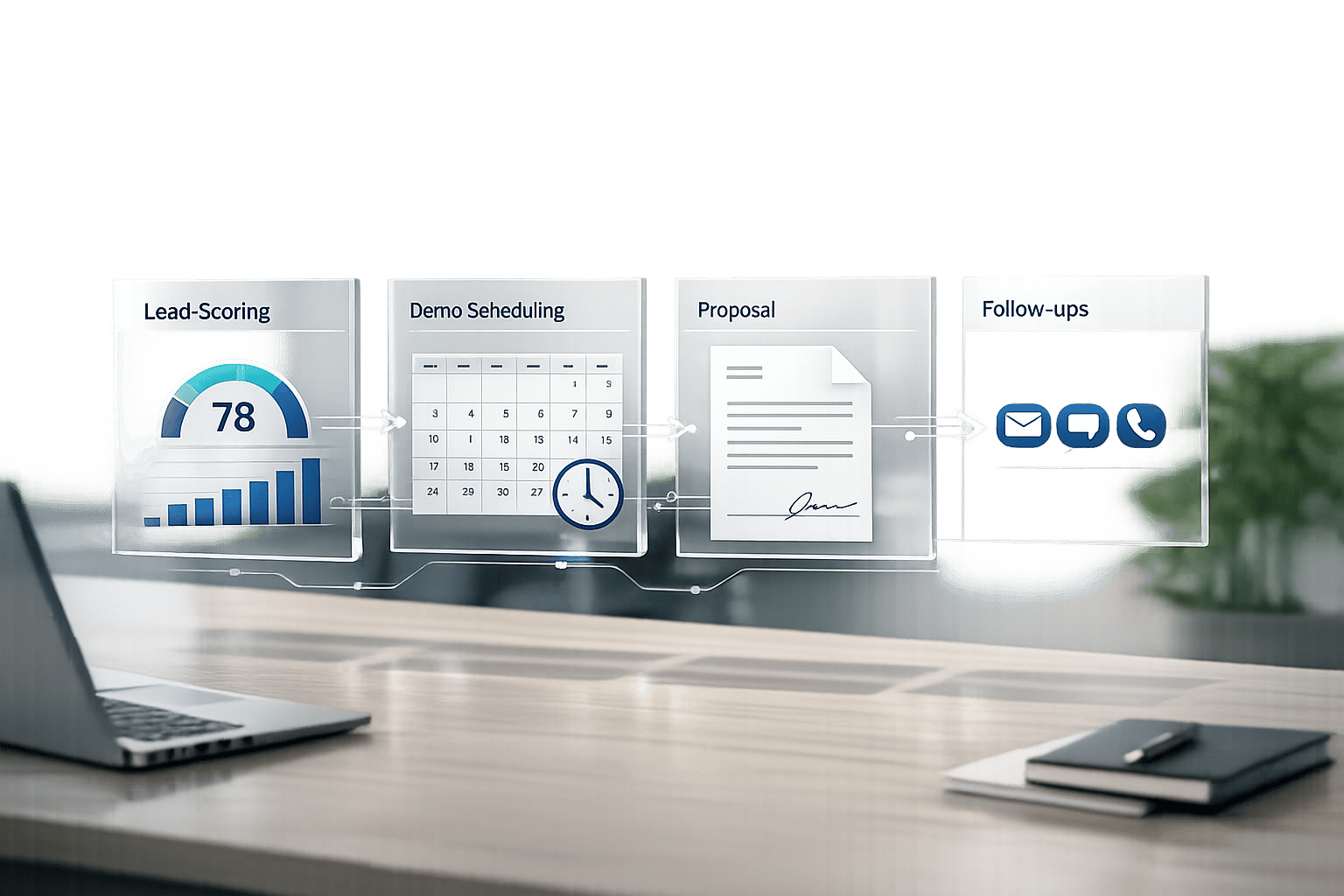
Manual sales processes are costing you time, deals, and revenue. Automating your sales pipeline ensures every lead is followed up, every task is completed, and no opportunity slips through the cracks. Here’s what you need to know:
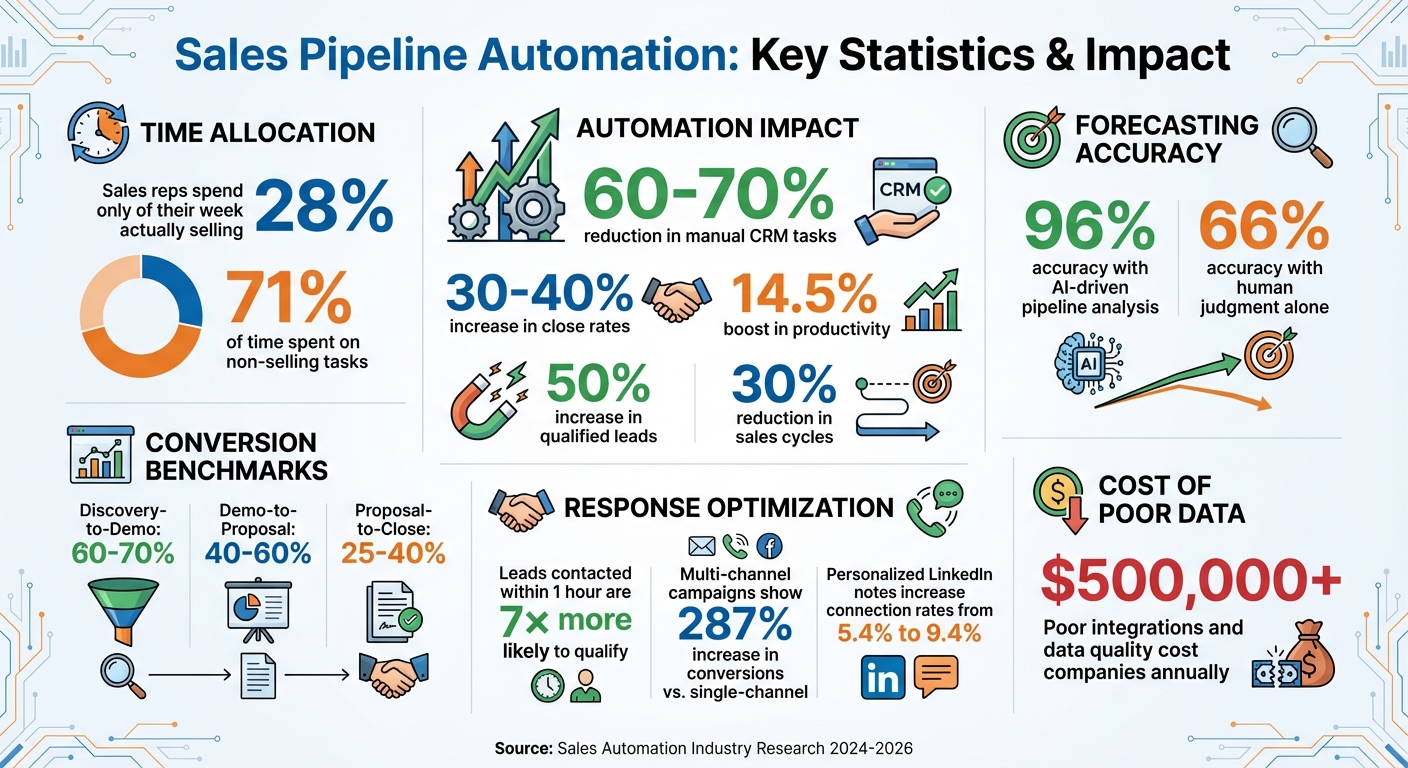
- Why it matters: Sales reps spend just 28% of their week selling. Automation cuts manual CRM tasks by 60–70%, increasing productivity and close rates by up to 40%.
- What to do first: Audit your CRM for bottlenecks, clean up messy data, and define pipeline stages based on buyer actions.
- Tools to use: Platforms like HubSpot, Salesforce, and Apollo streamline workflows, sync data, and automate follow-ups.
- Key benefits: Companies using automation report 14.5% higher productivity and 96% forecasting accuracy.
This guide covers everything from setting up workflows to automating lead scoring, demos, proposals, and follow-ups. Build a pipeline that works for you – not the other way around.
Sales Pipeline Automation Statistics and ROI Benefits
Preparing for Pipeline Automation
Before diving into automation, it’s crucial to ensure your foundation is rock solid. If your data is messy, automation will only magnify those issues.
Audit Your CRM and Sales Tools
First, check if your CRM subscription tier supports the automation features you need. For instance, HubSpot’s Professional or Enterprise plans are required to access the full workflow editor, and you’ll need Super Admin or Workflow edit permissions to set it up properly. If you’re on a Starter plan, you may find yourself limited in creating the multi-step workflows necessary for full automation.
Next, analyze your current process to identify bottlenecks. Map out how leads transition between SDRs, AEs, and Customer Success teams to find where deals get stuck. Also, confirm that your CRM syncs seamlessly with marketing tools like Gmail, Outlook, Apollo, and Calendly. Sales reps spend 71% of their time on non-selling tasks, often due to disconnected systems and manual workarounds.
Data hygiene is another critical step. Ensure you have proper deduplication logic, validation rules, and sync monitoring in place to prevent overlapping records or inaccurate lifecycle stages. Compare your CRM’s default close probabilities against historical win rates to keep your weighted forecasts accurate when automation kicks in.
Once this audit is complete, focus on defining pipeline stages that reflect your buyer’s journey.
Define Your Pipeline Stages
Your pipeline stages should align with buyer decisions, not seller activities. Instead of labels like "Demo Scheduled" or "Proposal Sent", use terms such as "Problem Confirmed" or "Solution Presented". After identifying gaps in your process, adjust stage names to focus on buyer actions for clearer reporting.
Set measurable entry and exit criteria for each stage. For example, only advance a deal when a specific action occurs, like a document link being opened or a proposal tool sending a notification. Use intuitive names like "Discovery" or "Negotiation" rather than vague labels like "Stage 1" or "Stage 2" to make reporting more transparent for the entire team.
"Ambiguity kills pipeline accuracy. Create specific, objective criteria for when deals enter and exit each stage."
– Hannah Recker, Head of Growth Marketing, Coefficient
Ensure that team handoffs are tied to specific pipeline stages. For example, when a deal progresses, your CRM should automatically reassign it to the appropriate team member – no manual effort required. You should also set validation rules to capture key criteria like BANT (Budget, Authority, Need, Timeline) before advancing deals to later stages.
Once your pipeline stages are clearly defined, bring in lead enrichment tools to enhance data accuracy.
Connect Lead Enrichment Tools
Tools like Apollo.io, Clearbit, and Clay can significantly improve your CRM data. Apollo.io provides access to over 200 million contacts and automatically appends firmographic and contact data to your records. Clearbit offers over 100 attributes per contact, such as company size and industry, eliminating the need for lengthy forms. Clay lets you build "enrichment waterfalls", combining data from multiple sources to verify and score leads based on your Ideal Customer Profile.
Integrate these tools directly into your CRM to avoid data silos. Platforms like Zapier or Make can help connect lead sources such as LinkedIn, chat, and email, ensuring real-time data flow. Poor integrations and data quality issues can cost companies over $500,000 annually.
To refine lead scoring, set up negative scoring for attributes like "student" job titles or competitor IP addresses. Use point decay to lower scores for leads that have been inactive for six months. Don’t forget to automate data normalization to handle variations like "NY" versus "New York", ensuring your routing rules work as intended.
If you need expert help auditing your CRM or setting up pipeline automation, GTM Engineering Services can provide tailored solutions to build a scalable revenue system.
Automating Lead Qualification
Once your pipeline stages are clearly defined, the next step is automating lead qualification. HubSpot offers two key scoring options to help streamline this process: Manual Lead Scoring (using the "HubSpot Score" property) and Predictive Lead Scoring (using the "Likelihood to Close" property). With manual scoring, you assign positive and negative values based on factors like contact details, engagement behaviors, and disqualifying traits. Predictive scoring, on the other hand, relies on AI and machine learning to analyze historical customer data and estimate conversion likelihood.
Set Up Lead Scoring
Your scoring model should align with BANT criteria – Budget, Authority, Need, and Timeline. Award points for key attributes such as decision-maker roles, visits to pricing pages, demo requests, and alignment with target industries. Deduct points for behaviors that signal a poor fit, such as inactivity for over 30 days, visits to the careers page, or using a competitor’s email domain. Implementing AI-driven lead scoring can result in a 50% increase in qualified leads and reduce sales cycles by 30%.
Before rolling out your scoring system, test it on a small segment of leads. Once validated, integrate scoring triggers into automated workflows for emails and notifications, ensuring smoother communication with leads.
Create Email Templates and Notifications
Navigate to the Leads > Pipelines > Automate section in your CRM. Under the Create workflows from scratch area, click the + plus icon for a specific lead stage to set up automated actions like sending emails or triggering notifications. For external engagement, use the Send email option to deploy pre-designed automated templates. Keep in mind, advanced email automation features may require premium subscriptions.
To keep your outreach engaging, mix up the content in your qualification sequences. Alternate between educational materials like case studies, credibility-building testimonials, and personalized touches such as short videos. Avoid repetitive "just checking in" emails. Internally, configure notifications to alert your team if a lead lingers in a qualification stage longer than your average sales cycle – commonly 7, 14, or 21 days. Automated follow-ups can lead to a 30–40% boost in close rates.
Track Qualification Metrics
Use HubSpot dashboards to monitor how many leads meet your scoring criteria and pinpoint where they stall during the qualification process. Pay close attention to conversion rates between stages like discovery-to-demo and demo-to-proposal to uncover potential bottlenecks.
Refine close probabilities by leveraging historical win rates instead of relying on default CRM settings. Companies incorporating AI for pipeline analysis achieve 96% forecasting accuracy, a significant improvement over the 66% accuracy of human judgment. Link activity metrics to revenue outcomes to validate the effectiveness of your automation efforts.
Automating Demo and Proposal Stages
Building on the foundation of CRM auditing and lead scoring, automating the demo and proposal stages keeps your sales pipeline moving smoothly. Once a lead is qualified, automating these critical steps ensures momentum isn’t lost.
Automate Demo Scheduling
Streamline demo scheduling by using tools like Salesforce Flow Builder to set up record-triggered flows whenever an opportunity enters the "Demo" stage. These flows can automatically create and assign tasks to the opportunity owner, ensuring immediate action. Add scheduled reminders, such as creating a follow-up task two days after the demo to check in with the prospect.
For even greater efficiency, integrate scheduling tools like Calendly or Chili Piper with your CRM. When a lead books a meeting through a calendar link, the system syncs it directly to Salesforce, advancing the deal stage without any manual input. For example, in 2024, RBC Wealth Management-U.S. cut client onboarding time from weeks to just 24 minutes using automated workflows.
Once demos are handled seamlessly, the next step is automating proposal generation.
Generate and Route Proposals
Set up workflows that pull CRM data into pre-designed proposal templates. Use conditional logic to include industry-specific clauses where necessary. In March 2026, Red Rover demonstrated the power of automation by reducing its RFP response time by 80%, addressing 95% of requirements (83 out of 87) with existing documentation.
Approval routing can also be automated to streamline the process. For instance, proposals exceeding certain discount thresholds or deal sizes can be automatically sent to managers or legal teams for review. Use activity triggers to move deals to "Proposal Under Review" when a document is opened, and set up follow-up tasks if the proposal remains unopened for 3–5 days. Connecting proposals to e-signature tools like DocuSign speeds up the transition from "Proposal Sent" to "Closed-Won".
Alert Teams About Stalled Deals
To address deals that lose momentum, set up automated alerts. Salesforce can notify your team when there’s no logged activity (emails, calls, or meetings) for 7, 14, or 21 days. Stage duration alerts can flag opportunities stuck in the "Proposal" stage longer than the historical average. Document tracking tools can trigger notifications if a proposal hasn’t been opened within 48–72 hours, and assign high-priority tasks like "Send Personalized Video Follow-up" after 7 days of inactivity.
Additionally, adjust close probability automatically if a deal lingers past its expected stage duration. This keeps forecasts accurate and actionable. Companies using AI-backed pipeline analysis achieve forecasting accuracy of 96%, compared to just 66% for those relying solely on human judgment.
Automating Negotiation and Closing
Once proposals are sent, the next step is keeping the momentum alive with focused, multi-channel follow-ups. Apollo stands out by orchestrating sequences across email, phone, and LinkedIn. Campaigns that leverage all three channels see a 287% increase in conversions compared to single-channel efforts.
Build Multi-Channel Follow-Up Sequences
Set up Apollo to launch a 14-day follow-up sequence triggered when a deal moves to "Proposal Under Review" or "Contract Sent." Here’s an example of how this could look:
- Day 1: Confirm next steps.
- Day 3: Share a case study.
- Day 7: Send a personalized video.
- Day 14: Issue a deadline reminder.
Mix up your messaging with educational content (like ROI analyses), social proof (such as testimonials), and urgency drivers (e.g., pricing updates). Relying on repetitive "just checking in" emails can backfire, yielding 80% lower response rates than sequences offering fresh, valuable content.
Apollo’s data enrichment tools let you tailor outreach by referencing specific triggers, like a company’s recent funding announcement or job openings. Add LinkedIn engagement into the mix – personalized notes can increase connection rates from 5.4% to 9.4%. High-growth teams typically aim for 16 touches per prospect over two to four weeks to maintain engagement.
Once your follow-up sequences are running smoothly, turn your attention to automating the contract process.
Automate Contract Routing
Take automation a step further by syncing Apollo with your CRM to trigger workflows when a deal moves to "Contract Sent". Use document tracking to monitor contract activity – automatically send follow-ups when a contract link is opened or flag deals that show no activity after 7, 14, or 21 days.
"Most deals are lost to silence, not to a competitor. Systematic follow-up sequences triggered by deal stage and inactivity intervals recover deals that would otherwise die from neglect." – Digital Applied
Assign probabilities to deal stages based on historical win rates – like 95% for "Contract Sent" – to keep revenue forecasts on point. Finally, ensure that once a deal is marked "Closed Won", all active prospecting sequences are halted to avoid sending irrelevant follow-ups.
Trigger Post-Close Workflows
Use Apollo to track changes in your CRM’s "Deal Stage" property. When a deal hits "Closed-Won", initiate an onboarding sequence that sends welcome emails and alerts your Customer Success Manager. For deals marked "Closed-Lost", launch a win/loss survey to gather feedback on why the deal didn’t close.
Thirty days after closing, set a follow-up task to explore upsell opportunities. This ensures no chance for additional revenue slips through the cracks. Teams using AI-driven pipeline analysis achieve 96% forecasting accuracy, compared to just 66% with manual methods.
Testing and Improving Your Automation
Automation works best when it’s treated as a living system – something you constantly fine-tune. Keep a close eye on your weekly conversion rates (Discovery-to-Demo: 60–70%, Demo-to-Proposal: 40–60%) and deal cycle times. If your Proposal-to-Close rate dips below 25–40%, it’s time to revisit your follow-up strategy or rethink how contracts are routed.
Review Pipeline Performance
Set up your CRM to flag deals that haven’t seen any activity for 7, 14, or 21 days. These "deal rot" alerts help you catch opportunities before they slip away. Pay attention to stage velocity – bottlenecks or delays often point to misaligned criteria. If your reps are regularly overriding automated stage changes, it’s a sign that your entry and exit rules might not match the buyer’s actual journey.
Reassess your forecast probabilities every quarter. Compare predicted revenue against actual closed revenue, then adjust stage close rates based on the win rates from the past 12 months instead of relying on CRM defaults. Companies using AI for forecasting achieve 96% accuracy, compared to just 66% with human judgment alone. Use these insights to update your analytics dashboards and track trends in real time.
Use Analytics Dashboards
Once you’ve identified bottlenecks, plug your CRM data into Business Intelligence tools. This allows you to compare performance across different reps and product lines. Keep an eye out for early warning signs like declining email open rates, missed follow-up deadlines, or deals with too few stakeholders involved. If your dashboard shows a backlog of deals stuck in "Proposal Sent" while the "Discovery" stage is running dry, it’s a cue to refocus your team on qualification and outreach.
Test Different Automation Rules
Experiment with A/B testing to find follow-up sequences that get the best response rates. Test variations in timing, content, or even how you present ROI comparisons and customer testimonials. Adjust lead scoring thresholds based on actual conversion data. Remember, a lead contacted within one hour is 7× more likely to qualify than one contacted later. Teams that embrace sales automation can boost their close rates by 30–40%, but only if they’re committed to regularly testing and refining their workflows.
Conclusion
Every piece of the sales puzzle – from data enrichment to multi-channel follow-up – contributes to building an automated, streamlined pipeline. This isn’t a one-and-done setup; it’s about creating a revenue engine that grows with your business. By integrating Apollo’s prospecting intelligence with the deal management workflows of platforms like HubSpot or Salesforce, you establish a seamless system where leads move effortlessly from discovery to closing. Apollo brings over 275 million verified contacts to enrich your database, while your CRM tracks every deal stage and customer interaction.
This integration tackles manual bottlenecks that often hinder growth. With bi-directional data syncing, when a prospect transitions from "MQL" to "SQL" in your CRM, Apollo automatically stops prospecting them. This ensures your sales team can focus their energy on closing deals instead of juggling administrative tasks.
"Your CRM is only as good as its data. This integration pipes Apollo’s best-in-class B2B database directly into HubSpot." – IntegrateIQ
Take the time to audit your workflows, identifying where deals stall or data gets lost. Implement buyer-focused stage definitions with measurable triggers to keep everything on track. Companies using automated pipelines see 30–40% higher close rates and achieve 96% forecasting accuracy.
The path to predictable revenue starts with removing friction in your pipeline. If you’re ready to move from founder-led selling to a scalable go-to-market model, GTM Engineering Services can help. They specialize in building automated revenue systems for funded B2B startups – covering everything from lead enrichment and CRM workflows to pipeline analytics and multi-channel outreach. Take the next step toward scaling your sales strategy today.
FAQs
Which pipeline stages should I automate first?
Start by simplifying processes that help prospects move through your pipeline while cutting down on manual work. Key areas to prioritize include:
- Lead Qualification and Enrichment: Focus on identifying and prioritizing the leads most likely to convert, saving your team time and effort.
- Deal Movement and Stage Transitions: Create systems that ensure deals flow smoothly through each stage, reducing bottlenecks.
- Follow-up Sequences: Automate timely follow-ups to keep deals on track and increase your chances of closing.
These steps not only make your pipeline run more smoothly but also reduce the need for repetitive data entry, helping your team focus on what matters most – closing deals.
How do I prevent bad CRM data from breaking automation?
Maintaining accurate, high-quality data in your CRM is the backbone of smooth automation. To avoid bad data throwing a wrench into your systems, focus on data validation and implement regular hygiene practices. Tools like Clay or Apollo can help with automated lead enrichment, reducing manual errors and keeping your database clean.
It’s also essential to routinely review your workflows and update CRM settings as needed. Integrating tools that automatically log activities – like emails and calls – can save time and ensure consistency. These proactive measures will keep your automation running efficiently while minimizing disruptions caused by poor data quality.
What metrics show my automation is working?
Automation delivers measurable results across the board. Businesses report close rates increasing by 30-40%, while forecast accuracy improves by approximately 25%. On top of that, automating processes cuts down on time wasted on non-selling tasks, allowing teams to focus on what truly drives revenue.
It doesn’t stop there – automation also boosts deal recovery with timely, automated follow-ups and provides invaluable insights into pipeline metrics. By tracking activity levels and engagement signals like email opens or clicks, companies can better understand deal progression and maintain a healthier pipeline.