
Key takeaway: Clay and Apollo APIs transform GTM workflows by automating prospect sourcing, data enrichment, and outreach. Together, they replace manual tasks with scalable systems, enabling teams to engage 500–1,000 prospects daily without additional headcount.
Why it matters:
- Clay API: Acts as an enrichment hub, pulling data from 75+ providers. Features like waterfall enrichment and AI-generated personalization (via Claygent) boost email find rates to 90–94%.
- Apollo API: Provides a robust B2B contact database and sequencing tools, ensuring 82–85% email accuracy and seamless CRM integration.
What you gain:
- Save hours on prospect research with automated workflows.
- Increase reply rates by 3x–5x through signal-based, AI-driven outreach.
- Cut customer acquisition costs as manual processes become obsolete.
How they work together: Use Apollo to source contact lists, then enrich and personalize them with Clay. Route the enriched data back to Apollo for scalable outreach, combining efficiency with tailored messaging.
Quick Comparison:
| Feature | Clay API | Apollo API |
|---|---|---|
| Primary Function | Data enrichment & personalization | Contact sourcing & sequencing |
| Data Sources | 75+ providers (waterfall method) | Proprietary database |
| Personalization | AI-powered messaging hooks | Basic templates |
| Best For | Complex workflows, AI logic | High-volume list building |
| Starting Price | ~$149/month | ~$99/month |
Clay and Apollo APIs: What They Do and How They Fit Your GTM Stack
When it comes to automating your go-to-market (GTM) processes, Clay and Apollo APIs work hand-in-hand to simplify and supercharge outreach efforts.
What is the Clay API?
Clay operates as an enrichment orchestration platform, acting as the backbone of your GTM stack. Instead of relying on just one data source, Clay connects to over 75 providers, including Apollo, Clearbit, and ZoomInfo. This eliminates the hassle of managing multiple subscriptions or constantly switching between browser tabs.
One of Clay’s standout features is its waterfall enrichment capability. If one data provider doesn’t have the email or information you need, Clay automatically moves to the next. This approach results in an impressive 70–92% data coverage, compared to the roughly 60% you’d get from a single tool. Additionally, Clay offers Claygent, an AI-powered research assistant that scans LinkedIn profiles and company websites to create personalized messaging hooks – saving hours of manual research.
"Clay is the center of gravity for most GTM engineers. It connects to dozens of data providers, supports AI-powered research via Claygent, and pushes enriched contacts to sequencers." – Rees Bayba, Founder, Astra GTM
What is the Apollo API?
Apollo focuses on contact data and sequencing. Its API provides programmatic access to an extensive proprietary B2B database, making it easy to build highly targeted prospect lists. You can filter by industry, employee count, revenue, and even technographic data like companies using tools such as HubSpot or Salesforce.
In addition to list-building, Apollo offers email verification, CRM syncing, and sequence execution. This makes it a key player in outbound campaigns. With email accuracy rates of 82–85%, Apollo ensures reliable data for outreach. Its seamless CRM integration keeps records updated automatically, making it a critical tool for GTM teams.
Key Differences Between Clay and Apollo APIs
Apollo and Clay complement each other by handling different aspects of the GTM process. Apollo focuses on identifying contacts, while Clay refines the messaging and logic for outreach.
| Feature | Clay API | Apollo API |
|---|---|---|
| Primary Role | Workflow & enrichment orchestration | Contact management & campaign execution |
| Data Source | Aggregates 75+ providers | Proprietary B2B database |
| Personalization | AI-generated hooks via Claygent | Basic merge tags/templates |
| Best For | Complex research, multi-step logic | High-volume list building & email sending |
Rather than competing, these tools are designed to work together. A typical workflow involves exporting contacts from Apollo into Clay for AI-driven enrichment. Once the data is finalized, it’s routed back to Apollo for outreach. This integrated process allows a single GTM engineer to handle tasks that once required an entire SDR team.
How GTM Teams Use the Clay API
Lead Enrichment and Data Aggregation
Manual research can be a huge time sink for GTM teams, but this is where Clay makes its impact. By leveraging waterfall enrichment, Clay boosts email find rates to an impressive 90–94%, compared to the 85–88% typical with a single data source.
Clay doesn’t stop at basic contact data. It also automates the detection of buying signals like job changes, funding rounds, and hiring trends. This ensures outreach is based on real, timely events rather than arbitrary schedules. As Samuel Brahem puts it:
"A single Clay table can replace what would otherwise be a dozen Zapier workflows, three spreadsheets, and two hours of manual work per day."
Once data is enriched, GTM teams can focus on automating more complex workflows, saving even more time and effort.
Custom Workflow Automation
Clay takes enriched data a step further by simplifying workflow automation. Acting as a central orchestration hub, it integrates scrapers, vendors, and manual processes into a seamless system. GTM teams can embed conditional logic directly into their prospecting tables, automatically routing leads based on factors like ICP scores, company size, or tech stack. These enriched records are then synced effortlessly to CRMs like HubSpot or Salesforce.
For instance, teams can connect tools like RB2B or Factors.ai to Clay. When a website visitor is identified, Clay enriches the anonymous visit and routes high-intent leads to SDRs almost instantly. This kind of speed-to-lead automation is tough to replicate with traditional tools. Jonathan Green, a GTM Engineer at GTM Engineering Services, sums it up well:
"The answer isn’t more headcount. It’s better infrastructure."
Outbound Personalization at Scale
Once workflows are automated, Clay helps GTM teams level up their outreach with tailored messaging. Forget basic merge tags – Clay’s AI columns, powered by GPT-4 or Claude, transform enriched data into contextual messaging hooks. These hooks are tied to meaningful business events, like a recent Series B funding round, a new VP of Sales hire, or a job posting that highlights a specific challenge the prospect is facing.
The results speak for themselves. Teams using Clay have seen reply rates soar to 10–12%, far above the 3.4% industry average. Take Sarah Chen, VP of Sales at a Series B SaaS company: in early 2026, her team implemented a Clay-powered outbound engine that boosted reply rates from 0.5% to 4.2% in just three weeks, securing 47 booked meetings in the first month.
One critical step to remember: AI-driven personalization only works if your data is clean. Always verify enriched emails with tools like ZeroBounce or NeverBounce before adding them to your sequencer. Skipping this step could harm your sender reputation and derail your entire workflow.
How GTM Teams Use the Apollo API
Prospecting and List Building
Apollo offers a powerful B2B contact database with integrated outbound tools. With its API, GTM teams can filter through Apollo’s database using detailed ICP criteria to automatically generate targeted contact lists. One standout feature is its ability to detect tech stacks – teams can use the API to pinpoint companies using tools like Salesforce or HubSpot, which serves as a strong indicator for high-value prospects. The starter plan, priced at $99 per month, includes contact finding, email verification, and basic enrichment for lists under 1,000 contacts. This streamlined list-building process leads directly to enriched data, ready for CRM integration.
Contact Enrichment for CRM Integration
Apollo doesn’t stop at finding contacts – it enriches them and integrates the data directly into your CRM, enabling scalable GTM workflows. It maps firmographic and technographic details to custom properties in platforms like HubSpot or Salesforce, eliminating the need for manual data entry and equipping sales teams with valuable context before they reach out.
A critical aspect of this process is deduplication. By using email addresses as unique identifiers during the CRM sync, you can avoid duplicate records. For Salesforce users, it’s important to match or create accounts before importing contacts to maintain proper relational structure.
Apollo’s email accuracy, which ranges from 82–85%, can be further improved by running email addresses through a service like ZeroBounce before syncing them to your CRM. This extra step helps keep bounce rates below 3%, protecting your sender reputation.
"Apollo serves two purposes in my stack. First, it is an excellent secondary enrichment source that catches contacts ZoomInfo misses… Second, Apollo’s built-in sequencing capabilities provide a backup outbound channel." – Samuel Brahem, Fractional GTM & AI-powered outbound operator
Sequence Automation and Follow-Up Efficiency
Once contacts are enriched and verified, Apollo simplifies outreach with its automated sequencing capabilities. The API can integrate with intent data platforms – like Factors.ai or RB2B – to automatically add high-intent website visitors to outreach sequences within minutes of their visit. This seamless process bridges the gap between identifying prospects and executing outreach.
Apollo’s automation separates two essential functions: the decision engine (which determines who to target and when) and the execution engine (which handles message delivery). While orchestration tools manage the logic, Apollo takes care of the execution.
"In this configuration, Clay decides who gets outreach, and Apollo sends it. The intelligence layer and the execution layer are cleanly separated." – Factors.ai
The results are impressive. Automated sequencing with Apollo enables teams to scale from the 50–100 daily touches a human SDR can manage to 500–1,000+ personalized outreaches per day. By leveraging this system, GTM teams can achieve 3x to 5x the output compared to manual efforts.
Clay vs. Apollo: Which API Should You Use?
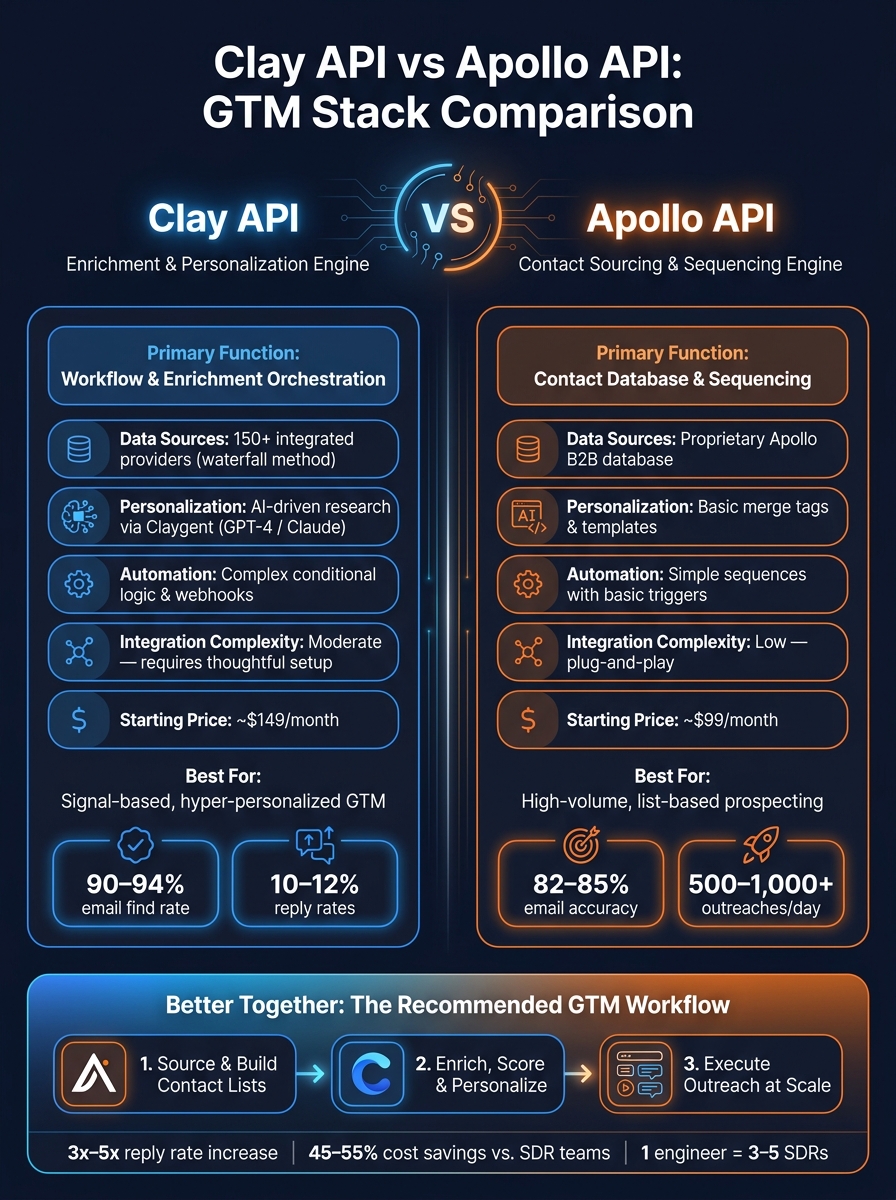
Clay API vs Apollo API: GTM Stack Comparison
Choosing between Clay and Apollo comes down to your specific go-to-market (GTM) goals. Apollo is ideal if you’re working with a tighter budget and need an all-in-one solution for contact sourcing and sequencing. On the other hand, Clay is the go-to option for advanced enrichment and AI-powered personalization. Knowing their strengths helps you invest in the right tools for your team’s needs.
If you’re an early-stage team with a limited budget (around $99/month), Apollo is a solid choice. It combines a searchable contact database and sequencing tools in one platform, making it straightforward for RevOps or SDR teams to use. But when static list-building isn’t enough, Clay steps in with its waterfall enrichment capabilities, which improve email find rates beyond what single-source tools can offer. Plus, Claygent’s AI-driven research enables highly personalized outreach at scale. The tradeoff? Clay requires more integration effort to unlock its full potential.
For the best results, many teams pair the two platforms. Use Apollo to source contact lists and Clay to enrich the data, score leads, and generate personalized, AI-driven messaging. Then, route everything to your sequencer. This combination aligns contact sourcing with dynamic enrichment, maximizing your GTM strategy.
"Apollo handles the ‘who,’ and Clay handles the ‘what to say.’" – Factors.ai
Comparison Table: Clay vs. Apollo API
Here’s a breakdown of how these two tools stack up, helping you match their features to your GTM priorities:
| Feature | Clay API | Apollo API |
|---|---|---|
| Primary Function | Workflow & Enrichment Orchestration | Contact Database & Sequencing |
| Data Sources | 150+ integrated providers (waterfall) | Proprietary Apollo database |
| Personalization | AI-driven research via Claygent | Basic merge tags & templates |
| Automation | Complex conditional logic & webhooks | Simple sequences with basic triggers |
| Integration Complexity | Moderate – requires thoughtful integration | Low (plug-and-play) |
| Starting Price | ~$149/month | ~$99/month |
| Best For | Signal-based, hyper-personalized GTM | High-volume, list-based prospecting |
Budget Consideration
Building a GTM engineering stack that includes Clay, a sequencing tool, and other integrations typically costs between $700 and $1,500/month. While this may seem like a sizable investment, it’s a scalable solution for funded B2B teams aiming to grow their pipeline without increasing headcount.
Next, we’ll explore how to integrate these APIs into your GTM system for peak efficiency.
How to Set Up and Use Clay and Apollo APIs Effectively
Getting the most out of Clay and Apollo APIs starts with a solid technical setup, maintaining clean data, and creating workflows that can grow with your needs.
Technical Prerequisites and Setup
Before diving in, make sure you’ve got the basics covered. Both platforms require active API keys and adherence to email protocols like SPF, DKIM, and DMARC to ensure emails land where they should. It’s a good idea to use secondary domains (e.g., tryacme.com instead of acme.com) and rotate through 3–5 domains. New domains need a warm-up period of 2–4 weeks, starting with just 5 emails a day to build credibility.
On the technical side, you’ll need a solid understanding of REST endpoints, webhooks, and rate limits. Basic coding skills in Python or JavaScript are also important for handling custom data transformations. These steps ensure your system is reliable and your data stays intact.
Keeping Data Clean and Accurate
Clean data is the backbone of any successful operation. Start by combining Apollo’s initial lookup with Clay’s waterfall enrichment, pulling from fallback providers like Hunter or Findymail. This approach can bump your email find rates from 60–75% up to 85–92%. After enrichment, use tools like ZeroBounce or NeverBounce for a final email verification step. This catches the last 5–10% of invalid emails that could otherwise slip through.
For CRM integration, HubSpot simplifies things with auto-deduplication via email. But if you’re using Salesforce, you’ll need to manually match contacts to accounts and map enriched fields to custom properties. This extra step ensures you don’t accidentally overwrite critical native data.
"Bad data in, bad pipeline out." – Samuel Brahem
Designing Workflows That Scale
Once your setup and data are in good shape, it’s time to focus on workflows that can keep up as you grow. Start small – test new API workflows with a batch of 200 rows to identify any logic errors or mismatches. Once you’ve ironed out the kinks, move from static list-building to signal-based triggers like job changes, funding announcements, or website visits. These triggers can automatically kick off enrichment and outreach.
Incorporating AI scoring columns helps filter leads based on your Ideal Customer Profile (ICP), cutting list sizes by 30–50% while boosting reply rates. A well-designed system can handle 500–1,250 contacts per week – far outperforming what a manual SDR could achieve.
"The goal is building an outbound system that gets smarter over time: better data, better targeting, better copy, better deliverability. That requires an engineer, not a spreadsheet operator." – Rees Bayba, Founder, Astra GTM
Conclusion: Using APIs to Build a Scalable GTM System
Clay and Apollo APIs are transforming how modern GTM systems operate by automating the entire process – sourcing, enriching, scoring, and engaging prospects seamlessly. This creates a pipeline that grows without relying on adding more team members.
With a GTM engineering model built on these APIs, businesses can save 45–55% compared to traditional SDR teams while generating 50–100% more qualified pipeline. A single technical operator using signal-based workflows can handle the workload of 3 to 5 SDRs, managing 500–1,250 contacts weekly and achieving reply rates of 10–12%. For context, the industry average reply rate is only 3.4%.
"GTM engineering is what happens when you treat sales development as an engineering problem instead of a hiring problem." – Forma Nôrden
These numbers highlight the edge this approach gives to startups, especially those in Series A or B stages. The pressure to demonstrate a scalable GTM system before the next funding round is intense, and building such infrastructure from scratch can be time-consuming. GTM Engineering Services offers a streamlined solution, helping funded B2B startups implement these systems within 4–8 weeks. From Clay and Apollo enrichment workflows to CRM automation and pipeline analytics, they handle it all. If you’re ready to transition from founder-led sales to a repeatable outbound engine, their free GTM Stack Audit is a smart place to begin.
As GTM Engineering Services puts it:
"The answer isn’t more headcount. It’s better infrastructure."
FAQs
What’s the best workflow to connect Apollo and Clay end-to-end?
The best way to optimize your outbound process is by using Clay as the central hub for enrichment and scoring, while Apollo acts as your primary contact data source – and optionally, your sequencing engine. Here’s how it works:
- Start by importing your target list into Clay.
- Use Apollo (and fallback providers if necessary) to enrich your data within Clay.
- Leverage Clay’s AI to score leads, identifying the most promising opportunities.
- Export these qualified leads directly to your CRM or sequencing tool to automate your outreach.
This setup simplifies your outbound workflow, reduces manual effort, and helps you operate more efficiently.
How do I keep bounce rates under 3% when enriching emails at scale?
To maintain bounce rates below 3%, include a dedicated verification step after email enrichment. While tools like Clay can help chain providers such as Apollo for better coverage, adding verification services like ZeroBounce or NeverBounce is essential. These tools catch 5–10% of invalid emails that often slip through during enrichment. Skipping this step risks damaging your sender reputation, so always ensure emails are validated before hitting send.
What triggers should I use for signal-based outbound (not static lists)?
Signal-based outbound thrives on identifying real-time events that suggest a potential buyer’s needs or shifting priorities. These signals could include funding announcements, new job postings, leadership changes, updates to their tech stack, or high-intent website activity – like visits to pricing pages or case studies.
By leveraging tools such as n8n, you can automate processes like data enrichment in Clay, lead scoring, and even outbound sequences. This kind of system ensures you’re acting on the right signals at the right time. GTM Engineering Services specializes in building these systems, transforming raw signals into a reliable and scalable pipeline.