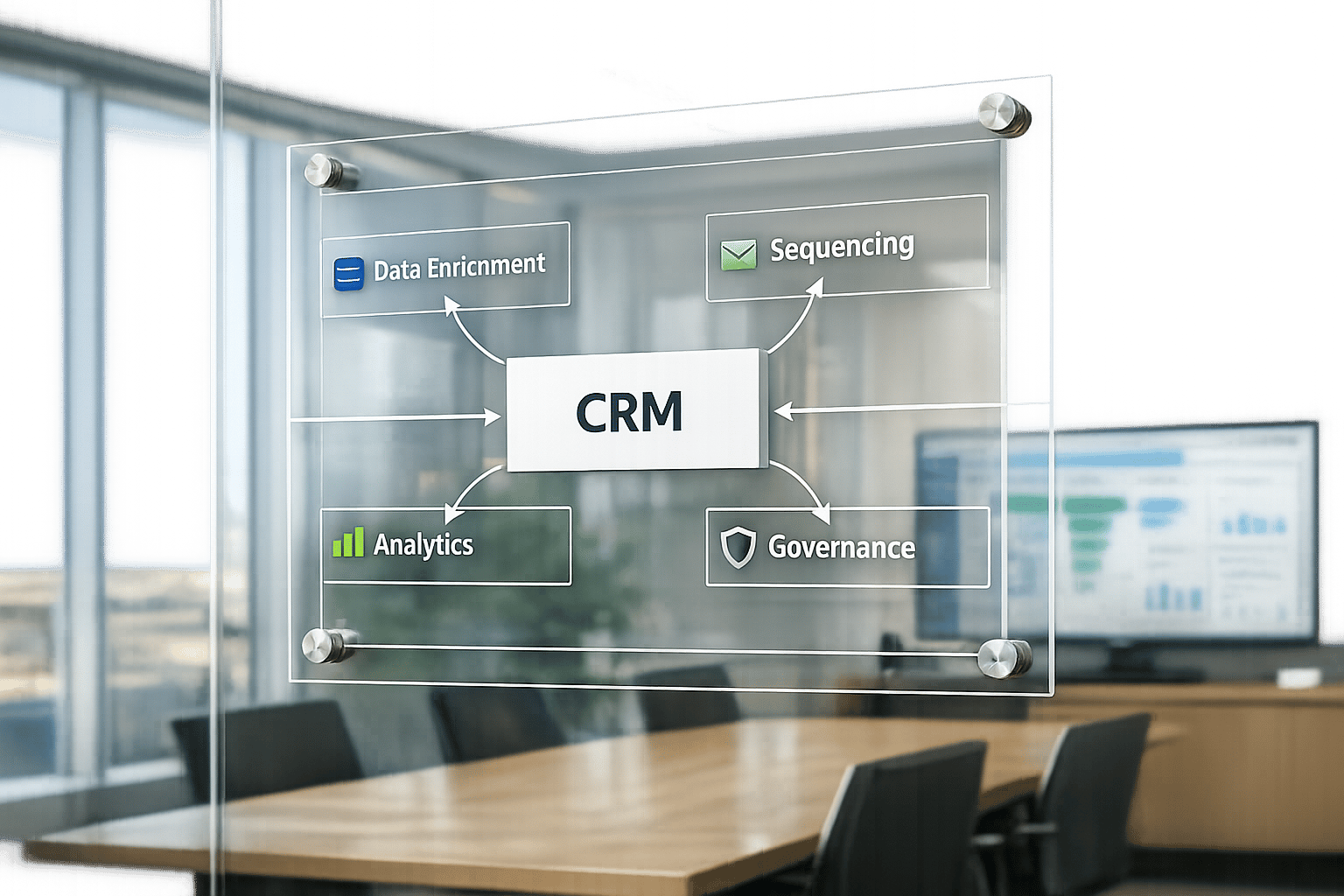
Series A startups often struggle to scale because their systems rely too heavily on manual processes. The solution? A well-structured GTM (go-to-market) tech stack that automates workflows, ensures data accuracy, and delivers the metrics investors need to see before committing to Series B funding.
Key insights:
- Automation saves time: 60% of sales reps’ time is wasted on manual tasks instead of selling.
- Data decays fast: B2B contact data can become outdated by 25–30% annually.
- Cost efficiency matters: A fully loaded SDR costs $135,000–$215,000 per year, making inefficient processes expensive.
Steps to Build Your GTM Tech Stack:
- Define your GTM motion (outbound, inbound, product-led, or hybrid) and map out system requirements.
- Structure your stack into four layers: inputs (data sourcing), storage (CRM), capabilities (outreach tools), and analytics.
- Select essential tools like HubSpot, Apollo, and Instantly, ensuring smooth integration.
- Automate workflows to reduce lead response times and eliminate repetitive tasks.
- Establish governance for error alerts, data consistency, and system reliability.
Why it matters: A properly designed GTM system can deliver 5–10x its cost in pipeline value, outperforming traditional hiring approaches. This guide outlines how to build a scalable system tailored for predictable growth.
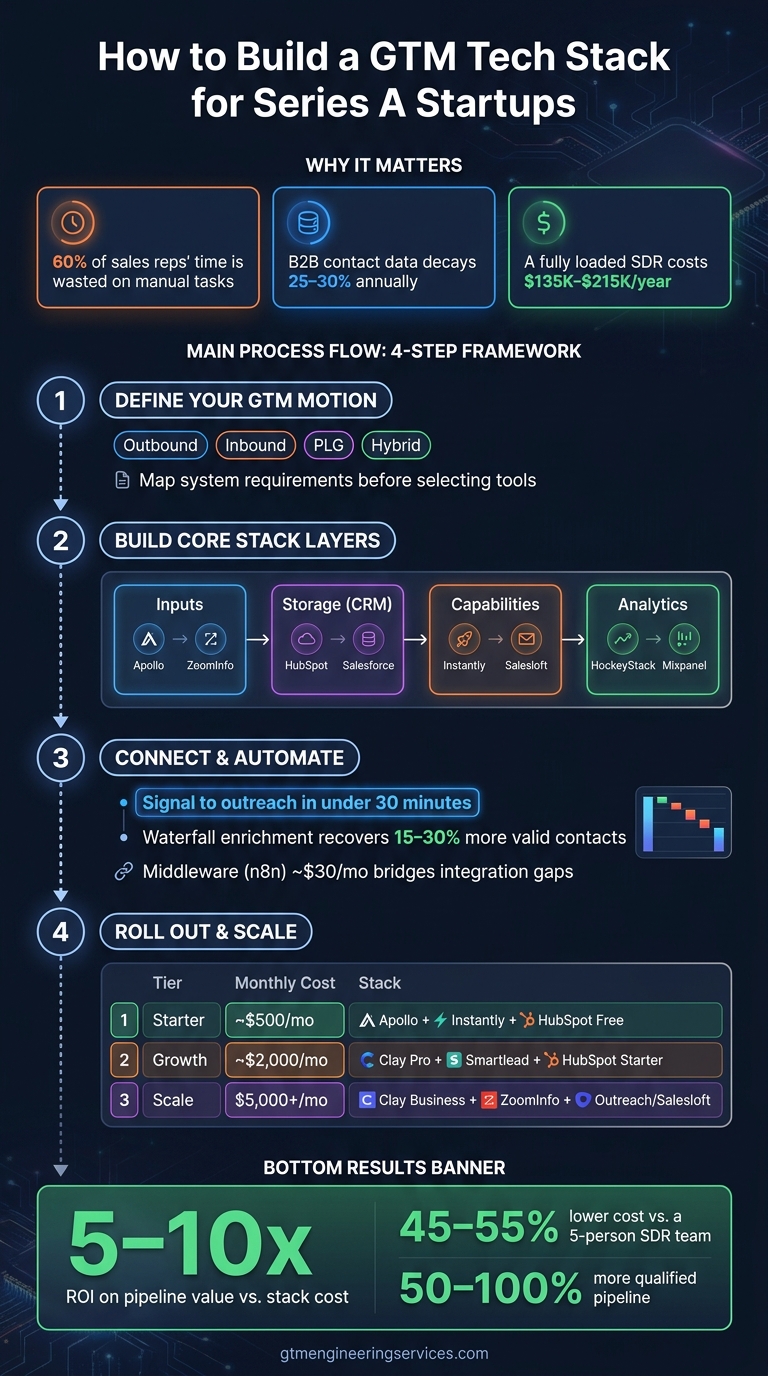
GTM Tech Stack for Series A Startups: 4-Step Framework
Step 1: Define Your GTM Motion and System Requirements
Before diving into tool selection, start by understanding how your company sells. One of the most common missteps for Series A startups is choosing software without first establishing a clear strategy. Your GTM motion shapes everything – what data you need, how leads flow through your system, and which automations will actually make a difference.
Clarify Your GTM Model and Motion
Most Series A startups fit into one of four models: outbound-led, inbound-led, product-led (PLG), or hybrid. Each model demands a unique approach to building your tech stack.
- An outbound-led motion focuses on tools for data enrichment, signal detection (like tracking job changes or funding events), and automated sequencing.
- An inbound-led motion prioritizes speed-to-lead, requiring automated lead routing and scoring to ensure your team follows up within minutes.
- A PLG motion integrates with product analytics tools, such as Mixpanel or Amplitude, to enable outreach based on in-app behavior rather than form submissions.
- A hybrid motion combines elements from multiple approaches, which means your stack must handle diverse data inputs without creating silos.
"GTM engineers know how to combine 4–5 core tools into workflows that actually move the needle. That’s the skill gap most companies are hiring to fill." – Patrick Spychalski, Co-founder at The Kiln
After identifying your GTM model, take time to document every manual process in your workflow. This will help you pinpoint the specific system features you need.
Document Your Core System Requirements
Once your GTM motion is clear, list all the manual steps in your lead flow. Each step is a potential candidate for automation. Identify the critical functions your tech stack must support, such as:
- Custom fields in your CRM for your ideal customer profile (ICP)
- Automated lead routing rules
- SDR-to-AE handoff workflows
- Domain rotation to maintain outbound email deliverability
Also, consider the size and technical skills of your team. A two-person sales team has very different requirements than a team of eight. A good rule of thumb: if you have 5+ reps, 1,000+ outbound touches per month, and 10+ tools in your stack, it’s time to formalize your system architecture. Beyond this point, manual coordination will quickly become unmanageable.
Create an Architecture Diagram
To structure your GTM stack, think in terms of four connected layers:
- Inputs: Tools for signal detection and data sourcing, such as Apollo, ZoomInfo, or RB2B. These feed raw intelligence into your system.
- Storage: Your CRM, which serves as the central system of record for contacts, deals, and activity.
- Capabilities: Execution tools like sequencers and outreach platforms (e.g., Instantly, Smartlead, or Salesloft) that handle email and LinkedIn outreach.
- Federation: The analytics layer where you measure performance metrics like reply rates, pipeline value, and attribution.
Mapping out these layers forces you to address a key question: How does a signal move from detection to action? For instance, a funding announcement might trigger enrichment in Clay, update a contact record in HubSpot, and enroll the prospect in a tailored sequence – all without manual input. Without a clear diagram, these workflows either won’t exist or will break without anyone noticing.
"The tools are only 20% of the equation – the architecture, the data flow, and the integration logic are the other 80%." – Samuel Brahem, Fractional GTM & AI-powered outbound operator
| Layer | Function | Example Tools |
|---|---|---|
| Inputs (Intelligence) | Signal detection, intent, and data sourcing | Apollo, ZoomInfo, RB2B, LinkedIn |
| Storage (System of Record) | Centralized deal and contact management | HubSpot, Salesforce, Attio |
| Capabilities (Execution) | Multi-channel outreach and sequencing | Instantly, Smartlead, Salesloft |
| Federation (Analytics) | Attribution, reporting, and pipeline ROI | HockeyStack, Mixpanel, HubSpot Reports |
With this framework in place, you’re ready to move on to building the core layers of your GTM tech stack in the next step.
Step 2: Build the Core Layers of Your GTM Tech Stack
With your architecture diagram in hand, the next step is constructing each layer of your GTM tech stack. The focus here isn’t on collecting tools but on selecting the right ones for each layer and ensuring they integrate smoothly. As Rome Thorndike from GTME Pulse explains, "The average GTM Engineer runs 5 to 8 tools across four core layers. The best know which four layers matter and how to connect them."
CRM as Your System of Record
Your CRM is the backbone of your GTM system. It’s where every contact, deal, activity, and enrichment field should be stored. If your sequencing or enrichment tools aren’t syncing back to your CRM, you’re essentially operating without full visibility into your pipeline.
For Series A startups, the choice typically boils down to HubSpot or Salesforce. HubSpot is often ideal for teams generating less than $10M ARR – it’s easier to set up, more forgiving when working with data, and offers better pricing. On the other hand, Salesforce is a better fit for organizations that require advanced custom objects, complex permissions, or are managing over 10,000 contacts. Notably, 88% of GTM engineers rely on one of these two platforms. When selecting your CRM, prioritize features like custom properties for tracking your Ideal Customer Profile (ICP), automated lifecycle transitions, lead routing, and robust API access for integrations. A poorly configured CRM can severely impact your ability to monitor pipeline performance.
Once your CRM is in place, keep it optimized with continuous data enrichment.
Lead Data, Intelligence, and Enrichment
Raw contact data alone won’t cut it. For a growing Series A company, enriching your data continuously ensures your pipeline remains both accurate and actionable. This layer should source, verify, and enhance your lead data with firmographic and technographic insights.
A waterfall enrichment strategy – querying multiple providers in sequence instead of relying on just one – can improve email find rates from 85–88% to as high as 90–94%. Platforms like Clay use AI to score leads before they even enter your CRM or sequencing tool.
"A single Clay table can replace what would otherwise be a dozen Zapier workflows, three spreadsheets, and two hours of manual work per day." – Samuel Brahem, Fractional GTM Operator
Even after enrichment, it’s essential to verify emails using a service like ZeroBounce. Roughly 5–10% of emails that pass initial checks may still be invalid, and sending to these can damage your deliverability.
Outbound Sequencing and Multi-Channel Outreach
Your sequencing tool is where strategy meets execution. It manages email campaigns, LinkedIn outreach, and call tasks across your prospect list. For Series A startups, tools like Instantly and Smartlead are popular options due to their multi-sender rotation models and built-in mailbox warmup capabilities.
Never use your primary domain for cold outbound efforts. Instead, purchase 3–5 lookalike domains (e.g., .io or .co variations) and rotate your sending across them. Skipping this step can lead to a 20–40% drop in inbox placement. Remember to warm up new domains for 2–4 weeks, starting with around 5 emails per day and gradually increasing to full volume.
When evaluating sequencing tools, focus on three critical features: support for domain rotation, native CRM sync for automatic activity logging, and the ability to run multi-channel sequences that combine email, LinkedIn, and phone outreach. By integrating these tools with automation, you’ll maintain a smooth pipeline flow. Relying solely on email tools can limit your outbound effectiveness as your strategy scales.
| Layer | Starter (~$500/mo) | Growth (~$2,000/mo) | Scale ($5,000+/mo) |
|---|---|---|---|
| CRM | HubSpot Free | HubSpot Starter / Salesforce Essentials | HubSpot / Salesforce Professional |
| Enrichment | Apollo ($99/mo) | Clay Pro + Apollo | Clay Business + ZoomInfo |
| Sequencing | Instantly ($37/mo) | Instantly / Smartlead ($97/mo) | Outreach / Salesloft ($100–$150/user/mo) |
Next, we’ll dive into how to connect these tools for seamless automation.
Step 3: Connect and Automate Your GTM Tech Stack
Now that your core systems are set up, it’s time to make them work together. Isolated tools won’t drive growth. What you need is a fully integrated system where data flows seamlessly from the first signal to closing the deal.
Map Your End-to-End Data Flows
Start by outlining the lead’s journey through your tech stack. Here’s a typical flow: a signal (like a funding announcement, job posting, or website visit) is identified, enriched with firmographic and contact details, entered into your CRM as a new record, and then sent to your sequencing tool for outreach. Each step represents a potential breakdown, so it’s critical to define inputs, outputs, and ownership at every stage.
To keep your pipeline accurate, use identity resolution to clean up duplicates across LinkedIn, your CRM, and email lists. Contact data changes over time, so regular re-enrichment is key to keeping your records up-to-date.
"GTM engineers find and fix revenue bottlenecks. They can discover that you should spend resources targeting NYC cafes with $10–20 entrees who just joined DoorDash – and help you reach them tomorrow, not next quarter." – Clay GTM Engineering Team
This mapping process lays the groundwork for integrating and automating your workflows with middleware.
Use Middleware and Automation for Orchestration
Middleware bridges the gaps when native integrations fall short, enabling advanced automations. Tools like n8n serve as the glue for your stack, managing complex routing rules. For instance, middleware can direct a lead to a specific sequence based on company size or trigger alerts when a high-priority account visits your pricing page. It can also handle multi-stage enrichment, update your CRM, and initiate outreach – all automatically. Self-hosting n8n costs about $30/month, avoiding per-execution fees when you’re processing hundreds of contacts weekly.
The objective? Reduce the time from signal detection to outreach to under 30 minutes. When a prospect shows buying intent, your system should act before your competitors even notice. Using automated waterfall enrichment – starting with Apollo and falling back to Hunter or FullEnrich – can recover 15–30% more valid contacts compared to relying on a single provider.
Set Up Governance and Reliability Standards
Once your automations are running, governance becomes essential to keep everything reliable as you scale. Without clear standards, even the best workflows can break down.
From day one, standardize your field names and workflow labels across tools. Inconsistent naming leads to conflicting dashboards and confusion during handoffs. Configure alerts to catch issues like a 15% drop in email deliverability or a workflow error immediately, rather than discovering them a week later.
Here’s a quick governance checklist to ensure everything stays on track:
| Governance Checklist | What to Verify |
|---|---|
| Naming Conventions | Field names and workflow labels are consistent across all tools. |
| Error Alerting | Alerts fire on workflow failures and deliverability drops. |
| Identity Resolution | Clear rules exist for merging duplicate person/account records. |
| Data Refresh Cadence | Stale records are re-enriched automatically on a set schedule. |
| Ownership | Your company owns all sending domains, mailboxes, and workspaces. |
If building this system from scratch feels overwhelming, GTM Engineering Services can help. They specialize in designing and implementing CRM automation, enrichment pipelines, and workflow governance. Instead of patching together tools, they create a reliable, scalable revenue infrastructure tailored to your needs.
Step 4: Roll Out and Scale Your GTM Tech Stack
With your automations in place and governance established, it’s time to roll out your system in a structured, phased manner. Following a clear process – audit, build, then scale – helps you stay organized and spot issues early.
Start with a Stack Audit and a Lean Setup
Before introducing new tools, take a close look at your current setup. Document every tool you’re using – your CRM, sequencer, enrichment sources, analytics dashboards – and identify where they fail to integrate. These gaps often lead to lost leads and force sales reps into tedious manual tasks instead of focusing on selling.
In addition to tool integration, examine your data quality. Look for stale contacts, duplicate records, and mismatched domains. Evaluate your infrastructure health by checking SPF, DKIM, and DMARC records, domain reputation, and mailbox warmup status. Use these findings to benchmark your current performance. Healthy baselines include a 3%–8% reply rate on cold outreach and a 40%–60% meeting rate from positive replies. Falling below these benchmarks highlights areas that need attention before scaling.
Once you’ve completed your audit, keep things simple. Start with a Starter Stack costing roughly $500/month that includes Apollo ($99/mo), Instantly ($37/mo), and HubSpot Free. This covers the essentials: enrichment, sequencing, and CRM. Avoid adding unnecessary complexity until this foundation operates smoothly. With this groundwork, you’re ready to build a more comprehensive revenue infrastructure.
Build Phase: Set Up Your Revenue Infrastructure
In the build phase, focus on connecting the pieces and creating a cohesive system. Key steps include:
- Configuring CRM fields and defining pipeline stages
- Establishing enrichment workflows
- Setting up alternative sending domains to maintain email deliverability
- Warming up new mailboxes for 2–4 weeks before launching cold outreach
Once the system is in place, train your team on how leads progress through the pipeline and assign clear ownership for each handoff. If your team lacks the technical expertise or time to handle this in-house, GTM Engineering Services can step in. They specialize in designing and implementing enrichment pipelines, CRM automation, and outbound systems tailored for Series A startups. Their Build Phase delivers a fully operational revenue infrastructure that your team can manage from day one. Once your system performs at benchmark levels, you can move into the scale phase and refine your workflows further.
Scale Phase: Refine Workflows and Add Advanced Features
As your system stabilizes, shift your focus to growth by enhancing workflows with advanced features. Upgrade to a Growth Stack costing around $2,000/month, which might include Clay Pro ($349/mo), Smartlead ($79/mo), and HubSpot Starter ($20/mo). This phase is where you implement waterfall enrichment – using tools like Apollo, Hunter, and FullEnrich in sequence. This approach can boost your email find rate from 60%–75% (with a single provider) to 85%–92%.
Adopt signal-based outreach to make your messaging more relevant at scale. For instance, trigger sequences automatically when a target account announces funding, posts a job opening, or updates its tech stack. This strategy allows you to scale without increasing headcount. A great example is Vercel, which replaced a 10-person outbound team with a single GTM Engineer. By automating research and enrichment pipelines using signals like GitHub activity and tech stack updates, they generated a more qualified pipeline.
Finally, incorporate AI-powered lead scoring and routing to ensure your highest-intent prospects are connected to an account executive within minutes.
"It takes one good builder to replace five decent operators. The companies that figure this out first get a 12 to 18 month lead on their market." – Thibault Garcia, Founder, Reachly
Conclusion: Building a GTM Stack for Predictable Growth
Putting together a GTM tech stack isn’t about collecting a pile of tools – it’s about creating a system where each tool works seamlessly with the others. As Samuel Brahem explains:
"Tools are only 20% of the equation – the architecture, the data flow, and the integration logic are the other 80%."
The guide outlines a clear four-step framework – from defining your GTM motion to deploying your tech stack – that transforms outbound efforts into a system that’s both predictable and measurable.
The numbers make a strong case for starting early. A properly designed GTM system can deliver 5–10x its cost in pipeline value, and adopting a GTM Engineering approach typically costs 45–55% less than hiring a five-person SDR team, while producing 50–100% more qualified pipeline. For Series A startups, where every dollar and every week matters, that’s a game-changing edge.
If building this infrastructure internally feels out of reach, GTM Engineering Services offers support tailored to Series A and B startups. They begin with a free GTM Stack Audit, a 30-minute consultation to pinpoint gaps in your current setup and outline a 90-day implementation plan. From there, their Build and Scale phases deliver a complete revenue system, including enrichment pipelines, CRM automation, multi-channel outbound workflows, and pipeline analytics.
FAQs
What GTM motion should we choose at Series A?
When you’re at the Series A stage, your priority should be building a go-to-market motion that relies on predictable, automated systems instead of simply adding more headcount. The focus needs to shift toward creating infrastructure that uses data-driven lead intelligence, automates multi-channel outreach, and integrates seamlessly with your CRM.
This is where GTM Engineering Services comes in. They design scalable systems that handle everything from lead enrichment to pipeline analytics. By automating repetitive tasks, these systems free up your team to focus on activities that drive real results – like accelerating deals and building relationships with key decision-makers.
How do we connect CRM, enrichment, and sequencing without breaking data?
To make sure your CRM, enrichment tools, and sequencing platforms work together without causing data chaos, think of your tech stack as one cohesive system. An orchestration layer like Clay can help by automating data pipelines, so your enrichment data stays clean, verified, and perfectly aligned with your Ideal Customer Profile (ICP) before syncing.
Here’s how to keep things running smoothly:
- Waterfall enrichment: Use multiple data providers and cross-check emails for accuracy.
- Standardize data: Ensure fields are consistently mapped to CRM properties for seamless integration.
- Automate routing: Send only qualified leads to your sequencing tools, cutting out unnecessary noise.
When should we hire a GTM Engineer vs more SDRs?
Consider hiring a GTM engineer or collaborating with a specialist when your team grows beyond five reps, manages over 1,000 outbound touches each month, and juggles more than 10 tools. If adding more SDRs feels like an expensive or inefficient way to scale, it’s time to prioritize automation. Systems like lead enrichment and sequencing can save time and resources while boosting output.
However, don’t rush into this too early. If you haven’t yet validated product-market fit, focus on proving your business model first. Once that foundation is solid, GTM engineering becomes the key to scaling efficiently without burning through your budget.