
Your revenue infrastructure could be silently costing you money. 72% of RevOps professionals report over 10% revenue leakage from process gaps like missed renewals, manual errors, and disjointed tools. In our experience working with Series A and B startups, that number is often closer to 30-40% — because earlier-stage companies haven’t yet built the systems to catch these leaks.
This guide breaks down a 5-step audit process to help you identify and fix revenue leaks. From evaluating your tech stack to mapping workflows and prioritizing high-impact improvements, these steps ensure your systems can support growth without breaking under pressure.
Key Steps:
- Review Your Tech Stack: Identify gaps, redundancies, and underutilized tools.
- Map Lead-to-Revenue Workflows: Spot bottlenecks and inconsistencies in your process.
- Find Process Gaps: Analyze metrics like pipeline velocity and win rates to locate revenue leaks.
- Rank Improvements by Impact: Focus on high-value fixes first.
- Execute and Test: Roll out changes in phases with measurable results.
Companies that optimize their revenue systems often see faster deal cycles, better pipeline performance, and fewer surprises at quarter-end. Let’s dive into how you can make this happen.
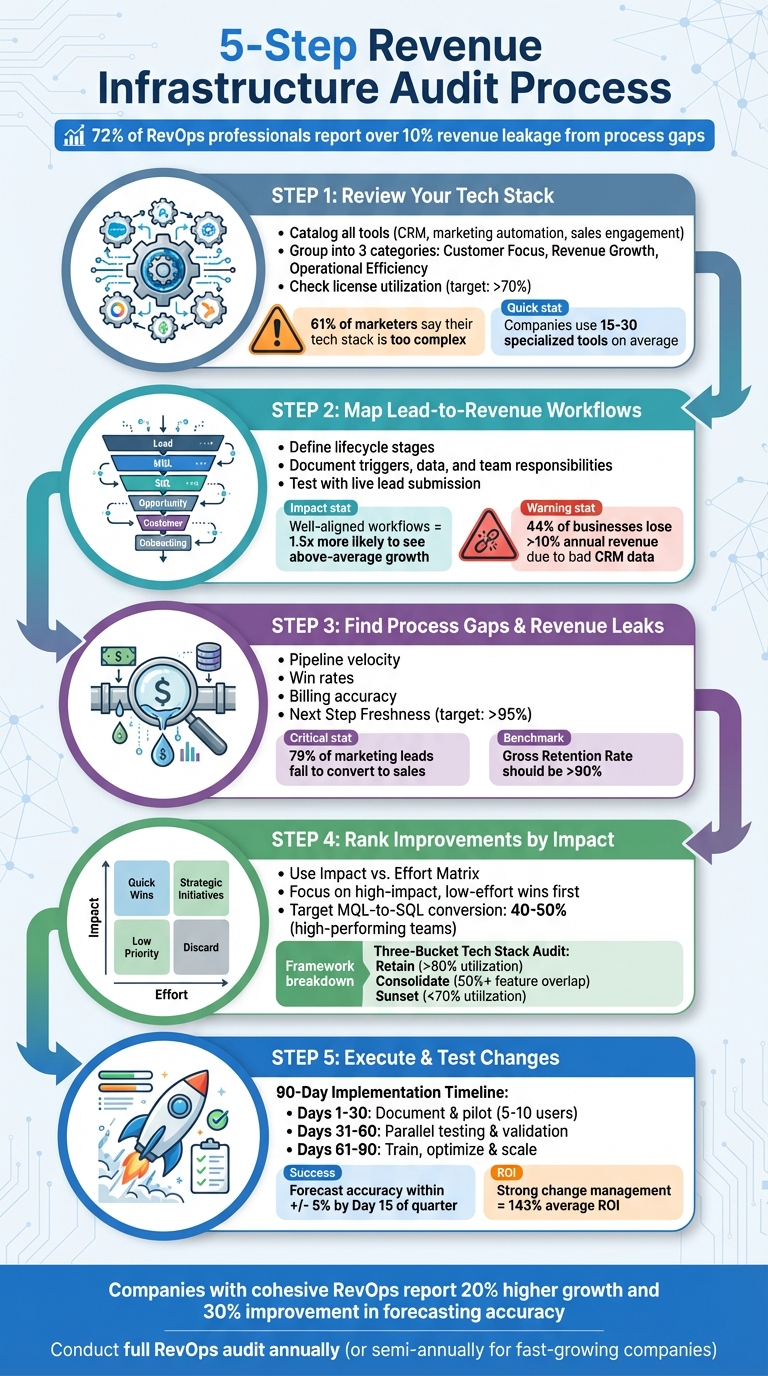
5-Step Revenue Infrastructure Audit Process for B2B Companies
Step 1: Review Your Current Tech Stack
Your tech stack is either the engine driving your growth or the roadblock slowing you down. Many B2B teams don’t intentionally design their stacks – they evolve over time. As companies expand, tools are often added without considering how well they integrate or align with existing systems. The result? Data silos, tedious manual processes, and teams spending more time wrestling with technology than closing deals. To fix this, start by taking a detailed inventory of your tools to identify gaps and inefficiencies.
List the Core Components of Your Tech Stack
Begin by cataloging every tool that interacts with your prospects or customers. This includes your CRM (like Salesforce or HubSpot), marketing automation platforms (such as HubSpot Marketing Hub or Marketo), sales engagement tools (like Outreach or Salesloft), intent and intelligence systems (6sense), customer success platforms (Gainsight, ChurnZero), and integration tools (Workato, Zapier). For each tool, document its owner, purpose, and how it integrates with other systems.
Group these tools into three categories: Enhancing Customer Focus, Supporting Revenue Growth, or Boosting Operational Efficiency. If a tool doesn’t clearly fit into one of these, it may overlap with another, signaling redundancy. On average, companies use between 15 and 30 specialized tools for revenue operations, but 61% of marketers say their tech stack is "too complex". The goal isn’t to pile on more tools; it’s to ensure the ones you have work together effectively.
Find Warning Signs in Your Infrastructure
One clear sign of a broken tech stack is data fragmentation. If your CRM reports one pipeline figure while your marketing platform shows another, you’re dealing with conflicting data instead of a single source of truth. Another red flag is manual workflow overload: if your team spends time copying data between platforms or manually routing leads, your systems aren’t built to scale.
Also, check your license utilization. If less than 40% of users are actively engaging with a tool or if license usage falls below 70%, you’re paying for tools that aren’t delivering value. For example, if a 50-person team loses just three hours a week to switching between tools, at a $75/hour rate, that’s $562,500 annually in lost productivity.
Once you’ve cataloged your tools, test your infrastructure. Submit a real form to trace lead routing and document any delays or manual steps. This exercise can pinpoint bottlenecks and failure points for targeted audits.
"Most B2B companies aren’t suffering from a lack of technology. They’re drowning in disconnected tools that were purchased with the best intentions but never properly integrated into a cohesive revenue engine." – Stephen Thiele, VP of Product, ATAK Interactive
This is exactly why GTM Engineering exists as a discipline. RevOps identifies what’s broken; GTM Engineering builds the infrastructure to fix it and prevent it from breaking again.
Step 2: Map Your Lead-to-Revenue Workflows
Lay out the journey your prospects take – from the first interaction to becoming paying customers. Many revenue teams rely on assumptions about how leads move through their systems, but those assumptions often don’t reflect reality. The result? 44% of businesses lose more than 10% of their annual revenue due to bad CRM data. By mapping out your workflows, you’ll uncover where these gaps exist and pinpoint where revenue is slipping away.
Build a Workflow Diagram
Start by defining your lifecycle stages: Lead → MQL → SQL → Opportunity → Customer → Onboarding. For each stage, identify the trigger, key data (like UTM source, budget, or pain points), and team responsibilities. For instance, when a lead reaches a HubSpot Score of 50 or higher, marketing should pass along specific qualification details to sales, ensuring a seamless handoff.
"A handoff isn’t just tagging someone in a CRM or Slack message. It needs to be clear and consistent." – Adam Statti, RevPartners
Don’t stop at the sale. Extend your workflow to include post-sale processes, like onboarding milestones, time to first value, and renewals. Companies with well-aligned cross-functional workflows are 1.5 times more likely to see above-average growth. When we map these workflows for clients, we often find the biggest leaks aren’t in lead gen or closing — they’re in the handoff between sales and customer success, where deals close but onboarding stalls. This level of alignment depends on clearly documenting every handoff – not just between marketing and sales, but across the entire customer lifecycle.
Once your workflows are mapped, you can move on to identifying bottlenecks and inefficiencies.
Locate Bottlenecks and Inefficiencies
Use your workflow diagram as a guide to uncover delays and weak points. Test the process with a live lead submission and track how it flows through the system. Take note of any slow, manual, or broken steps. Then, review your last 20 closed deals to see how the documented process compares to what actually happened. If you find deals consistently skipping stages or stalling for 30+ days, you’ve identified a bottleneck.
Some common red flags include missing close dates (which throws off forecasting), high lead-to-MQL dropoff rates (hinting at poor qualification standards), and manual data entry (which slows things down and increases errors). To address these, set up automated alerts to catch issues in real time. For example, trigger a Slack notification if an opportunity hasn’t been updated in 30 days or if a new lead remains unassigned for more than five hours. These alerts turn hidden problems into actionable solutions.
| Bottleneck Warning Sign | Potential Impact |
|---|---|
| Stalled Deals (30+ days) | Signals poor follow-up or unclear next steps. |
| Missing Close Dates | Skews revenue forecasts and pipeline visibility. |
| High Lead-to-MQL Dropoff | Points to misaligned qualification or poor lead quality. |
| Manual Data Entry | Slows processes and increases the risk of human error. |
Step 3: Find Process Gaps and Revenue Leaks
Using your workflow map as a guide, take a hard look at your metrics to identify where revenue is slipping away. These gaps often hide in plain sight – team handoffs that don’t flow smoothly, unclear stage definitions, or billing delays that pile up over time. We call this "plugging the leaks" — and it’s the highest-ROI work most startups ignore because it’s less exciting than chasing new leads.
Here’s the kicker: companies with well-aligned cross-functional teams are 1.5 times more likely to achieve above-average growth. Fixing these inefficiencies isn’t just housekeeping – it directly boosts your bottom line.
Check Core Revenue Metrics
Start by diving into the KPIs that reveal where revenue is leaking. Pay close attention to:
- Pipeline velocity: How quickly deals move through each stage.
- Win rates: The percentage of SQLs converting to closed-won deals.
- Billing accuracy: How often invoices align with contracts.
One specific area to monitor is "Next Step Freshness." Keep it above 95% by ensuring opportunities are updated within 14 days. If deals sit idle for 30+ days without movement, you’ve likely found a leak.
Handoff metrics are another red flag area. Track Speed to Lead and Time to First Touch – delays here often translate into lost revenue. In fact, 79% of marketing leads fail to convert to sales, frequently due to breakdowns in these transitions.
"If your team is ‘surprised’ at end of quarter, that’s not a forecasting problem – it’s a pipeline hygiene problem. Clean input → credible forecast." – Heather Davis Lam, Founder & CEO, Revenue Ops LLC
Don’t stop at the sales pipeline – post-sale metrics matter too. Keep an eye on Gross Retention Rate (GRR), aiming for a healthy benchmark of over 90%. Also, measure Time to First Value (TTFV) – slow onboarding increases the risk of early churn. Watch for contract-to-cash issues, like delays in quote approvals or invoice generation, which can lead to billing errors and revenue recognition problems. Regularly auditing these metrics ensures your forecast stays grounded in reality.
Run Quarterly Audits for Better Forecasting
Metrics alone won’t cut it – you need a structured review process to keep your pipeline healthy. Set up quarterly audits to evaluate pipeline hygiene, stage exit criteria, and data consistency across your systems. Look for stale opportunities – deals with no next steps, unrealistic close dates, or no recent activity. These outliers skew your forecast and mask the true health of your pipeline.
Another critical checkpoint is identifying data silos between sales and finance. Misaligned numbers between teams often lead to manual fixes, slowing down forecasting and creating errors. To stay ahead, use automated alerts for issues like unassigned records, SLA breaches, or deals that haven’t moved in 30 days. Companies with cohesive revenue operations report 20% higher growth and a 30% improvement in forecasting accuracy. By sticking to these audits, you’ll build a reliable data foundation that supports steady scaling – and avoid those end-of-quarter surprises altogether.
Step 4: Rank Improvements by Revenue Impact
After mapping out your workflows and identifying gaps, the next step is to rank these improvements by their potential revenue impact. Without clear prioritization, you risk wasting time on low-impact fixes while missing out on high-value opportunities.
Prioritize Gaps by Revenue Impact
Leverage your earlier gap analysis and plot each issue on an Impact vs. Effort Matrix. This tool helps you evaluate each gap based on its revenue potential and the effort required to address it. Start with the high-impact, low-effort fixes – these are your quick wins. For example, aligning lifecycle stage names or automating lead routing with SLA targets can deliver immediate results.
Focus on initiatives that drive compound improvements rather than linear ones. Adding more leads is a straightforward effort, but improving conversion rates creates a ripple effect throughout the funnel. High-performing RevOps teams often achieve MQL-to-SQL conversion rates of 40–50%, compared to the 25–35% range typical of less aligned teams.
Use the "Board Slide" Test to guide your decisions. Ask yourself, "Which metrics will resonate most with a CEO or investor?" Metrics like close rates, average deal size, and pipeline growth often take center stage. For instance, while fixing duplicate contact records may not make a compelling case, implementing weighted lead scoring could improve demo-to-close ratios by 21%. Keep an eye on ghost leads, as they disrupt accurate campaign revenue tracking.
Create an Optimization Plan
Once you’ve ranked your priorities, create a roadmap that tackles the most impactful fixes first. Start with data hygiene – set duplicate rules and require essential fields in your CRM. Poor data quality can derail every other initiative, especially when using AI tools like Salesforce Einstein. Aim for at least 95% CRM accuracy before layering on automation or predictive scoring.
Next, refine your lead scoring system. Combine fit (firmographics matching your Ideal Customer Profile) with intent (behavioral signals like pricing page visits). Use category caps to prevent single actions, such as repeated email opens, from inflating scores unfairly. For example, limit email engagement points to a maximum of 25. Tools like HubSpot Breeze AI provide real-time intent scoring with detailed "Signal Breakdowns", while Salesforce Einstein uses machine learning to identify traits linked to past wins. Platforms like 6sense can also capture account-level intent signals, helping you prioritize accounts showing buying interest.
After cleaning up your data and refining lead scoring, automate high-value workflows. Tools like RevenueHero or native HubSpot workflows can route hot leads instantly once they hit a scoring threshold (e.g., 70+ points) and enforce SLA-backed response times. Reducing speed-to-lead delays is critical, as these are often a major source of revenue loss.
Finally, conduct a tech stack audit using the Three-Bucket Framework:
- Retain tools with over 80% utilization.
- Consolidate those with 50%+ feature overlap.
- Sunset tools with less than 70% utilization.
Streamlining your tech stack and operationalizing a well-defined ICP in your CRM can lower customer acquisition costs by 30% and cut sales and marketing expenses by 50%.
"A tech stack audit without prioritization is just shelfware… politics will always decide what gets built unless you give the business a clear, agreed-upon sequence." – Tate Stone, RevBlack
Step 5: Execute and Test Infrastructure Changes
Once you’ve identified gaps and prioritized improvements, it’s time to put your plan into action. Roll out changes in phases to ensure a smooth transition. A structured 90-day approach allows you to test, gather feedback, and adjust before fully deploying new systems. By building on your audit findings, this phased rollout turns analysis into measurable progress.
Build a 90-Day Implementation Plan
Break your implementation into three clear phases. Here’s how the timeline unfolds:
Days 1–30: Focus on laying the groundwork. Start by documenting your stage exit criteria, cataloging your software ecosystem, and mapping data flows from initial contact to renewal. Bring in 5–10 cross-functional users to pilot workflows and validate data synchronization. This small group helps identify potential issues early, minimizing disruptions to the broader team.
Days 31–60: Shift to execution and testing. Run your legacy systems alongside the new ones for 2–4 weeks. This parallel testing ensures your reporting remains accurate without disrupting current operations. Test lead routing with live submissions, following deals through every stage. Introduce validation rules to block bad data from entering your system.
Days 61–90: Focus on optimizing and scaling. Train team members on pipeline management and dashboard usage. Regular forecast reviews during this phase help track improvements like reduced duplicate records, faster first-response times, and more stable forecasts. Research shows that projects with strong change management frameworks are 7 times more likely to succeed, with an average ROI of 143%.
"The most expensive mistake in platform consolidation is lift-and-shift: migrating legacy processes exactly as they exist today into new systems. You pay consolidation costs without gaining modernization capabilities." – Maria Akhter, Editor, Outreach
Avoid the "lift-and-shift" trap – this 90-day period is your chance to redesign workflows, eliminate manual reconciliation, and establish a unified data record. These steps ensure your new infrastructure is built for efficiency and scalability.
Track Success Through Key Metrics
Set clear metrics to measure success before implementation begins. Focus on data hygiene by tracking a decline in duplicate records and improvements in property completeness. Monitor lead response times, SLA adherence, conversion rates, and win rates to quickly spot bottlenecks.
Pipeline health metrics are equally critical. High-performing teams achieve MQL-to-SQL conversion rates of 40–50%. Keep an eye on win rates and sales cycle length to ensure your changes aren’t introducing new challenges. Most importantly, measure forecast accuracy – top revenue teams hit forecasts within +/- 5% accuracy by Day 15 of each quarter.
Assign ownership for each change and establish clear success criteria. During pipeline reviews, enforce live updates in the system to maintain data accuracy and accountability. Create a single leadership dashboard that consolidates demand, pipeline, and forecast data into one source of truth.
This 90-day plan aligns Marketing, Sales, and Customer Success teams by standardizing MQL, SQL, and SQO definitions, preventing pipeline distortion. Conduct a full RevOps audit annually – or semi-annually for rapidly growing companies – to ensure your systems keep pace with increasing complexity and volume.
Conclusion: Plug the Leaks Before You Scale
A revenue infrastructure audit isn’t a one-and-done activity – it’s an ongoing process to ensure your systems, data, and teams can handle the demands of growth without crumbling under the weight of complexity. The startups that break through to Series C aren’t the ones with the most leads — they’re the ones who stopped losing 30% of their pipeline to infrastructure failures.
Companies with aligned teams are 1.5 times more likely to surpass average growth rates. The deciding factor? Whether your tech stack empowers your processes or forces you to bend to its limitations.
By following a five-step approach – evaluating your tech stack, mapping lead-to-revenue workflows, identifying process gaps, prioritizing improvements, and implementing changes – you can seal revenue leaks and create a system where every piece of your revenue engine works seamlessly together.
When tools like HubSpot, Salesforce, and 6sense are properly integrated into a well-aligned infrastructure, their potential to amplify results grows exponentially. Regular audits help uncover hidden issues before they snowball into unstable forecasts or missed goals.
"A revenue engine built on inconsistent data, misaligned teams, and disconnected workflows will not accelerate with scale – it will break under pressure." – DevriX
FAQs
What are the key signs that your tech stack might be losing revenue?
Revenue leaks in your tech stack often stem from data inaccuracies – think mismatched or outdated records that skew analytics and lead to poor decisions. Another major culprit? Inefficient lead management. Delays in follow-ups, misjudged lead scoring, or fumbled handoffs between teams can cause promising opportunities to vanish. Then there are misaligned or redundant systems – tools that either overlap or fail to integrate properly, creating bottlenecks and dragging down pipeline efficiency. Fixing these gaps isn’t optional; it’s the key to streamlining your revenue operations and getting all your tools to work in harmony.
What’s the best way to prioritize fixing revenue leaks?
To boost your pipeline efficiency, focus on plugging the revenue leaks that hurt the most. Start by diving into your pipeline data to pinpoint the biggest trouble spots – think slow lead follow-ups, misaligned processes, or messy, inconsistent data. These are the kinds of issues that can quietly drain your revenue potential.
Once you’ve identified the main culprits, prioritize solutions based on their ability to improve conversion rates and drive better revenue results. Addressing the most pressing problems first will lay the groundwork for a more reliable revenue system and help you make noticeable strides toward your goals.
What key metrics should I monitor to evaluate the success of revenue infrastructure updates?
To gauge how well your revenue infrastructure updates are performing, keep a close eye on a few key metrics: pipeline conversion rates, lead-to-revenue workflow efficiency, and any process gaps that might be slowing things down. These indicators give you a clear picture of whether your changes are delivering measurable improvements.
It’s also important to track trends over time. This helps ensure your adjustments align with broader goals like improving pipeline efficiency and reinforcing your go-to-market strategy. By consistently reviewing these metrics, you’ll gain valuable insights into how effective your optimizations really are.