
The costs of managing a go-to-market (GTM) stack often go beyond just software subscriptions, and founders need to understand where their budgets are leaking. On average, B2B SaaS companies use 110 tools, with 30–40 dedicated to GTM teams. These tools can silently drain resources with hidden expenses like implementation, unused licenses, redundant tools, and maintenance.
Key takeaways:
- Hidden Costs: Implementation, integration, and maintenance can double or triple the price of tools.
- Redundant Tools: 30–50% of GTM budgets are wasted on overlapping tools, costing startups up to $93,240 annually.
- Scaling Risks: Every new hire increases tool costs, often faster than revenue growth.
- Usage Audits: Regular audits reveal underused licenses and overlapping tools, saving $10,000–$60,000 per year.
- Consolidation Wins: Simplifying stacks and automating workflows can cut costs without hurting performance.
The solution? Audit your tools regularly, consolidate where possible, and ensure every tool directly contributes to growth. Founders who focus on building efficient systems, rather than just adding tools, can save resources and scale more effectively.
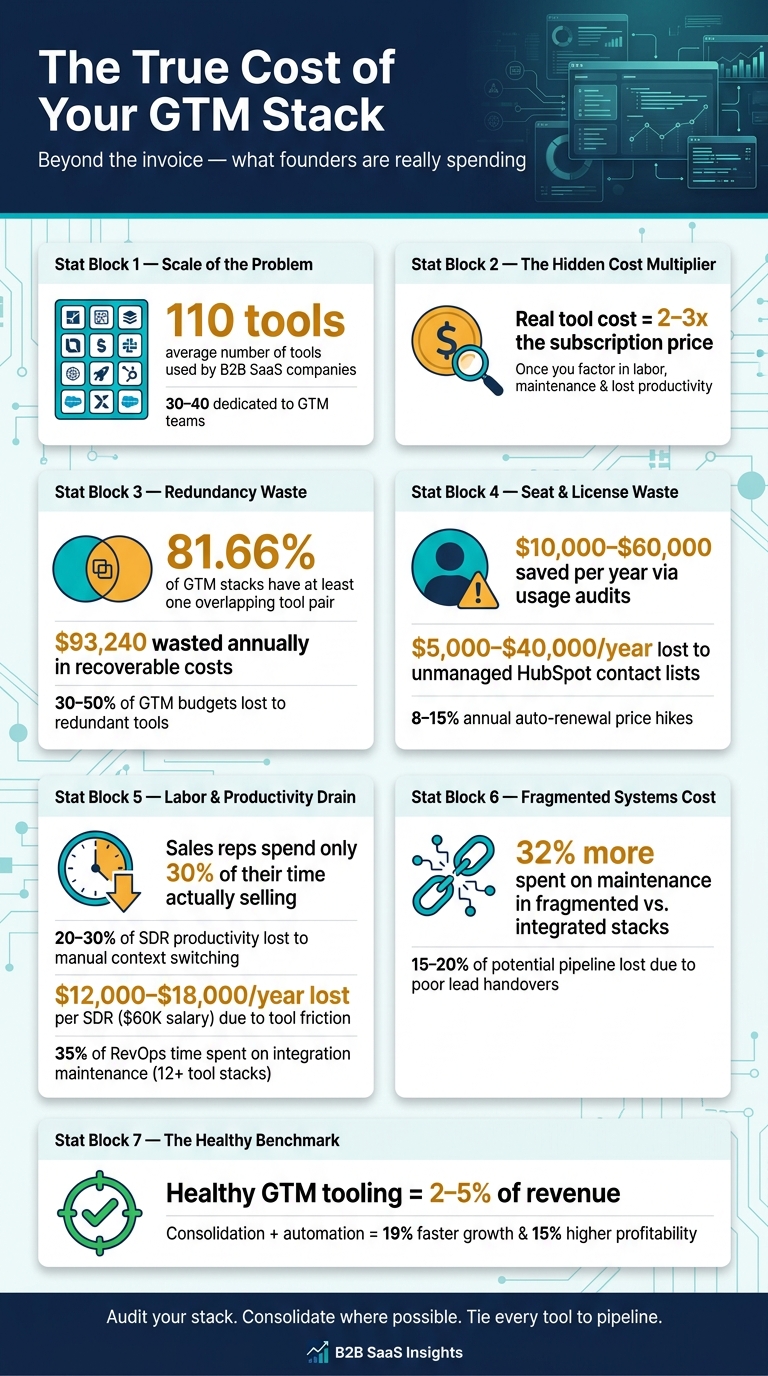
Hidden GTM Stack Costs: Key Stats Every Founder Must Know
Breaking Down GTM Stack Costs
To get a handle on your GTM budget, you first need to understand where the money is going. It’s easy to focus on obvious monthly invoices, but the real budget bloat often comes from less visible areas. Let’s break down the main contributors that can quietly drive up your costs.
Software Licenses and Seat-Based Pricing
One of the biggest culprits is per-seat licensing. Tools for CRM, sales engagement, and marketing automation often charge based on the number of users. For example, HubSpot Sales Hub Pro costs about $90 per month per seat, while Salesforce Professional runs around $80 per month per seat. Add in sales engagement platforms like Outreach or Salesloft, and you’re looking at another $100–$150 per seat per month.
"Per-seat fees quickly accumulate. Most tools are priced per user, so as you scale, your tool spend scales faster than your headcount – and often faster than your revenue." – Vendisys Team
Another sneaky cost driver is contact-tier pricing, where charges increase based on the size of your database. Without regular list cleanups, these costs can spiral. For instance, HubSpot’s contact-tier creep can quietly rack up between $5,000 and $40,000 per year.
Data Enrichment and Lead Intelligence
The price of lead intelligence tools varies widely. Enterprise-grade platforms like ZoomInfo are on the higher end, while tools like Apollo offer bundled data and sequencing at a lower cost for smaller teams. For SMBs, monthly costs typically range from $0 to $1,000, but at the enterprise level, those numbers can jump to $30,000–$150,000 per month.
The real risk lies in usage-based pricing. Platforms that charge based on credit consumption – where each contact lookup or enrichment action uses up a credit – can easily exceed projections. Automated workflows without strict limits can double or quadruple costs. A single misstep, like a misconfigured workflow, can burn through an entire month’s credit budget in just a few days.
Implementation and Integration Expenses
Don’t forget to factor in the cost of setup. Vendor prices often increase by 25–40% when you include admin time, integrations, and professional services. For example, rolling out Salesforce in a 200-person company can cost between $50,000 and $150,000 just for professional services.
Even low-cost connector tools like Zapier or Make can climb quickly. While they may start at $29 per month, higher automation volumes can push costs to $69 or more per month. And getting a well-integrated stack fully operational often takes 2–4 months.
Ongoing Maintenance and Support
Once your tools are live, they require regular maintenance. API changes, data sync issues, and evolving workflows all demand attention. Keeping a best-of-breed stack running typically takes 4–8 hours of operations time per month, and companies with 12 or more tools often dedicate about 35% of their operations team’s time to integration maintenance.
Admin overhead is another hidden cost. If your Salesforce user base exceeds 20 reps, you’ll likely need a dedicated admin, which adds $80,000–$140,000 per year in labor costs. Then there are annual auto-renewal uplifts – usually 8–15% – which can tack on an extra $5,000–$25,000 per year to your stack expenses without any increase in usage.
Hidden Costs That Push GTM Spending Higher
Your GTM budget isn’t just about the invoices you see – hidden costs often creep in, driving expenses far beyond the initial estimates. The real budget busters? The ones you don’t spot on a vendor contract.
Manual Work and Labor Overhead
Every tool that doesn’t seamlessly integrate with your stack creates extra work, and that extra work adds up fast. When reps are stuck copying data between platforms, juggling spreadsheets, or manually triggering workflows, they lose focus. This constant context switching can drain 20–30% of an SDR’s productivity. For an SDR earning $60,000 annually, that’s a loss of $12,000–$18,000 per year.
It doesn’t stop there. Complex tools like Salesforce or Marketo often require dedicated administrators just to keep them running. These hidden labor costs rarely make it into the initial budget but can pile on quickly, creating a recurring expense.
"The more tools you have, the more integration work justifies a RevOps hire. The RevOps hire becomes the expert who manages the tools, making the organization dependent on both." – Rachel Okafor, Senior Revenue Operations Manager, Greenway.ai
Here’s a simple way to think about it: the real cost of any GTM tool is often 2–3 times its subscription price once you factor in labor, maintenance, and lost productivity from constant switching.
And let’s not forget about redundant tools.
Duplicate Tools and Overlapping Features
It’s shockingly common for GTM stacks to include tools that do the same thing. In fact, 81.66% of stacks have at least one overlapping tool pair, wasting an average of $93,240 annually in recoverable costs. That’s money that could be fueling growth instead.
Here’s how it happens: Sales picks one sequencing tool, Marketing picks another, and then someone adds a data enrichment layer that duplicates functionality already baked into the CRM. Before you know it, you’re paying for tools that do the same job.
"Overlap is an emergent property of scale – every new team that buys its own tools adds a redundancy the org already paid for elsewhere." – StackSwap
Take a look at some common overlapping tools and their potential cost savings:
| Overlapping Pair | % of Stacks | Median Recovery/Year |
|---|---|---|
| Apollo.io + ZoomInfo | 20.49% | $2,400 |
| Outreach + Salesloft | 18.74% | $1,200 |
| Clearbit + ZoomInfo | 13.99% | $3,600 |
| Clari + Gong | 23.79% | $1,200 |
(Source:)
Brittle Integrations and Workflow Failures
APIs break, webhooks fail without warning, and data gets lost, duplicated, or overwritten as it bounces between platforms. When your stack is fragmented, keeping integrations functional can consume 20–30% of your RevOps team’s time – time that should be spent on strategic work, not fixing broken workflows.
The ripple effects are massive. Companies with fragmented systems spend an average of 32% more on maintenance and lose 15–20% of potential pipeline due to poor lead handovers. A workflow that works perfectly on day one can slowly degrade, creating inefficiencies that bleed resources over time. These hidden costs underscore the importance of auditing and refining your GTM stack regularly.
How to Cut GTM Stack Costs Without Losing Performance
Once you’ve spotted the hidden costs in your GTM stack, the next step is trimming those expenses without compromising on performance. Here’s how you can make it happen.
Tool Consolidation and Simplification
One of the easiest ways to save money is by cutting out duplicate tools. 30–50% of GTM budgets are wasted on overlapping tools. The solution? Stick to platforms that handle multiple functions instead of juggling standalone tools.
For instance, swapping out separate tools like Outreach, ZoomInfo, and Salesloft for a single consolidated platform can lead to significant savings. Similarly, merging redundant conversation intelligence tools into one can free up even more budget.
"The stack that wins is the one reps actually use." – AutoScaled
The "single anchor" strategy is key here: select one main platform for each core function – CRM, sales engagement, or data enrichment. Every tool in your stack should directly contribute to pipeline creation, deal progression, forecasting, or coaching. Anything outside of these goals? It’s just unnecessary overhead.
While trimming tools reduces fixed costs, focusing on automation can tackle inefficiencies in daily operations.
Automating Repetitive Tasks
Sales reps spend only 30% of their time selling – the rest goes to manual tasks like data entry and admin work. Automation can change that.
By automating data flows, you eliminate the time wasted on manual entry. Plus, considering it takes 23 minutes to refocus after a manual interruption, the productivity gains across a team add up fast. AI-powered workflows can handle tasks like ICP building, sequence creation, and lead routing, often at a fraction of the cost of hiring more staff. Companies that integrate marketing and sales data tightly see 19% faster growth and 15% higher profitability compared to those relying on disconnected systems.
Next, take a closer look at how many software seats you’re paying for – and whether they’re actually being used.
Seat Rightsizing and Usage Audits
Unused software licenses are like throwing cash out the window. A 90-day usage audit can reveal underutilized seats – check adoption metrics, and if fewer than 60% of intended users are actively engaging with a tool, it’s time to consider cutting it.
Focus on matching tools to roles. For example, Gong licenses assigned to reps who aren’t being coached or ZoomInfo seats for non-prospecting team members are easy targets for removal. These simple adjustments can save $10,000–$60,000 annually. Also, don’t ignore your HubSpot contact counts – unmanaged marketing lists can quietly inflate costs by $5,000–$40,000 per year.
"A tool that costs $18,000 a year and gets opened twice a week by three people is a candidate for removal regardless of how well-liked it is in principle." – Megan Foster, Sales Leader, AutoScaled
When planning for new hires, factor in $100–$150 per month per person for SaaS licenses to avoid unexpected cost spikes.
Phased Implementation for Cost Control
Switching to a new stack all at once can be both expensive and chaotic. Instead, take it step by step to keep costs manageable and give your team time to adjust.
Start with one outbound workflow, test it on the new or consolidated platform for 60 days, and measure the results before committing to a full migration. This phased approach helps you catch integration issues early, avoiding costly fixes later. If a tool doesn’t deliver during the pilot, you’ve saved yourself from the expense of a full rollout.
And don’t forget: set reminders to cancel free trials before they automatically convert into paid subscriptions.
When a GTM Stack Audit Makes Financial Sense
If your tech stack feels bloated even after trimming costs and adding automation, it might be time for a detailed audit. This process identifies inefficiencies and helps you build a leaner, more cost-effective setup.
Signs You Need a Stack Audit
Certain warning signs suggest it’s time to reassess your GTM stack:
- Low tool adoption: If less than half of your licensed seats are being used, you’re likely overspending. Check the earlier recoverable waste figures to calculate the financial impact.
- Data distrust: Only 35% of sales professionals fully trust their CRM data. If reps rely on shadow spreadsheets or leadership pulls conflicting numbers from multiple systems, your stack has underlying issues.
- Manual overhead: When reps spend too much time on non-selling tasks because tools don’t integrate well, it’s not a user issue – it’s a systems issue.
- Unjustified expenses: If no one on your team can quickly explain a tool’s value, it’s probably time to cut it.
Timing your audit is just as important as recognizing the need for one. The most cost-effective moment is before a major contract auto-renews, as vendors often impose annual price hikes of 8–15%. Other natural points for an audit include transitioning to your first dedicated sales hire, onboarding a RevOps lead, or scaling past 30 sales reps.
"Most GTM stacks aren’t under-tooled – they’re over-tooled." – StackSwap
When these signs emerge, an audit is the next logical step.
How GTM Engineering Services Can Help
A GTM stack audit goes beyond reviewing a list of tools – it’s about understanding data flow, spotting integration breakdowns, and identifying which tools genuinely drive revenue versus adding noise.
GTM Engineering Services offers a free 30-minute GTM Stack Audit. This includes a review of your current infrastructure, a gap analysis, and a 90-day plan for improvements. Tailored for Series A and B founders, this service helps optimize your GTM systems before your next funding round.
After the audit, their Build and Scale phases handle implementation tasks such as automated lead enrichment, CRM workflow design in HubSpot or Salesforce, multi-channel outbound systems, and pipeline analytics dashboards. The end goal? A streamlined, connected stack where data flows seamlessly. This approach reduces the integration headaches that often consume 20–30% of RevOps bandwidth in fragmented systems. A thorough audit ensures your GTM stack becomes a revenue driver, not a cost center.
Conclusion: Making Sound GTM Stack Spending Decisions
To maintain growth, it’s crucial to understand both the visible and hidden costs of your GTM stack. The expenses go well beyond software subscriptions. The real strain comes from less obvious factors: sales reps dedicating just 30% of their week to actual selling, fragmented tools that cost 32% more to maintain compared to integrated solutions, and renewal clauses quietly adding 8–12% to your annual budget. These hidden costs can quickly turn what seems like a manageable budget into a significant obstacle.
The best way forward? Tie every tool to a clear, measurable outcome – whether it’s pipeline creation, deal progression, forecasting accuracy, or coaching. If a tool doesn’t directly contribute to one of these, it’s likely just overhead. For small to mid-sized businesses, healthy GTM tooling should fall between 2–5% of revenue, but staying within this range requires consistent oversight, not occasional reviews. This aligns with the earlier advice to regularly audit and simplify your stack.
"Your GTM stack isn’t a strategy. It’s a collection of tools that either work together or work against you." – Mark Bedard, CEO and Founder, Upcell
Even minor inefficiencies can snowball into significant costs, draining funds that could otherwise fuel growth.
Smart GTM spending means ensuring every dollar contributes to measurable outcomes. Regular audits, thoughtful consolidation, and building a connected system where data flows seamlessly – without manual work – are essential steps. This is how you create a scalable GTM stack that supports growth, instead of one that drains resources.
FAQs
How do I calculate the true cost of a GTM tool beyond the subscription?
To figure out the true cost of a GTM tool, you need to account for more than just the obvious expenses. Sure, subscription fees, implementation costs, and renewal charges are easy to spot. But what about the hidden costs? These often include:
- Engineering hours spent maintaining integrations
- Manual data cleanup caused by sync errors
- Lost productivity from constant context-switching
- Inefficient reporting processes
These hidden factors can quietly drive up the total cost – sometimes by 2–4 times the price of the tool’s license fees. Conducting a GTM stack audit can shine a light on these overlooked expenses.
What’s the fastest way to find and remove redundant tools in my stack?
The first step in trimming down unnecessary tools is conducting a detailed stack audit. Dive into usage data from the past 90 days to identify tools that aren’t pulling their weight. Map each tool to critical workflows – like pipeline creation, deal progression, forecasting, or enablement – and ask yourself: Does this tool directly contribute to these processes? If the answer is no, it’s time to let it go.
Next, evaluate how well your tools integrate with each other. Poor integration often leads to inefficiencies and hidden costs, like wasted time from constant context-switching. By consolidating tools that overlap or don’t integrate smoothly, you can save money and improve productivity without major disruptions to your team’s workflow.
When should I run a GTM stack audit to avoid renewal-driven cost spikes?
About six months after setting up your GTM stack, it’s time to take a closer look. This timing is crucial because it allows you to spot any upcoming renewal-driven cost increases and make adjustments before they hit your budget. By evaluating your tools at this stage, you can ensure you’re managing expenses wisely while keeping everything aligned with your growth objectives.
Regular audits like this aren’t just about cost-cutting – they’re about making sure your stack is working as hard as you are to drive results.