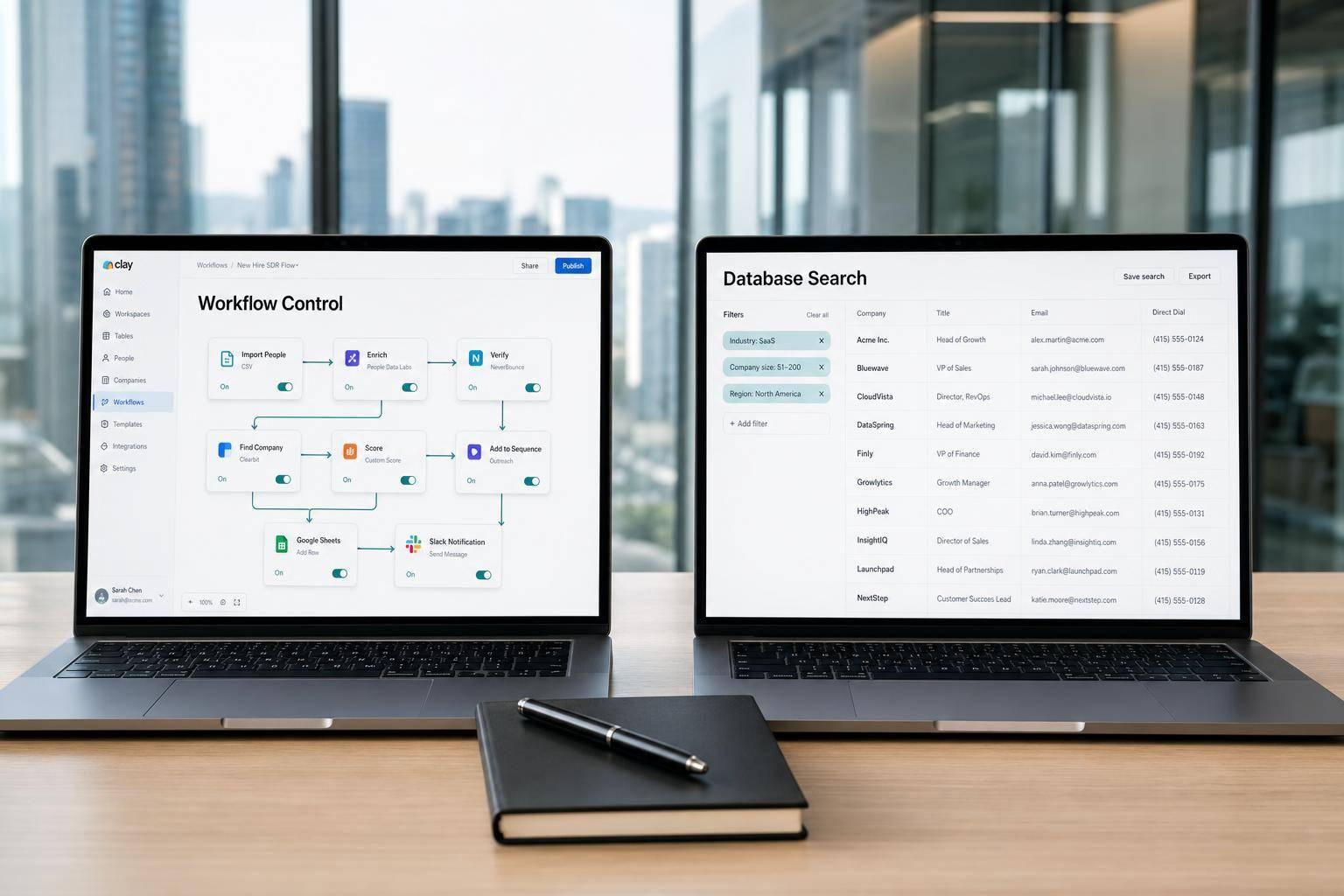
If you need control, pick Clay. If you need a big built-in database, pick ZoomInfo. That’s the short answer.
I’d frame it like this:
- Clay fits teams that want to build custom enrichment flows across many data sources
- ZoomInfo fits teams that want one system with contact data, intent, and CRM sync
- Clay starts around $149/month
- ZoomInfo starts around $15,000/year
- Clay usually takes 2–4 weeks to set up
- ZoomInfo is easier to start with, but comes with annual contracts
- B2B data decays by about 30% per year, so stale records can drag down outbound fast
If I were choosing at a Series A startup, I’d ask one question first: Do I have someone who can own the enrichment system? If yes, Clay gives me more control over cost, logic, and provider mix. If not, ZoomInfo is the simpler path for a sales team that needs lists, direct dials, and intent data in one place.
Quick Comparison
| Criteria | Clay | ZoomInfo |
|---|---|---|
| Main model | Workflow layer across many providers | Single large B2B database |
| Best for | Teams building their GTM system | Teams running a set outbound motion |
| Pricing | From $149/month | From about $15,000/year |
| Setup | More hands-on | Less setup work |
| Data approach | Sequential waterfall | Parallel vendor checks |
| Intent data | Through outside sources | Built in |
| Flexibility | High | Lower |
| Contract | Monthly or annual | Annual only |
My take: Clay is the better fit for testing and building. ZoomInfo is the better fit for scale and simplicity.
How Clay Handles Lead Enrichment
Clay is an orchestration layer, not a database. It plugs into 130+ external data sources and gives teams control over enrichment logic without tying them to one provider. That matters when enrichment needs to run like a system every week, not like a one-time search.
Multi-Source Enrichment, Waterfalls, and AI Workflows
The main engine is the waterfall. Clay checks providers one by one until a field gets filled. If Apollo can’t find a verified email, it moves to Cognism. If Cognism misses, it tries Datagma. That usually gives better coverage than relying on a single source. In internal testing across 5,000 prospects, a four-provider waterfall (Apollo → Cognism → Datagma → ZoomInfo) hit a 92% email match rate, compared with 78% for ZoomInfo alone.
Clay also manages deduplication, normalization, and persona tagging. On top of that, you can set conditional rules so the workflow skips high-cost steps until a record meets the right criteria. Once the workflow finishes, clean records can sync straight into HubSpot or Salesforce through native integrations.
Clay also includes Claygent, an AI agent that can visit websites, read LinkedIn posts, and pull together news searches to build prospect context. Used this way, Claygent adds context to enriched records before they enter outbound sequences. For lean outbound teams, that’s a big deal. You’re not just getting data – you’re giving reps a better starting point.
"Clay wins for teams that want to build custom enrichment workflows, chain multiple data providers, and move fast with a small, technical GTM crew." – Vrushti Oza, Content Marketer, Factors.ai
Pricing Model and Startup Cost Range
Clay uses a subscription-plus-credit model, with monthly plans usually starting around $149 and moving up based on included credits.
| Plan | Monthly Cost | Credits Included | Best For |
|---|---|---|---|
| Starter / Launch | ~$149–$167 | 2,000–2,500 | Early-stage teams testing outbound |
| Explorer / Growth | ~$349–$446 | 10,000 | Growing teams with defined workflows |
| Pro / Business | ~$800 | 25,000–50,000 | High-volume or technical GTM teams |
Simple lookups cost 1 credit. Deeper waterfalls can run 10–20+ credits per record. If you set up workflows well and use Clay’s Bring Your Own Key (BYOK) model, which lets you pay providers straight through your own API keys, cost per enriched contact can drop to under $0.15. Without that setup, deep enrichment usually lands around $0.50 to $1.50 per record.
Best Fit for Startups Building GTM Infrastructure
Clay works best for teams that have a RevOps or GTM engineering owner who can build and maintain workflows. That gives you tight control over data logic, provider spend, and CRM sync quality. The tradeoff is time. Most teams should expect a 2–4 week learning curve, plus upkeep as APIs change.
For Series A and B companies, Clay is strongest when one person owns the workflow layer from start to finish. That’s where the system starts to pay off. The downside is setup complexity, and that’s what makes rollout speed the next point to compare. If you want less setup and one database source, the next section covers that model.
How ZoomInfo Handles Lead Enrichment
ZoomInfo is a proprietary B2B data platform with 300M+ contacts and 100M+ company records. In plain terms, that means one vendor can handle most of your enrichment needs instead of stitching together multiple tools and API keys. That setup matters most when you’re weighing workflow control against speed to launch.
Database Coverage, Intent Signals, and Native Enrichment
ZoomInfo enriches records with verified business emails, direct-dial phone numbers, org charts, firmographics, technographics, and buyer intent signals. The intent layer – powered by Bombora and ZoomInfo’s own proprietary signals – tracks research behavior across its network, which helps teams focus on accounts already researching relevant categories instead of grinding through a cold list.
Its GTM Studio waterfall checks 25+ vendors in parallel and returns the best match. One credit is charged per enriched record, no matter how many vendors were checked in the process. ZoomInfo reports a 95%+ email accuracy rate and bounce rates under 5%.
Native, bidirectional syncs with Salesforce, HubSpot, and Microsoft Dynamics push enriched records straight into your CRM without custom logic. That’s a big plus for teams that want to move fast. The downside is simple: you get less flexibility than you would with a custom enrichment stack.
Pricing Model and Contract Terms
ZoomInfo runs on annual contracts. Pricing starts in the mid-five figures, and there is no monthly billing option.
| Tier | Estimated Annual Cost | What’s Included |
|---|---|---|
| Professional+ | $14,995–$18,000 | 5,000 annual credits, basic filters, CRM sync |
| Advanced+ | $25,000–$30,000 | 10,000 credits, intent data, technographics |
| Elite+ | $40,000–$45,000+ | Custom integrations, advanced account intelligence |
Additional users usually cost $1,500–$2,500 per seat per year on top of the base fee. Contracts run 12–36 months. ZoomInfo also requires a 60-day cancellation notice before renewal, so it makes sense to set a reminder at least 75 days in advance if you want to avoid rolling into another year. That contract structure makes ZoomInfo a very different purchase from Clay.
Best Fit for Startups With a Defined Outbound Motion
ZoomInfo works best when your ICP is already locked in and your team is ready to run volume – especially if you’re targeting U.S. mid-market and enterprise accounts with a defined outbound motion. It is built around a list-building and export workflow: SDRs can pull targeted lists, filter by firmographics or intent signals, and send records into outbound workflows without needing a technical owner to keep the system running.
For Series A or B companies with a structured sales team going after U.S. enterprise accounts, that simplicity can save a lot of time. The tradeoff is flexibility. ZoomInfo is built for breadth and speed, not custom enrichment flows. Its data coverage is strongest in North America. That gap becomes clearer in the side-by-side comparison below.
Clay vs ZoomInfo: Side-by-Side Comparison for B2B Startup GTM Teams
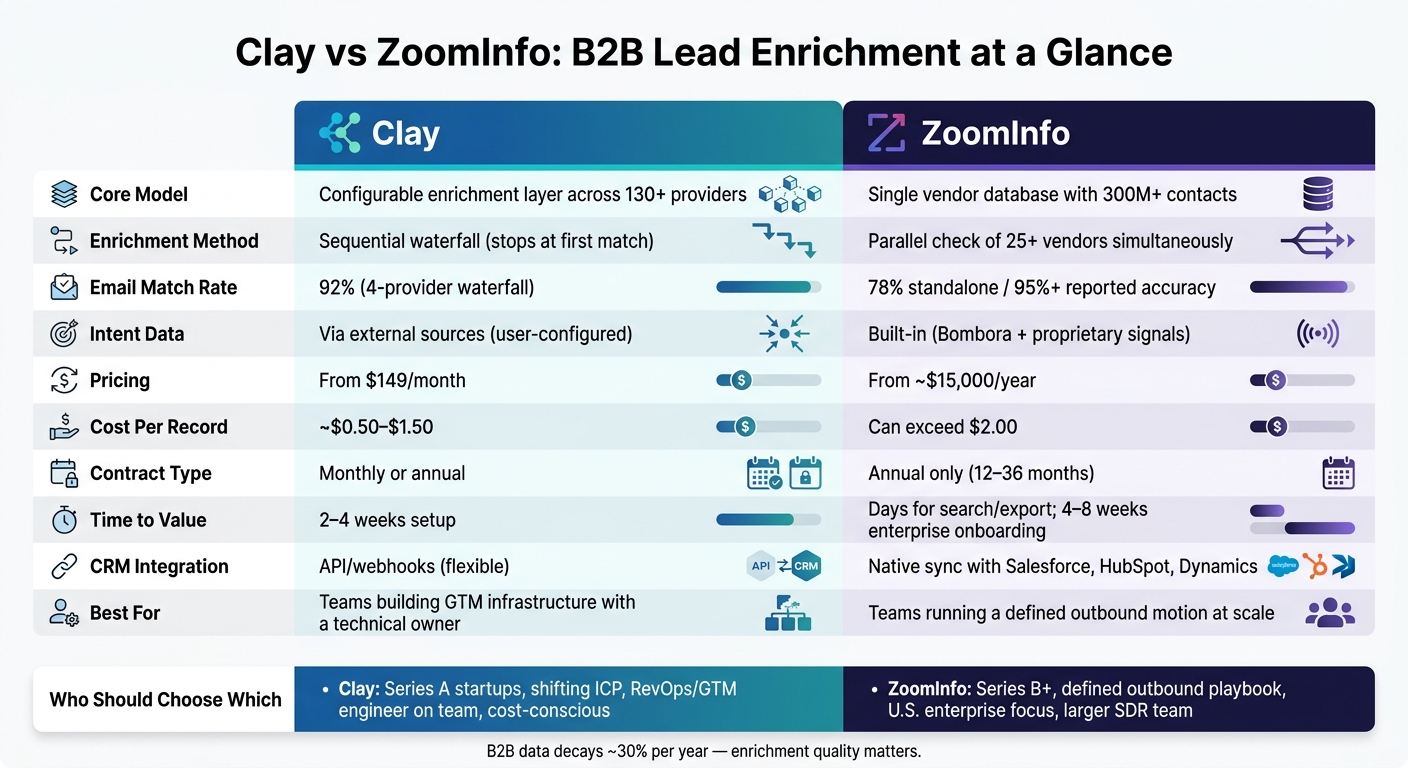
Clay vs ZoomInfo: B2B Lead Enrichment Comparison for Startups
This section comes down to one tradeoff: workflow control vs. database simplicity. The table below focuses on what matters most for Series A and B SaaS teams moving from founder-led sales to a repeatable go-to-market motion: control, coverage, and speed to launch. Choose Clay when you need to build the system. Choose ZoomInfo when you need to run it.
Comparison Table: Data Model, Workflows, Integrations, and Pricing
| Dimension | Clay | ZoomInfo |
|---|---|---|
| Core Model | Configurable enrichment layer across many providers | Single vendor database with parallel vendor checking |
| Enrichment Method | Sequential waterfall; stops at the first match | Parallel; evaluates 25+ vendors simultaneously and returns the best match |
| Coverage | Broad via aggregation | Very strong, especially for U.S. enterprise data |
| Contextual Enrichment | Claygent gathers custom context from web and social sources | AI-assisted account prioritization |
| CRM Integration | API and webhooks to any system | Native CRM integrations with Salesforce and HubSpot for bulk sync and data refresh |
| Intent Data | Built in for ZoomInfo; user-configured through external sources in Clay | Built-in intent and technographic data |
| Data Retention | Re-enrichment consumes new credits | 12-month retention; refresh without new credits |
| Pricing Model | Monthly or annual from $149/month | Annual contract from ~$15,000/year |
| Cost Per Record | About $0.50–$1.50 | Can exceed $2.00 when platform features are bundled |
| Time to Value | 2–4 weeks to build the workflow | Days for search/export; 4–8 weeks for enterprise onboarding and CRM sync |
Where Clay Wins: Flexibility, Testing, and Cost Control
Clay is stronger when the workflow itself matters most. If your ICP is still shifting, or you’re going after niche verticals where one database leaves gaps, Clay lets you chain providers and stop the waterfall as soon as a match appears. That helps manage spend while improving coverage.
Claygent also pulls custom context from web and social sources that a static database usually won’t have. That can make personalization feel more specific and less like a mail merge. And when the workflow is set up well, conditional logic does a lot of the heavy lifting. For example, you can run higher-cost steps like phone enrichment only after an email verification gate, which helps control credit use.
This is why Clay tends to fit teams with a GTM engineering owner – someone who can build, tune, and maintain the system as pipeline needs change.
Where ZoomInfo Wins: Coverage, Simplicity, and Faster Deployment
ZoomInfo is stronger when speed and simplicity matter more than workflow design. Its parallel waterfall checks 25+ vendors at the same time and returns the best match, all for a single credit per record. That’s a big deal when the goal is to get reps into market fast instead of piecing together an enrichment stack.
Built-in intent data, org charts, and direct dials – especially for U.S. enterprise accounts – remove an extra layer of tools that Clay users often have to connect on their own. For teams with limited RevOps bandwidth, the search-and-export model can cut setup work and get outbound moving in less time.
If your outbound motion is already proven, that tradeoff can make sense despite the higher annual commitment. ZoomInfo fits teams that want a simpler operating model and don’t want to spend weeks building workflows from scratch.
Recommendation: Choosing the Right Platform for Your GTM Setup
The line that matters most is simple: do you need workflow control, or do you need a ready-made database? Clay fits the first case.
Choose Clay If You Need a Custom Enrichment System
Clay works best when your ICP is still moving and you need a flexible enrichment workflow. Entry-level plans start at about $149/month. That lower price comes with a catch: Clay usually takes 2–4 weeks to implement and needs someone on your team to own it and keep it running.
This is a good fit when you want to shape the system around your process instead of working inside a fixed database. If you don’t need that level of control, ZoomInfo is the faster option.
Choose ZoomInfo If You Need a Single Database With a Simpler Rollout
ZoomInfo makes more sense for larger SDR teams going after U.S. enterprise accounts and needing a fast rollout. Built-in intent data and org charts cut down the number of tools you need to connect, and the search-and-export model helps reps get into market fast.
That speed comes with a tradeoff. ZoomInfo is built for breadth and speed, not custom enrichment flows.
Conclusion: Matching Platform Choice to Workflow Complexity and Budget
The choice is pretty direct: Clay pays off when your team can own the system internally. ZoomInfo pays off when team scale matters more. If you’re at Series A and still refining your ICP, Clay gives you more room to test, adjust, and keep costs lower. If you’re at Series B with a defined outbound playbook and a growing sales team, ZoomInfo’s database depth and simpler operating model help you ramp faster.
FAQs
How much setup work does Clay really need?
Clay usually takes more setup work, especially if you want to use everything it can do. Teams often have to build custom workflows, set up waterfall enrichment logic across multiple providers, and connect Clay to their CRM or automation stack.
For new users, getting the first enrichment waterfall live can take 1–2 weeks. Getting comfortable with the more advanced features can take months. That heavier setup and upkeep load makes Clay a better fit for GTM teams that have technical help in-house.
Is ZoomInfo worth an annual contract for a Series A startup?
It comes down to budget, flexibility, and growth stage. ZoomInfo can work well for teams going after larger enterprise accounts, but the annual contract and starting price of about $15,000 per year can be a tough sell for early-stage startups.
For most Series A startups that are still dialing in their ICP and outbound motion, Clay’s usage-based pricing is usually the better fit. It gives teams more room to test, adjust, and spend with more control. ZoomInfo tends to make more sense after your outbound engine is already working and your target market is clear.
Which tool is better if our ICP is still changing?
If your ideal customer profile is still shifting, Clay is usually the better fit. It gives you more room to build custom workflows, pull in data from multiple providers, and automate outbound triggers as your ICP changes.
ZoomInfo takes a more database-first approach, which tends to work better for teams with a steadier ICP. If your startup is still dialing in who you want to target, Clay is often the stronger pick.