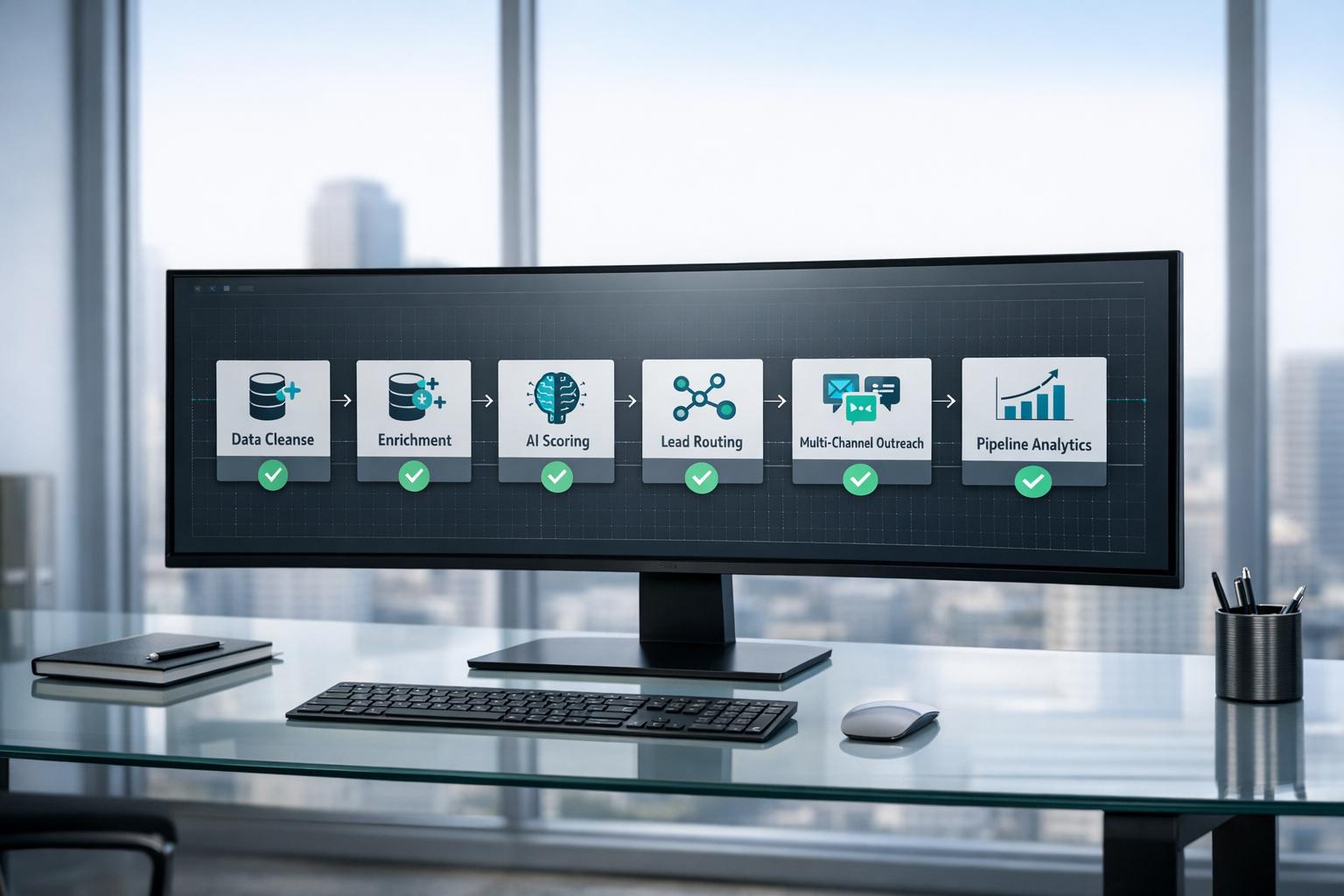
Scaling revenue after Series B funding isn’t about hiring more – it’s about building efficient systems. Sales automation allows a single rep to manage 300–500 prospects, compared to just 50–100 with manual processes. The payoff? Teams using automation see 73% faster lead response times, 45% shorter sales cycles, and a 58% boost in conversion rates.
Here’s what you need to focus on:
- CRM Hygiene: Standardize fields, eliminate duplicates, and clean up workflows.
- Lead Enrichment: Use tools like Apollo to verify and enhance data accuracy.
- Scoring and Routing: Automate lead assignment based on quality and buying signals.
- Outbound Sequences: Leverage multi-channel strategies for better engagement.
- Pipeline Analytics: Track deal velocity and identify bottlenecks with dashboards.
Automation isn’t just cost-effective (platforms cost $500–$2,000 per rep monthly vs. $150,000+ for a new hire) – it’s the infrastructure that drives scalable growth. Companies with automated processes generate 28% more revenue than those relying on manual workflows.
Let’s dive into how you can build a system that works.
Preparation: Build Your Foundation
Before diving into automation, take a step back to ensure your processes and data are in top shape. Automation will magnify whatever is already in place – if your workflows are messy or your CRM is riddled with duplicates, you’ll just scale those problems faster.
Map Your Buyer Journey and Internal Handoffs
Start by reviewing your last 20 closed deals to understand the actual steps in your process. Document every interaction, how long each stage took, and what content was shared. Keep in mind that most B2B buyers involve 6–10 decision-makers, and 73% of initial contacts aren’t the ones making the final call.
Define clear, objective criteria for moving deals through each stage. For example, focus on tangible actions like "shared proposal with CFO" rather than vague cues like "seemed interested." Similarly, establish specific exit criteria for handoffs. Decide what key details – such as budget, stakeholders, or confirmed next steps – need to be gathered before a lead moves from Marketing to SDR or SDR to AE. Speed matters: companies that respond to leads within five minutes are four times more likely to qualify them.
To track progress, create custom fields to timestamp every stage change. This way, you’ll be able to measure how quickly deals move and pinpoint where things tend to stall. These insights will be crucial when you start fine-tuning your automation.
Once your buyer journey is mapped and handoff criteria are set, you’re ready to refine your targeting and tools.
Define Your ICP and Buying Signals
Your Ideal Customer Profile (ICP) identifies the right fit based on firmographics and technographics, while buying signals highlight intent or behavior. For Series B startups, your ICP might include factors like employee count, annual revenue, funding stage (Series A–C), growth rate, and target regions [11,14]. Add technographic details to understand if prospects use platforms like Salesforce or HubSpot, and assess their integration needs and existing systems [11,14].
Organize buying signals into three tiers:
- Tier 1 (Champion Moves): Decision-makers or product champions starting new roles at different companies.
- Tier 2 (Known Intent): Direct communications about specific projects or challenges.
- Tier 3 (Inferred Intent): Behavioral clues, such as browsing particular solution categories on third-party sites.
Start with behavioral scoring to measure engagement, and as your CRM data improves, layer in ICP fit. Use caps to avoid inflated scores from repeated actions (e.g., opening the same email multiple times). Also, implement score decay so that points drop off if no activity occurs within 90 days.
Once your ICP and buying signals are locked in, it’s time to evaluate your current tools.
Audit Your Current GTM Stack
Take stock of every tool in your customer journey, noting who owns it and the details of its contract. Identify tools with less than 70% license usage as candidates for consolidation or removal, and flag any with more than 50% feature overlap to avoid redundancy and technical debt.
Trace the flow of data from the first touchpoint to renewal. Clearly define which system serves as the "source of truth" for each key object (contact, company, deal) to prevent data gaps. Double-check sync settings, update frequencies, and app permissions to ensure data moves accurately. Your CRM data should hit at least 95% accuracy to support reliable AI-driven automation [12,15].
Test your system by submitting a real form and tracking its journey through your stack. Note any slowdowns or breakdowns along the way. Use a simple three-bucket framework to classify your tools:
- Keep: High-value tools with more than 80% utilization.
- Consolidate: Tools with over 50% feature overlap.
- Sunset: Low-ROI tools with less than 70% utilization.
Maria Akhter from Outreach offers a cautionary note:
"The most expensive mistake in platform consolidation is lift-and-shift: migrating legacy processes exactly as they exist today into new systems. You pay consolidation costs without gaining modernization capabilities".
CRM Setup and Data Management
Once your foundation is optimized, it’s time to configure your CRM to handle automation effectively. A properly set-up CRM ensures leads flow smoothly through your pipeline without manual intervention. On the flip side, a poorly configured system can amplify existing problems, creating more chaos than clarity.
Standardize Your Data Fields
Start by standardizing your data fields to maintain consistency and reduce errors. For firmographic data, simplify company names (e.g., remove "Inc." or "LLC") and categorize employee counts into predefined ranges. For contact details, streamline job titles (e.g., "VP Sales" instead of lengthy variations) and use dropdown menus for seniority levels.
Lead management fields also need structure. Replace vague "Lead Source" entries with more specific ones, like distinguishing high-intent from low-intent keywords for organic search traffic or noting if paid clicks came from competitor terms. Introduce a numerical lead quality score based on behavior and firmographics to guide routing decisions. Add an engagement level field (e.g., Cold, Warm, Hot, Urgent) that updates dynamically based on recent activity.
For qualification, dropdown menus aligned with frameworks like BANT or CHAMP can ensure clarity. Options for fields like budget ("Confirmed", "Estimated", "Unknown"), authority ("Decision Maker", "Influencer"), and timeline ("This Month", "This Quarter") make data easier to interpret and automate. Dropdowns also help avoid manual entry mistakes. Fields like State/Country, Industry, and Disqualification Reason should have pre-set options, and validation rules should require key fields – such as Budget or Next Steps – before advancing a deal.
| Category | Essential Fields | Purpose |
|---|---|---|
| Firmographics | Company Size, Industry, HQ Timezone | Lead routing and territory assignment |
| Qualification | Budget Confirmed, Authority Level, Timeline | Automated scoring and SQL transitions |
| Behavioral | Pricing Page Visits, Email Clicks, Last Activity Date | Triggering "Hot Lead" alerts and re-engagement |
| Pipeline | Stage Entry/Exit Timestamps, Loss Reason, Competitor | Velocity reporting and win/loss analysis |
With these standardized fields, your data is primed for smooth two-way synchronization.
Set Up Two-Way CRM Sync
To connect your CRM with outbound tools, precise field mapping is essential. For instance, map HubSpot Contacts to Salesforce Leads or Contacts, Companies to Accounts, and Deals to Opportunities. Establish clear conflict resolution rules for each field (e.g., "Prefer Salesforce unless blank" or "Always use Salesforce" for critical data).
Start small by syncing only the most essential fields, such as contact information, deal stages, and ownership. Use a dedicated integration user with specific permissions instead of personal logins to enhance security and maintain audit trails. Ensure picklist values align perfectly in both systems to prevent sync errors.
Monitor error logs weekly and categorize issues, such as association errors (e.g., when a deal links to an unsynced account), picklist mismatches, permission problems, or validation rule conflicts. Before launching, test the system with live forms to ensure data flows correctly.
Once the sync is solid, you can focus on automating lead routing to remove manual bottlenecks.
Automate Lead Routing
Streamline lead assignment by automating workflows based on criteria like company size, industry, lead score, and buying signals. For geographic distribution, assign leads according to the contact’s timezone to ensure they reach a rep during local business hours.
High-value leads, such as companies with 1,000+ employees and a lead score above 80, should go directly to Enterprise AEs for immediate follow-up. Use round-robin assignment for mid-market leads and queue lower-scoring leads for SDR nurturing.
Every routing action should trigger an alert, such as "High-priority SQL – contact immediately." Set up tasks upon routing and notify managers if follow-ups are delayed by more than 48 hours. If a lead reaches MQL status without an owner, workflows should automatically assign it to an active representative. Teams leveraging advanced automation report 73% faster lead response times and 45% shorter sales cycles.
Lead Enrichment and Data Intelligence
After automating your CRM processes and ensuring data integrity, the next step is enhancing your contact data for better segmentation. While automation streamlines routing, the success of your outreach hinges on the accuracy of your contact information. Keep in mind that around 30% of CRM data becomes outdated annually due to job changes and company updates. This makes consistent data enrichment essential.
Source and Verify Lead Data
To fill in missing contact details efficiently, use waterfall enrichment tools like Clay. These tools query multiple providers – such as Apollo, Kaspr, and FullContact – in sequence, eliminating the need for manual checks or redundant database subscriptions.
To reduce email bounce rates from 15–25% to under 2% and improve inbox placement to over 95%, implement a three-step verification process:
- Syntax check: Ensures email addresses are formatted correctly.
- Domain/MX check: Confirms the domain exists and can receive emails.
- SMTP verification: Verifies the email address is active and deliverable.
Also, set up email authentication protocols like SPF, DKIM, and DMARC to protect your sender reputation and maintain high deliverability rates.
With enriched and verified data in hand, you can create highly targeted segments for outreach.
Create Signal-Based Target Lists
Instead of relying on broad audience segments, refine your approach by layering buying signals. For example, target lists like "Marketing leaders at retail startups (<50 employees) who visited pricing pages in the last week" are far more effective.
High-intent signals to consider include:
- Recent funding announcements
- Attendance at webinars
- Visits to pricing or demo pages
- Job changes or promotions
- Email engagement, such as opens or replies [22, 24]
Apollo’s Growth Operations Manager, Casey Krebs, shared how his team used event-triggered data routing to prioritize leads showing these signals. By automating high-intent leads into tailored sequences, they tripled meetings booked and achieved a 23% increase in sales-qualified opportunities, securing over 350 meetings monthly.
"With Apollo’s event-triggered data, we could create high-intent audiences and deliver the perfect message to our prospects precisely when it mattered most."
- Casey Krebs, Growth Operations Manager, Apollo
To keep your lists fresh, apply time-based decay. For example, set intent scores to expire after 90 days, ensuring your team focuses on recent activity rather than outdated signals.
This precise segmentation lays the groundwork for incorporating AI into lead scoring.
Add AI Lead Scoring
AI tools take lead prioritization to the next level by analyzing behavioral patterns and firmographic data. Platforms like HubSpot Breeze and Salesforce Einstein use historical data to identify traits that predict conversion. In our client implementations, we’ve found that layering these AI scores with manual signal tracking (like champion job changes) catches opportunities the algorithms miss.
It’s important to separate Lead Grade (how well a prospect fits your ideal customer profile) from Lead Score (their engagement level). For instance, a prospect might receive an excellent grade (A) for being a perfect fit but have a low score (20) due to limited activity – or the reverse. This dual perspective ensures your team doesn’t waste time on poor-fit leads with high engagement or perfect-fit leads that aren’t ready to buy.
To avoid score inflation, set limits on specific categories. For example, cap email opens at 25 points to prevent repetitive actions from artificially boosting scores. Additionally, use negative scoring to subtract points for behaviors like unsubscribes or extended inactivity. Teams that implement effective scoring systems often achieve MQL-to-SQL conversion rates of 40–50%, compared to the 25–35% range seen with average scoring practices.
Multi-Channel Outbound Automation
After enriching and scoring your lead data, the next step is to create outreach sequences that spark engagement. A multi-channel strategy – combining email, LinkedIn, and calls – outperforms single-channel email-only sequences by a significant margin. While email-only campaigns achieve a 46% meeting booking rate, multi-channel approaches push that number to 70%. That extra 24% stems from connecting with prospects on the platforms they actively use, instead of flooding their inboxes alone.
Build Automated Outreach Sequences
Tailor your outreach sequences based on the importance of each prospect.
- Tier 1 prospects (enterprise buyers or key strategic accounts) warrant highly personalized, manual outreach. For example, start with a custom email on Day 1, engage with their LinkedIn post, and follow up with a call and connection request by Day 4.
- Tier 2 prospects (strong-fit accounts) respond well to hybrid sequences, blending automated emails with manual LinkedIn touches spaced seven days apart to avoid overwhelming them.
- Tier 3 prospects (lower-priority but still qualified) can be placed in fully automated sequences that use dynamic variables to keep messaging relevant at scale.
The secret lies in aligning your sequence intensity with the value of the prospect. Automate pauses in sequences for replies, out-of-office messages, or negative signals like unsubscribes. Tools like Apollo let you add "Wait For" intervals – usually at least three days – between touchpoints to maintain momentum without coming off as pushy. When we configure this for clients, we typically set dynamic intervals based on engagement signals rather than fixed delays.
"Always leave a voicemail that references your email [or LinkedIn message]. It’s a huge help with open rate."
- Landon Richards, Senior SDR, Zeni
From here, focus on simplifying the scheduling process to remove barriers in the buyer journey.
Streamline Meeting Scheduling
Eliminate the back-and-forth of scheduling by embedding round-robin calendar links directly into your email signatures. This allows prospects to book time with the next available rep instantly. Integrate tools like Google Meet or Zoom so meeting links are generated automatically, logged into your CRM, and trigger pre-meeting preparation tasks.
Set Up Team Notifications
Enable real-time Slack alerts for key actions like prospect replies, high-intent signals (e.g., multiple email opens), and lead handoffs between SDRs and AEs. When a prospect books a meeting or advances to a new pipeline stage, your CRM should automatically create tasks and notify the right team members.
Trigger-based notifications also help you identify and act on buying signals – such as recent funding announcements or visits to your pricing page – by moving these prospects into customized sequences. This kind of automation can triple the number of meetings booked and boost sales-qualified opportunities by 23%.
"The automation we have in place allows our sales team to do what they do best – hop on calls to uncover pains and drive value in order to help our clients be more successful."
- Paula Urrutia, Senior Sales Manager, Apollo
Pipeline Tracking and Optimization
Once your outbound sequences are up and running, the real work begins: measuring performance and fine-tuning inefficiencies. Scalable automation thrives on consistent tracking and regular adjustments.
Build Performance Dashboards
Start by creating dashboards that give you a clear view of your pipeline. Use properties like "Entered Stage Date" and "Exited Stage Date" to track how long deals spend in each stage and analyze stage-to-stage conversion rates. This will help you spot and address bottlenecks in your funnel quickly. Keep a close eye on lead response time – how quickly your automated systems enable reps to follow up with new leads. Any lead left untouched for more than five hours should be flagged.
Engagement metrics such as open rates, click rates, and reply rates are also critical. They reveal whether your messaging is hitting the mark. It’s worth noting that companies with a formal sales process often see 28% higher revenue. Use these metrics as the foundation for monthly reviews to keep your system running smoothly.
Run Monthly System Reviews
Set aside time every 30 days for a thorough audit of your workflows. These reviews help you catch broken processes before they snowball into bigger issues. Check that your routing rules align with your current team structure and adjust them as needed. Identify deals stuck in a single stage for longer than your historical averages – this often signals a bottleneck. These deals might need manual intervention or re-engagement.
Dive into Stage-Skip and Deal Journey reports to uncover pipeline stages that reps frequently bypass, which could point to unnecessary admin tasks rather than meaningful buyer interactions. Don’t forget to clean up your data – aim for 85–90% field completion for critical details like company size and industry. Since B2B data decays at an average rate of 30% per year, keeping your data fresh ensures your automation operates effectively.
These regular reviews keep your pipeline in top shape, making it easier to compare performance before and after automation.
Track Before and After Metrics
To ensure your automation delivers results, start by documenting baseline metrics like customer acquisition cost, win rate, and sales cycle length. These benchmarks will help you measure ROI and refine your scoring and routing rules over time. A well-optimized system should lead to a 15–25% improvement in forecast accuracy and cut sales cycle time by 15–22% within 12–24 months.
Automate win/loss analysis at the close of each deal to gather actionable insights. This continuous feedback loop ensures your scoring algorithms and routing rules stay aligned with revenue-driving factors. High-performing RevOps teams see MQL-to-SQL conversion rates of 40–50%, compared to 25–35% for average teams. Tracking these metrics monthly will help you spot performance dips early and make the necessary adjustments to keep your growth on track.
Why Most Series B Startups Get This Wrong
Here’s the pattern we see repeatedly: A startup raises their Series B, immediately hires 3-5 new sales reps, then scrambles to generate enough leads to keep them busy. Six months later, they’re burning cash on underutilized headcount while their pipeline stays flat.
The fix is counterintuitive: Accelerate before you innovate. Before adding new tools or hiring new reps, plug the leaks in your existing system. Most startups lose 30-40% of qualified opportunities to simple infrastructure failures — leads that fall through the cracks, deals that stall without follow-up, prospects who never get routed to the right rep.
This is what GTM Engineering solves. It’s not about buying more software or hiring more bodies. It’s about building the revenue infrastructure that makes every rep, every tool, and every dollar work harder.
Complete Implementation Checklist
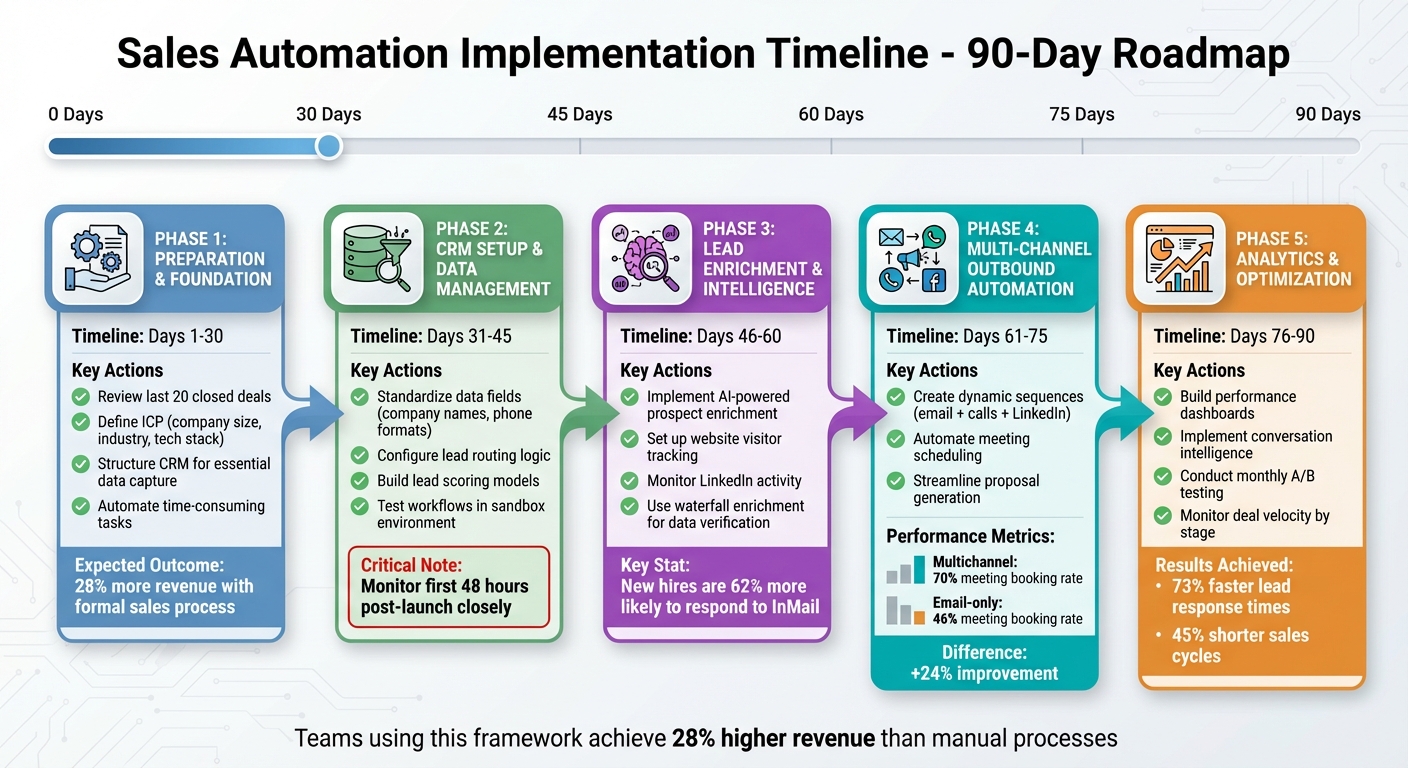
5-Phase Sales Automation Implementation Roadmap for Series B Startups
Checklist by Implementation Phase
To successfully implement sales automation, follow this phased checklist, which breaks the process into five key stages. Each phase outlines specific actions and expected outcomes, ensuring a structured approach to building an efficient system.
Phase 1: Preparation & Foundation (Days 1–30)
Start by reviewing recent closed deals to identify gaps in your sales process. Clearly define your Ideal Customer Profile (ICP), including details like company size, industry, tech stack, and buying signals. Structure your CRM to capture essential data, such as lead source details, behavioral signals (e.g., visits to pricing pages), and qualification criteria. Focus on automating time-consuming tasks like follow-ups and data entry. Research shows that companies with a formal sales process generate 28% more revenue than those without one.
Phase 2: CRM Setup & Data Management (Days 31–45)
Set up automated workflows to clean and standardize data fields, such as company names, phone formats, and job titles. Configure lead routing logic based on factors like company size, quality score, and geography, ensuring high-value leads are assigned promptly. Build lead scoring models that combine demographic data, behavioral signals, and disqualifiers. Test workflows rigorously in a sandbox environment, using both high-volume and edge-case scenarios. During the first 48 hours post-launch, monitor automations closely, as this is when most critical issues arise.
Once your CRM is optimized, you’ll be ready to enrich and qualify your leads.
Phase 3: Lead Enrichment & Intelligence (Days 46–60)
Leverage AI tools for continuous prospect enrichment, pulling in data like firmographics, tech stack details, and funding signals. Implement website visitor tracking to identify anonymous traffic on high-intent pages such as pricing or demo requests. Keep an eye on LinkedIn activity to engage leads effectively – new hires, for instance, are 62% more likely to respond to InMail messages compared to long-term employees. Use waterfall enrichment algorithms to verify lead data across multiple sources, ensuring accuracy and high deliverability.
Phase 4: Multi-Channel Outbound Automation (Days 61–75)
Create dynamic sequences that blend automated emails, personalized outreach, calls, and LinkedIn interactions. Research shows multichannel sequences outperform email-only approaches, booking 24% more meetings. Sequences incorporating calls, LinkedIn, and manual emails achieve a 70% meeting booking rate, compared to 46% for email-only sequences. Automate meeting scheduling with features like calendar sync and timezone detection. Streamline proposal and document generation by automating triggers tied to deal stage changes.
Phase 5: Analytics & Optimization (Days 76–90)
Develop dashboards to track key metrics such as pipeline velocity, lead-to-opportunity conversions, and deal progression. Use conversation intelligence tools to analyze sales calls, identifying sentiment and patterns. Conduct monthly A/B testing on subject lines and sequence content to refine outreach. Monitor deal velocity by stage and set up alerts for delays. Teams using advanced automation report 73% faster lead response times and 45% shorter sales cycles. Establish clear, action-based exit criteria like "scheduled technical follow-up" to maintain focus. These analytics help ensure your automation efforts continue to evolve, driving consistent growth in revenue.
Conclusion: Scale Your Sales with Automation
For Series B startups, sales automation isn’t just about efficiency — it’s about proving to your board and your next-round investors that your go-to-market engine can scale without linear headcount growth. The difference between landing your next funding round or hitting a plateau often hinges on whether you can show consistent, scalable revenue growth. Automation rewrites the playbook by enabling a small team of five to handle the workload of a manual team twice their size.
By automating processes, you unlock higher conversion rates, faster lead response times, and shorter sales cycles. These improvements directly lower customer acquisition costs as reps spend less time on mundane tasks – like data entry, which eats up 40% of their day – and more time selling. And when you compare the cost of a full automation platform ($500–$2,000 per rep monthly) to hiring a new rep ($150,000–$200,000 annually), the math speaks for itself.
But automation isn’t just about saving money. It creates a foundation for better operations. Clean data, standardized workflows, and accurate forecasting signal that your revenue team is ready to scale. Companies with strong alignment between sales and RevOps see 19% faster revenue growth and 15% higher profitability. Even more crucially, automation provides the stability you need to expand into new markets or segments without overhauling your entire sales system.
The startups that push past Series C have one thing in common: they’ve moved from founder-led hustle to scalable systems. Organizations using structured, automated sales processes report 28% higher revenue than those relying on manual workflows. Your automation stack – covering everything from lead enrichment and routing to multi-channel sequences and pipeline analytics – becomes the engine driving that growth.
As Sean O’Connor of monday CRM puts it:
"Automation handles the mechanical work while preserving the human elements that build relationships and close deals".
The goal here isn’t to replace your sales team – it’s to amplify their impact and set the stage for your next phase of growth.
FAQs
What are the essential steps for implementing sales automation in a Series B startup?
To set up sales automation effectively in a Series B startup, start with the basics: clean and organized CRM data. Your CRM should house accurate, up-to-date contact information – this is the foundation for managing leads and building automation workflows that actually work.
From there, focus on defining clear sales processes and workflows. Map out your customer journey step by step. Identify repetitive tasks – like sending follow-up emails, nurturing leads, or assigning them to reps – that can be automated. This not only saves time but also minimizes the risk of human error.
Tools like HubSpot, Salesforce, or Apollo can handle multi-channel outreach, enrich lead data, and provide insights into your sales pipeline. Use these platforms to track metrics like pipeline velocity and identify bottlenecks. With the right analytics, you can fine-tune your approach, lower customer acquisition costs (CAC), and set the stage for scalable and efficient growth.
What steps should we take to clean up our CRM data for sales automation?
To get your CRM data ready for sales automation, it’s crucial to start with clear data standards. Consistency across all records ensures smoother operations. Regular audits of your database are just as important – this is when you catch and clean up duplicates, outdated entries, and incomplete information. A clean database means fewer errors when automation kicks in.
You can take this a step further by automating data hygiene tasks like deduplication and validation workflows. This not only saves time but also keeps your data accurate over the long run. Don’t forget to bring key stakeholders into the mix to establish consistent data entry practices and ensure everyone is accountable. With these steps in place, your CRM will be clean, dependable, and primed for scalable automation.
How can sales automation help drive revenue growth for our startup?
Sales automation is a game-changer for boosting revenue growth. By taking over repetitive tasks, it minimizes manual errors and frees up your team to focus on what really matters – high-impact activities that drive results. It also fine-tunes your go-to-market (GTM) infrastructure, creating more seamless operations and better coordination across teams.
With automation handling tasks like lead enrichment, multi-channel outreach, and pipeline analytics, you can speed up pipeline velocity, increase conversion rates, and lower customer acquisition costs (CAC). These gains don’t just improve day-to-day efficiency – they set the foundation for scalable, measurable growth over time.