After helping dozens of Series A startups build their revenue infrastructure, I’ve noticed a pattern: founders either over-automate too early (creating robotic, impersonal outreach that tanks reply rates) or under-automate for too long (burning through runway on manual tasks that should have been systematized months ago).
The truth? There’s no universal answer. But there is a framework.
As a GTM Engineer, my job is to build the systems that turn chaotic founder-led sales into predictable pipeline machines. This article breaks down exactly how I help clients decide what to automate, what to keep manual, and which tools actually matter in 2026.
- Automation saves time. Sales reps spend only 30% of their time selling, with the rest lost to admin tasks like data entry and follow-ups. Automating these can reclaim up to 15 hours per week per rep.
- Automation drives results. Startups using mobile CRM tools see 65% of reps hit quotas, compared to 22% without. AI tools further increase productivity (81%) and revenue (83%).
- Manual sales still matters. High-value deals, complex negotiations, and personalized outreach require a human touch. Automation supports these efforts by handling repetitive tasks.
- Key tools: HubSpot ($9/month/seat), Salesforce ($25/month), and Apollo (free or custom pricing) cater to different needs – scaling teams, enterprise workflows, or outbound-heavy strategies.
Bottom line: Automate routine tasks to free up reps for building relationships and closing deals. Choose a CRM that aligns with your growth goals, sales cycle, and team size.
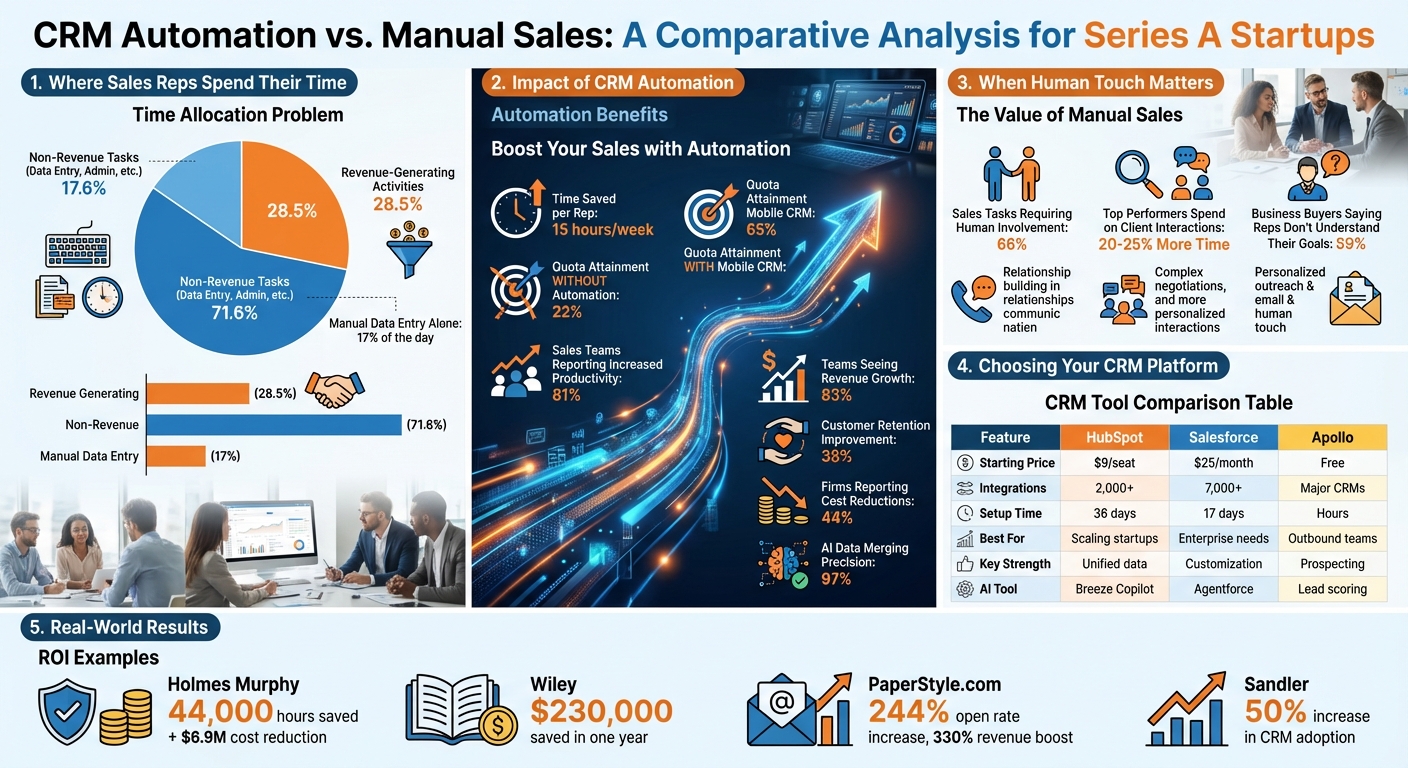
CRM Automation vs Manual Sales: Key Statistics and Tool Comparison for Series A Startups
Why Series A Startups Choose CRM Automation
Series A startups often face a critical challenge: proving their ability to scale without significantly increasing costs. CRM automation offers an effective solution by empowering small teams to manage larger pipelines and handle growing lead volumes – all without a corresponding spike in headcount or burn rate. It’s about increasing capacity without inflating costs.
The benefits of automation are immediate and measurable. By eliminating data silos, a unified CRM creates a single source of truth, avoiding the inefficiencies of piecemeal systems that can bog down growing teams. Mircea Dima, Founder and CEO of AlgoCademy, highlights this advantage:
"Using a unified CRM system results in much less context switching, synchronization problems, reporting issues, and consequent focus shifting to other activities, allowing the team to focus on selling".
This matches what I see constantly. One of my clients—a business consultancy—was drowning in 15+ hours per week of manual lead generation across spreadsheets, LinkedIn, and their CRM. After we implemented an AI-powered lead-gen system with automated enrichment using Clay and Apollo, they generated $150K in new business within the first hour of the system going live. That’s not a typo. The bottleneck was never their sales ability—it was the manual friction eating their capacity.
Another key advantage is real-time visibility into pipeline health. Automated dashboards help identify bottlenecks and at-risk deals as they happen, rather than during post-mortem reviews when it’s too late to take action. For startups racing to hit milestones before their next funding round, this proactive approach can be a game-changer.
Reducing Time Spent on Administrative Tasks
Here’s a stat that should make every founder uncomfortable:
Sales reps spend a staggering 17% of their day on manual data entry. In fact, only 28.5% of their time is spent on revenue-generating activities, while the majority – 71.6% – is consumed by non-revenue tasks like data entry, lead prioritization, and proposal creation.
I call this the "invisible burn rate"—you’re paying for salespeople, but 70% of their time is going to admin work that a well-designed automation could handle.
CRM automation tackles these inefficiencies by automatically capturing data from emails, calls, and LinkedIn profiles. AI tools can extract contact information from email signatures and documents, saving reps up to 15 hours per week. This reclaimed time allows teams to focus on closing deals. Companies using mobile CRM software report that 65% of their sales reps meet their quotas, compared to just 22% for those relying on manual processes.
Consider Holmes Murphy, an insurance brokerage firm. In 2025, they implemented CRM automation to analyze prospect behavior and streamline their renewal process. The result? They saved approximately 44,000 hours of manual work and $6.9 million in operational costs.
Automation also improves data accuracy. AI-driven tools achieve 97% precision when merging duplicate records, reducing errors caused by manual data cleaning.
Accelerating Deal Cycles
Automation doesn’t just save time – it speeds up deal progression. Deals often stall when leads are neglected or when reps focus on low-priority prospects. CRM automation addresses these issues with lead scoring and intelligent routing. AI ranks prospects based on behavioral signals like website visits, email opens, and content downloads, ensuring reps prioritize the right opportunities.
Automated workflows also ensure smooth transitions between marketing and sales. Triggers can assign inbound leads to the appropriate rep instantly, based on criteria like territory or deal size, preventing leads from slipping through the cracks. For deals that remain stalled for over 10 days, automation flags them for manager intervention before momentum is lost.
The productivity gains are undeniable. 81% of sales teams using AI tools report increased productivity, and 83% have seen revenue growth in the past year. Aligning sales and marketing efforts with unified CRM data also leads to 36% better customer retention.
A compelling example comes from Wiley, a book publisher. During the 2024–2025 back-to-school season, their AI-powered chatbots integrated with their CRM to handle a surge in customer service requests. This allowed them to onboard temporary agents faster and reduced the need for seasonal hires, saving $230,000 in a single year.
Lowering Customer Acquisition Costs
For Series A startups, every dollar spent on acquiring customers matters. CRM automation helps reduce customer acquisition costs (CAC) by optimizing resource allocation and allowing reps to focus on high-value activities. Automating one-third of sales tasks shifts the focus to building relationships, which directly impacts CAC. In fact, 44% of firms using sales automation or AI report cost reductions within their sales departments.
Take RBC Wealth Management as an example. In 2025, their advisors spent three to four hours preparing for client meetings, pulling data from 26 different systems. After switching to a unified CRM with AI-driven alerts and automated scheduling, prep time dropped to minutes. This efficiency enabled more client interactions per day, lowering the cost per client acquired.
Automation also enforces consistent sales processes as teams grow. AI ensures every lead gets a high-quality experience, regardless of which rep is handling it, maintaining standards even as new hires come aboard. This consistency reduces the ramp-up time for new team members and minimizes the risk of revenue loss from less experienced reps.
When Manual Sales Still Makes Sense
While automation offers undeniable advantages, about two-thirds of sales tasks still require a human touch. For Series A startups, timely manual involvement can make all the difference in landing transformative deals. The key lies in knowing when to blend automation with human expertise.
Building Relationships in Complex Sales
When personalization is non-negotiable, human interaction becomes indispensable. In high-ticket deals, prospects expect – and often demand – personalized attention. Top-performing sales reps dedicate 20% to 25% more time to client interactions, building the trust needed to move complex deals forward.
Manual engagement offers insights that automation simply can’t replicate. Body language, tone of voice, and subtle expressions during conversations reveal critical clues. For instance, a prospect’s hesitation during pricing talks or their enthusiasm about a specific pain point provides actionable intelligence that no email click-through rate can offer. As one of my podcast guests, a VP of Sales at a $50M ARR company, told me:
"The deals we lose aren’t the ones where we automated too much—they’re the ones where we automated the wrong things. The human moments in a complex sale aren’t optional. They’re the whole point."
Now, consider the numbers: if your average deal size is $25,000, an in-person meeting that boosts the close probability by even 10% to 20% can easily justify the investment in travel and time. In a digital-first world, face-to-face interactions cut through distractions, leading to deeper discovery and more meaningful conversations.
Additionally, manual efforts allow you to gain a "3D view" of your prospect’s business. Visiting a client’s workspace or participating in their team discussions can uncover hidden needs and opportunities that automated tools would miss entirely.
Adapting to Non-Standard Client Needs
Automation shines in repetitive tasks, but its rigidity becomes a liability when unique client needs arise. It operates within predefined rules and lacks the intuition required to navigate nuanced challenges. This is especially critical in consultative sales, where 59% of business buyers report that sales reps fail to understand their specific goals.
Complex deals often require creative problem-solving. Crafting non-standard terms – like flexible payment options, phased implementations, or bespoke service packages – demands human ingenuity that no CRM system can replicate. Likewise, navigating organizational dynamics, such as identifying internal blockers or cultivating champions, relies on the kind of judgment only humans can provide.
Andrew McDermott of Pipeline CRM sums it up well:
"Relationships are driven by value, fed by communication, and nurtured by listening." – Andrew McDermott, Pipeline CRM
While automation can handle routine follow-ups, it cannot truly listen or respond to the emotional triggers that often influence high-stakes buying decisions.
Managing Low-Volume, High-Value Deals
For startups targeting a select group of strategic accounts rather than chasing mass-market leads, manual outreach often proves more effective. Personalized communication builds trust and fosters real-time learning, ensuring high-value prospects receive the attention they deserve.
To maximize efficiency, establish clear handoff points where automation supports, rather than replaces, manual engagement.
The GTM Engineering Perspective: Automation as Leverage, Not Replacement
Here’s my contrarian take: the goal of CRM automation isn’t to remove humans from sales. It’s to make every human hour count for more.
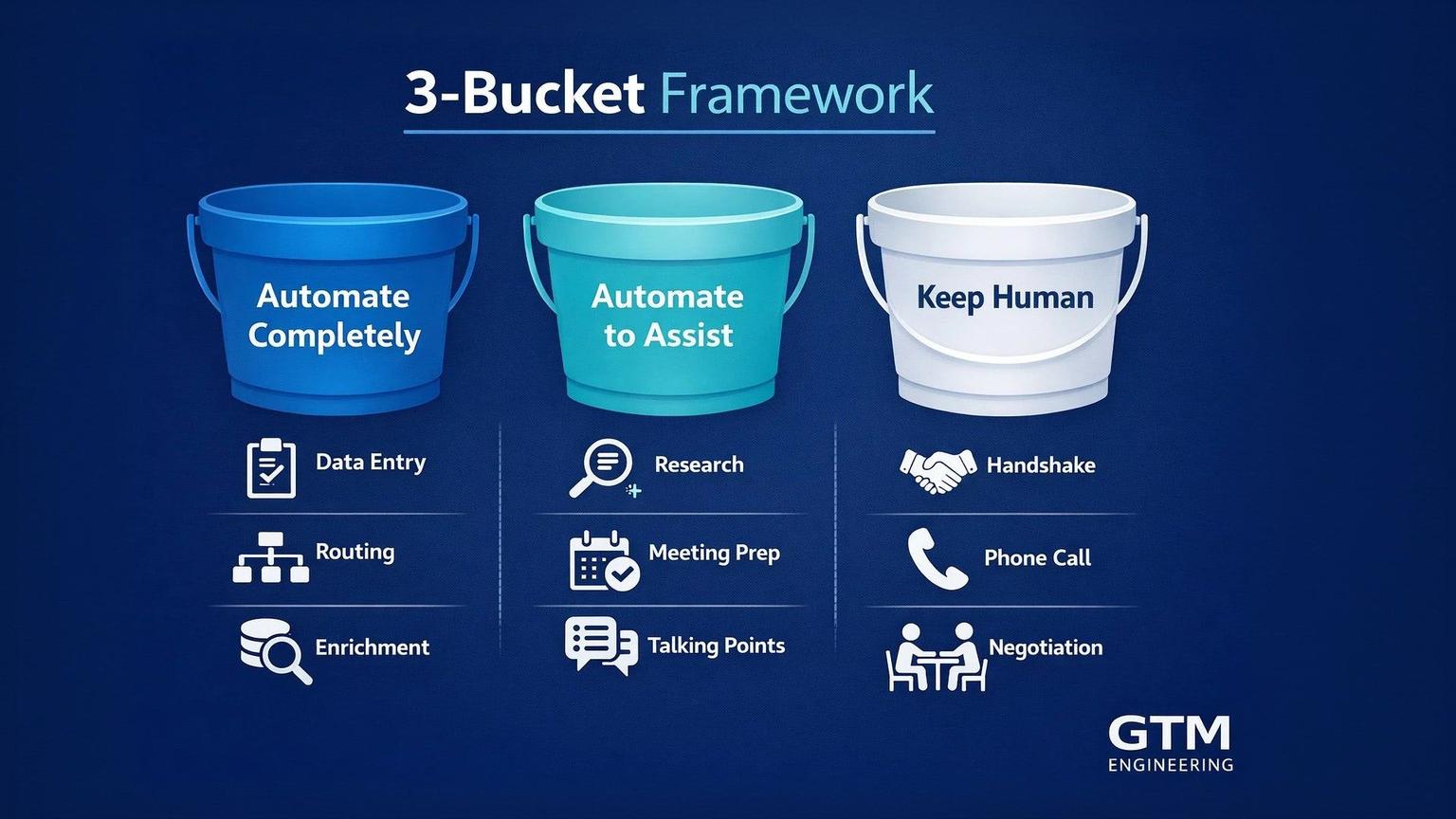
When I work with Series A startups, we map every activity in their sales process to one of three buckets:
- Automate completely — Data entry, lead routing, follow-up scheduling, enrichment
- Automate to assist — Research, talking points generation, meeting prep
- Keep fully human — Discovery calls, negotiations, relationship building, complex objection handling
The startups that win are the ones who get this categorization right. They’re not choosing between automation and manual—they’re engineering the optimal blend.
Comparing CRM Tools: HubSpot, Salesforce, and Apollo
Picking the right CRM is all about aligning your startup’s priorities with a platform that offers the best fit for your goals. Each tool has its own approach to automation, and understanding these distinctions can save you both time and money.
Feature Comparison Table
| Feature | HubSpot | Salesforce | Apollo |
|---|---|---|---|
| Primary Strength | Ease of use & unified data | Customization & scale | Prospecting & outbound |
| AI Tool | Breeze Copilot | Agentforce | AI-powered lead scoring |
| Key Automation | Sequences & lead routing | Quotes & forecasting | Workflow engine & sync |
| Integration Count | 1,840–2,000+ | 7,000+ | Connects to major CRMs |
| Setup Time | ~36 days | ~17 days (SMBs) | Minutes to hours |
| Starting Price | Free / $9 per seat | $25/month | Free / varies |
| Best For | Scaling startups | Complex enterprise needs | Outbound-heavy teams |
HubSpot is designed to centralize your marketing, sales, and service data into one platform. With its Breeze Copilot, it simplifies tasks like content creation and lead prioritization, while automated lead routing ensures no prospects slip through the cracks. For Series A startups, the Professional tier – priced at $90 per seat annually – offers 300 workflows and sequences, enough to standardize outbound efforts. User feedback highlights a 109% improvement in deal close rates within a year, with 63% of reps saving at least four hours weekly through automation.
Salesforce is the go-to choice for companies needing enterprise-grade capabilities. Its Agentforce AI operates around the clock to nurture leads, while its ecosystem of over 7,000 app integrations supports even the most complex tech stacks. Ranked #1 in 164 software categories on G2, Salesforce has dominated the CRM market for over a decade. As Decimal CEO Matt Tait puts it:
"At some point, every company makes the decision. Do I think I’m going to grow? Do I think I’m going to grow big? If yes to both, go to Salesforce immediately." – Matt Tait, CEO, Decimal
Apollo stands out as a prospecting powerhouse, leveraging its 210-million contact database and real-time LinkedIn insights to keep your pipeline full. Its Workflow Engine uses conditional logic to automate outreach, such as triggering actions when prospects change jobs. Apollo syncs with Salesforce or HubSpot every 15 minutes, helping to maintain accurate data. Chris Cozzolino, CEO & Founder of Uptown Creation, shares:
"Apollo Workflows save my team a ton of time. There’s less steps to creating a workflow which makes it easy to train our employees. And they can build an entire campaign in one workflow." – Chris Cozzolino, CEO & Founder, Uptown Creation
A November 2023 case study from PaperStyle.com highlights Apollo’s impact. By implementing automated email triggers based on user behaviors – like clicking wedding-related links – they achieved a 244% increase in open rates, a 161% boost in click rates, and a 330% jump in revenue per mailing.
These differences highlight how each CRM caters to specific needs, helping you decide which one aligns with your goals.
The Modern GTM Engineering Stack (2026)
The tools above are solid foundations, but the most aggressive Series A startups are layering in a new generation of GTM-specific tools. Here’s what I typically implement:
| Layer | Tool | Function | Why It Matters |
|---|---|---|---|
| Enrichment | Clay | Multi-source data enrichment & waterfall logic | 10x more data coverage than single-source tools |
| Outbound Automation | Instantly or Smartlead | High-volume email delivery with warmup | Deliverability is everything in 2026 |
| Workflow Engine | n8n or Make | Connect everything without code | Your CRM becomes the hub, not a silo |
| Intent Signals | Common Room or Koala | Know who’s ready to buy | Stop spraying; start targeting |
| AI Layer | Clay AI or custom agents | Personalization at scale | Generic outreach is dead |
These tools don’t replace HubSpot or Salesforce—they supercharge them. The CRM remains your system of record; these tools make the data flowing into it dramatically better.
How to Choose the Right CRM
Start by identifying your biggest challenge. If manual data entry and scattered information are slowing your team down, HubSpot‘s unified platform can streamline operations and eliminate inefficiencies. As Stephanie Hunter, COO and Co-Founder of Ving, recommends:
"If you’re looking for an all-in-one platform that goes far beyond a CRM… I would 100 percent go with HubSpot." – Stephanie Hunter, COO and Co-Founder, Ving
For teams managing multi-layered workflows, like multi-currency deals or territory-based routing, Salesforce offers unmatched configurability. While its setup typically requires technical expertise, its implementation time for small businesses averages just 17 days – faster than HubSpot’s 36-day timeline.
If your growth relies heavily on outbound efforts, Apollo is a strong option. Acting as a top-of-funnel engine, it complements existing CRMs by driving prospecting at scale. Its free tier, which includes basic search and sequence tools, offers a low-risk way to get started.
Budget is another key factor. HubSpot’s Professional tier comes with a $1,500 onboarding fee, while the Enterprise level requires $3,500 upfront. Salesforce starts at $25 per user per month, with advanced features available through custom pricing. Apollo’s costs vary based on user count and contact credits.
Finally, evaluate your team’s technical expertise. HubSpot is known for its straightforward interface, while Salesforce offers advanced capabilities that require more know-how. Apollo strikes a middle ground with a quick setup measured in hours, making it a flexible choice for teams looking for immediate results.
A note on stack architecture: I often see startups agonize over CRM choice when the real leverage is in what sits around the CRM. If you’re choosing between HubSpot and Salesforce, either will work. What matters more is whether you have the enrichment, automation, and intent layers properly connected. That’s where GTM Engineering comes in—we design the full system, not just pick a CRM.
Combining Automation with Manual Sales
The most effective Series A teams strike a balance between automation and manual sales efforts. While your CRM acts as the central hub for data, automation serves as the "action engine", handling repetitive tasks that eat into your team’s time. This frees up your sales reps to focus on what truly matters: building trust and closing deals that require a human touch. By redistributing manual effort to these high-value interactions, you’re setting the stage for smarter, more strategic growth.
It’s crucial to clearly define what should be automated versus handled manually. On average, sales reps spend only 30% of their time actually selling, with the other 70% tied up in administrative tasks. Automation can reclaim much of that lost time by taking over routine work, leaving your team to focus on moments that demand human expertise. This approach builds on earlier efficiency wins, paving the way for even greater growth potential.
What to Automate First
Start by automating the tasks that drain resources without directly contributing to revenue. Lead routing is a great place to begin – set up your CRM to automatically assign inbound leads to the appropriate rep based on criteria like territory, deal size, or industry. This eliminates delays between a lead’s inquiry and the first point of contact, significantly improving conversion rates. Beyond lead routing, consider automating:
- Post-demo email sequences
- Data syncing across platforms
- Task-triggered templates
These processes ensure consistency and speed, helping your team stay focused on selling while maintaining operational efficiency.
Where to Focus Manual Effort
Save manual effort for situations where human judgment makes the most impact. AI-driven lead scoring can help identify high-intent prospects by analyzing behaviors like website visits or email engagement. For example, in August 2025, Pynest introduced AI agents to analyze open-source data for lead qualification. This reduced screening time by 32% and increased pipeline velocity by 22%.
When it comes to complex negotiations and strategic planning, human involvement remains indispensable. As HubSpot puts it, "Human review still matters for high-stakes decisions, relationship building, and complex negotiations where judgment beats prediction". These are the moments where your team’s expertise truly shines.
Connecting Your Tools
To ensure everything runs smoothly, prioritize seamless data flow between your platforms. Keeping customer information up-to-date in real time is critical, especially as you scale. If you’re using tools like Apollo for prospecting alongside HubSpot or Salesforce, enable native integrations to sync intent signals and enrichment data directly into your CRM. For tools that don’t offer built-in connections, middleware like Zapier can bridge the gap, linking your CRM with communication tools like Slack or Gmail.
The ultimate goal is to maintain a single source of truth – one system where all customer data is consistently updated and accessible across your tech stack. For startups in rapid growth mode, this integrated approach ensures your tools align with your broader strategic goals.
How to Implement CRM Automation
For Series A startups, implementing CRM automation doesn’t have to be a massive undertaking. By starting with a thorough audit of your current sales process, you can identify repetitive tasks and pinpoint where deals tend to stall. Use this process map as your guide, showing which workflows to automate first while leaving others manual for now. This phased approach keeps things manageable, reduces disruptions, and delivers quick wins early on.
Before transferring any data to your new CRM, clean up your contact database. Remove outdated contacts, duplicates, and test records. This step ensures your automation runs on accurate data from the start and avoids unnecessary costs tied to storing "dirty" records. Clean data not only improves efficiency but also sets the stage for better CRM adoption by your team.
What to Automate First (The GTM Engineering Priority Stack)
Based on working with Series A startups, here’s the exact order I recommend:
Week 1-2: Lead Routing + Enrichment Set up automatic lead assignment so no inbound lead waits more than 5 minutes for contact. Layer in Clay or Apollo enrichment so reps never open a lead record with missing data.
Week 3-4: Follow-up Sequences Build templated but personalized sequences for post-demo follow-up, no-show re-engagement, and closed-lost nurture. This alone recovers 10-15% of "dead" pipeline.
Month 2: Outbound Infrastructure If outbound is part of your motion, build the Clay → email tool → CRM pipeline. This is where most startups see the biggest ROI—turning 2-3 hours of manual prospecting into 15 minutes of review and approval.
Month 3: Intent-Based Triggers Connect website visitor tracking and intent signals to your sequences. When a target account visits your pricing page three times, that should trigger a personalized outreach automatically.
For example, in 2025, Sandler unified six separate tools into HubSpot’s Sales Hub and added engagement tracking to notify reps when prospects interacted with content. According to Enterprise Account Executive Jackson Mead, this resulted in a 50% increase in CRM adoption year-over-year, as reps saw direct benefits in more meaningful sales conversations.
"Understanding where a prospect is in the buyer’s journey… has made conversation with them a lot more relevant. We’re able to meet prospects where they are rather than just taking a shot in the dark." – Jackson Mead, Enterprise Account Executive, Sandler
Planning Your Budget
CRM automation for startups typically costs between $20 and $100 per user monthly for software subscriptions. Entry-level options like HubSpot CRM start at $9 per seat per month, while Salesforce Starter Suite begins at $25 per month. Start with these affordable plans and scale up as your team and contact database grow.
You’ll also need to budget for data migration and initial setup. If your team doesn’t have the bandwidth for a detailed process audit, consider hiring external sales consultants for a one-time CRM review. Alternatively, assign internal "champions" – experienced team members who can guide peers and provide feedback during the rollout. Focus your spending on automation tools that directly enhance sales productivity. Show your team how automation frees up time for selling, increasing their earning potential, rather than just teaching them how to use new features.
Once your budget is set, prioritize role-specific training to ensure a smooth transition.
Training Your Sales Team
Tailor training to specific roles. For example, sales reps and managers will need different levels of system access. Create quick-reference guides for essential tasks like adding contacts, updating deal stages, and generating reports. Build workflows based on the proven methods of your top-performing salespeople to align the system with real-world success.
Adopt a phased training strategy. Start with core platform features that reps need immediately, and schedule follow-up sessions to introduce advanced tools once the basics are mastered. Begin with a pilot group of power users to test automations and gather feedback before rolling out the system to the entire team. This approach minimizes errors and allows you to refine workflows based on actual use. Keep in mind that 81% of sales teams using AI-powered CRM tools report increased productivity, but this only happens if your team fully adopts the system. Focus your training on how the tools will make their work easier and more rewarding, rather than overwhelming them with technical details.
The 90-Day Implementation Reality
Most vendors will tell you implementation takes "a few weeks." Here’s the truth from the field:
- Days 1-14: You’re cleaning data and fixing the mess you didn’t know you had
- Days 15-30: Basic automations go live; your team complains about change
- Days 31-60: Iteration based on what’s actually working; you’ll rebuild 40% of what you launched
- Days 61-90: System stabilizes; you start seeing compound returns
This is why I structure GTM Engineering engagements as 90-day sprints minimum. Anything shorter and you’re just installing software, not engineering a system.
Tracking CRM Automation Performance
Once you’ve implemented CRM automation, it’s crucial to measure its impact. For Series A startups, every tool needs to demonstrate a direct contribution to revenue growth. The right metrics will reveal whether automation is cutting down your sales cycle, reducing acquisition costs, and improving forecast accuracy. Focus on measurable outcomes that drive revenue.
Start by recording baseline metrics like data entry time, sales cycle length, and forecast accuracy before automation. These benchmarks are critical for calculating the actual ROI of your investment and comparing performance pre- and post-automation. They provide the foundation for assessing improvements across the sales process.
Pipeline Velocity and Deal Cycle Time
Keep a close eye on how quickly deals progress through your pipeline. Configure your CRM to flag deals that stall at any stage – such as spending more than 10 days in "Negotiation" – to prevent momentum loss. These automated alerts help ensure that valuable opportunities don’t slip through the cracks. By eliminating manual delays, automation can significantly shorten your sales cycle.
Another key metric is lead response time. Automation enables near-instant engagement with high-intent leads, which can result in higher conversion rates. To maintain reliable velocity metrics, ensure your team uses standardized definitions for each deal stage. For example, every rep should follow the same criteria for moving a deal from "Discovery" to "Proposal." This consistency ensures that reported metrics reflect actual progress, not just administrative inconsistencies.
Customer Acquisition Cost and Time Savings
Calculate how much time your team saves on administrative tasks each week. AI-powered CRM automation can free up as much as 15 hours per week for each sales rep by automating tasks like data capture and updates. Multiply those saved hours by the number of reps on your team to understand the total capacity gain. For instance, if five reps each save 12 hours weekly, that’s 60 hours of extra selling time – equivalent to adding 1.5 full-time salespeople. This efficiency boost directly lowers your customer acquisition cost by making better use of existing resources.
Track improvements in conversion rates as well. AI-driven lead scoring can increase conversion rates by 20–25% by helping your team focus on high-intent prospects. Compare your lead-to-opportunity and opportunity-to-close ratios before and after implementing automation to quantify its impact.
Data Quality and Forecast Accuracy
Reliable forecasting starts with clean data. Set clear quality goals, such as achieving 95% data completeness across all contact records and reducing duplicate entries by 90% using automated cleaning tools. Incomplete or inaccurate data affects nearly 45% of sales reps, compromising forecast reliability. Advanced AI tools can merge duplicate records with 97% precision and 95.5% recall.
Monitor forecast variance – the difference between projected revenue and actual closed deals. Automation ensures cleaner, more consistent data inputs, which helps reduce these gaps. Regular audits can validate your stage-to-close conversion rates and fine-tune automation rules if predictions start to drift. It’s worth noting that 98% of sales leaders agree that trustworthy data is essential for sound decision-making.
Use exception reporting to flag anomalies or deals that don’t align with your automated rules. This ensures that high-value opportunities still get the necessary manual attention, allowing your team to focus on strategic decisions rather than tedious data cleanup.
The Metrics That Actually Matter
Forget vanity metrics. Here’s what I track with every client:
- Pipeline Velocity — Not just "deals closed" but how fast deals move stage-to-stage
- Rep Capacity Utilization — What % of their time is now on revenue activities vs. admin?
- Cost Per Qualified Meeting — Total GTM spend divided by meetings that actually convert
- Automation ROI — Hours saved × rep cost per hour = hard dollar savings
If you’re not tracking these monthly, you’re flying blind.
Choosing the Right Approach for Your Startup
Finding the right balance between CRM automation and manual sales processes is not a one-size-fits-all decision – it’s about tailoring the mix to fit your specific needs. Start by auditing your sales journey, from the first touchpoint to deal closure, to identify where bottlenecks and inefficiencies lie. If your reps are spending more than 30% of their time on administrative tasks, it’s time to prioritize automation.
Your approach should align with your go-to-market strategy. For inbound-heavy startups, integrating marketing and sales automation is a must. On the other hand, outbound teams need robust tools for prospecting and managing multi-channel outreach. For startups handling complex, high-value B2B deals with long sales cycles, manual touchpoints are essential for building relationships. However, automation can still play a role by managing repetitive tasks like follow-ups. Striking the right balance between automation and personal interaction is key to building a scalable and effective sales process.
Team capacity often becomes a critical factor, especially for Series A startups looking to grow without significantly increasing headcount. Automation can dramatically increase efficiency, enabling a single sales rep to manage 300–500 active prospects compared to the typical 50–100. With platforms costing $500–$2,000 per rep monthly, automation can deliver substantial savings when compared to the $150,000–$200,000 annual cost of hiring another team member. For startups keeping a close eye on their burn rate, this cost-effectiveness makes automation an appealing option.
The startups that scale fastest aren’t the ones with the biggest sales teams—they’re the ones who engineer their GTM motion from day one.
Where to Go From Here
If this framework resonates but you’re not sure where your startup falls, here are your options:
Self-assess: Download the Series A GTM Playbook — it includes the exact diagnostic questions I use with new clients to identify automation opportunities, plus the 10-Point GTM Readiness Checklist to score yourself.
Talk to us: If you’re a funded Series A/B startup doing $1-10M ARR and want to skip the guesswork, book a free GTM Stack Audit. We’ll map your current state and show you exactly where automation would have the highest impact. No pitch — just clarity.
FAQs
How does CRM automation help sales reps save time on administrative tasks?
CRM automation takes the mundane, repetitive tasks off your sales reps’ plates – things like data entry, scheduling follow-ups, and updating records. With these time-consuming chores handled automatically, your team can zero in on what truly matters: strengthening customer relationships and sealing deals.
By automating these processes, sales teams not only work more efficiently but also cut down on errors and ensure no critical task gets overlooked. The result? Smoother workflows, boosted productivity, and a direct path to better outcomes.
What should Series A startups look for in a CRM tool to support growth?
When choosing a CRM tool, Series A startups should zero in on features that align with their growth objectives and simplify sales workflows. Automation is a must-have – it saves time by taking care of repetitive tasks, streamlines pipeline management, and helps cut down customer acquisition costs (CAC). Look for tools that include automated follow-ups, lead assignment, and data enrichment to support efficient scaling.
Equally important are ease of use and seamless integration with your existing tools. A CRM should be intuitive enough for teams to adopt quickly and flexible enough to grow with your business. Customizable workflows and scalability are essential to keep pace with your evolving needs. Don’t overlook cost considerations either – find a solution that balances affordability with advanced features like AI-driven insights and analytics to deliver a strong ROI. The right CRM can transform your operations, driving efficiency and setting the stage for sustainable growth.
When should startups prioritize manual sales over CRM automation?
Startups often find manual sales more effective when building personal connections with prospects is a priority. In the early days, understanding each customer’s specific needs and earning their trust can lay the groundwork for lasting relationships. This hands-on approach allows for customized communication and a level of human interaction that automation tools may not fully replicate.
Manual efforts also shine when a startup’s sales process is still taking shape or lacks a clear framework. They give teams the flexibility to adapt to unique customer scenarios and refine their approach as they go. As processes become more structured with growth, automation can step in to handle repetitive tasks, freeing up sales reps to concentrate on meaningful, high-impact conversations.